
Participant
September 26, 2024
Answered

URGENT HELP WITH PREVIEW MODE
  • September 26, 2024
  • 1 reply
  • 617 views


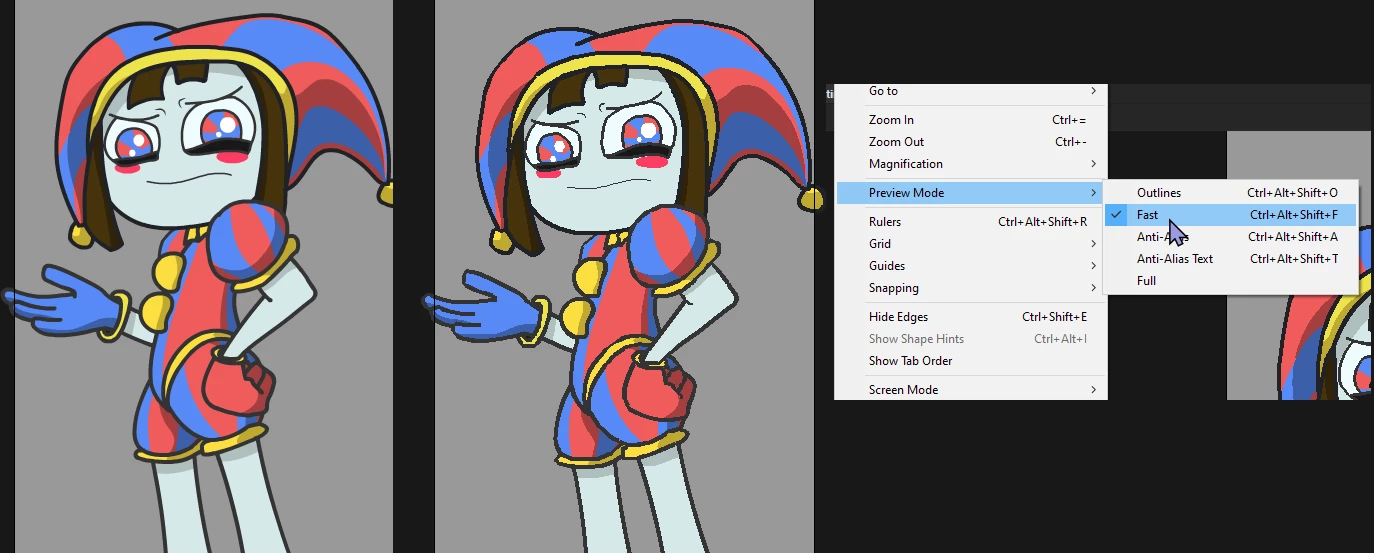
Is there a way to export the animation or PNG Sequence in "FAST" quality, identical to how it looks in Preview mode?

Look, the image on the right is in "Fast" mode from the preview. It looks a bit more pixelated, and it looks much better in motion. If anyone knows, please help!

This topic has been closed for replies.
Correct answer n. tilcheff

Put either 

stage.quality = "low"

or

stage.quality = "medium"

on the first frame of your main timeline. Then export SWF or video.


1 reply

n. tilcheff
n. tilcheffCorrect answer
Legend
September 26, 2024

Put either 

stage.quality = "low"

or

stage.quality = "medium"

on the first frame of your main timeline. Then export SWF or video.


Nick - Character Designer and Animator, Flash user since 1998 | Member of the Flanimate Power Tools team - extensions for character animation
pink_5009Author
Participant
September 26, 2024

Thank you very much for responding. Where do I enter those commands?