


Participant
May 2, 2020
Answered

Use symbol in multiple projects

  • May 2, 2020
  • 1 reply
  • 1247 views

Hi, I'm new to Adobe animate if someone can help me. I created a character in a symbol, and I would like to use the symbol in several projects, is it possible to export the symbol? where you have to recreate your character for each project and convert it to a symbol.

Correct answer n. tilcheff

Hi mate,


You can copy/paste a Symbol Instance from the timeline of one FLA document to another while both are open.


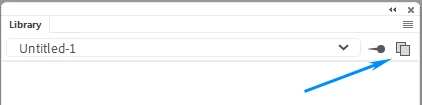
You can open a second Library panel by using this button

then drag your Symbol from one Library to another.


You can also, copy a block of frames or layers from one FLA to another.


Hope this helps!


1 reply

n. tilcheff
n. tilcheffCorrect answer
Legend
May 2, 2020

Hi mate,


You can copy/paste a Symbol Instance from the timeline of one FLA document to another while both are open.


You can open a second Library panel by using this button

then drag your Symbol from one Library to another.


You can also, copy a block of frames or layers from one FLA to another.


Hope this helps!


Nick - Character Designer and Animator, Flash user since 1998 | Member of the Flanimate Power Tools team - extensions for character animation
Participant
May 3, 2020

Hi

Thank you for your explanation this is exactly what I was looking for