
Timmonsxp
Known Participant
March 12, 2017
Answered

Using a button to go back in the timeline

  • March 12, 2017
  • 3 replies
  • 462 views

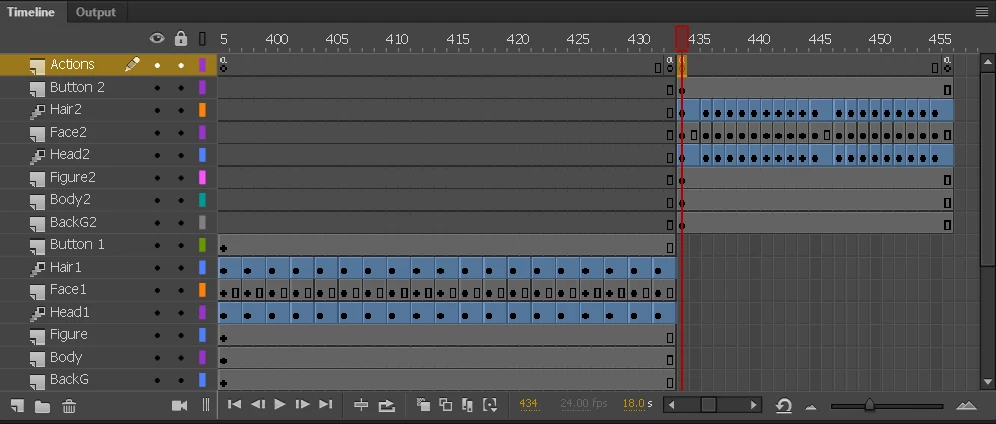
Hello I am having trouble with a button I want to use. I have 2 sets of looping frames and a button for each set to navigate between the 2 sets. I got the first button to work using the basic action script.

FastSymb.addEventListener(MouseEvent.CLICK, fl_ClickToGoToAndPlayFromFrame_16);

function fl_ClickToGoToAndPlayFromFrame_16(event:MouseEvent):void

{

  gotoAndPlay(435);

}

It works fine and it navigates me forward into the 2nd looping frame set. I did the same thing for the 2nd button to navigate me backwards in the timeline back to the first set of looping frames but it doesn't work. I used the actionscript.

SlowSymb.addEventListener(MouseEvent.CLICK, fl_ClickToGoToAndPlayFromFrame_17);

function fl_ClickToGoToAndPlayFromFrame_17(event:MouseEvent):void

{

  gotoAndPlay(397);

}

I'm guessing you cant go backwards in the timeline without a special script or something? Please give me a hand!
    This topic has been closed for replies.
    Correct answer Colin Holgate

    Your script for the second button is in frame 434, but you're playing from frame 435. I guess that the script at the end of the fast loop is also gotoAndPlay(434). If it is then the listener will get added then. Do you notice if the button works after the first loop?

    If your end script is gotoAndPlay(435), then the second button listener never gets added.

    You should look into using frame labels. Then you could have labels of slowloop and fastloop, and you would say gotoAndPlay("fastloop");. That way if you need to add frames you don't have to change the frame numbers that you used.

    3 replies

    Timmonsxp
    TimmonsxpAuthor
    Known Participant
    March 12, 2017

    Thanks for your replies everyone. The issue was my own. I'm still VERY new to all of this. I've had the program for 4 days so I don't really understand movie clips and their own timelines. I will definitely study. I didn't notice the little number at the bottom that says what frame i'm on currently so to be completely honest I was counting frames and I messed up. In my action script I used the wrong frame numbers. After using the frame number at the bottom and re doing the action script it works fine. I do agree that my timeline is sloppy and kind of annoying to navigate so I will look into movie clips. Thank you ClayUUID. And thanks Colin for pointing out that my frame placement was off.

    Legend
    March 12, 2017

    Furthermore, messily bouncing around the main timeline like this is exactly why movieclips exist. You should put each of those spans in its own sub-clip.

    Colin Holgate
    Colin HolgateCorrect answer
    Inspiring
    March 12, 2017

    Your script for the second button is in frame 434, but you're playing from frame 435. I guess that the script at the end of the fast loop is also gotoAndPlay(434). If it is then the listener will get added then. Do you notice if the button works after the first loop?

    If your end script is gotoAndPlay(435), then the second button listener never gets added.

    You should look into using frame labels. Then you could have labels of slowloop and fastloop, and you would say gotoAndPlay("fastloop");. That way if you need to add frames you don't have to change the frame numbers that you used.