


Zack With A Wack
Inspiring
Dec 14, 2024 5:06 AM UTC
Answered

using classic tween

ok everyone ive got a real question to ask on something i wanted to use on animate for a long time. you see this video #1 on how i use classic tween the only tool ive ever knowned how to use to zoom in on a picture or to make it move anywhere but now do you see video #2 how tv gets their pictures to first move slowly and at the end it slowly stops there has got to be a tool better then classic tween that can make pictures go like video #2 instead of the frame fast moving and fast stopping

    This topic is closed to new replies. Start a new post to keep the conversation going.
    Mario_CR
    Mario_CRCorrect answer
    Community Expert
    Dec 14, 2024 5:51 AM UTC

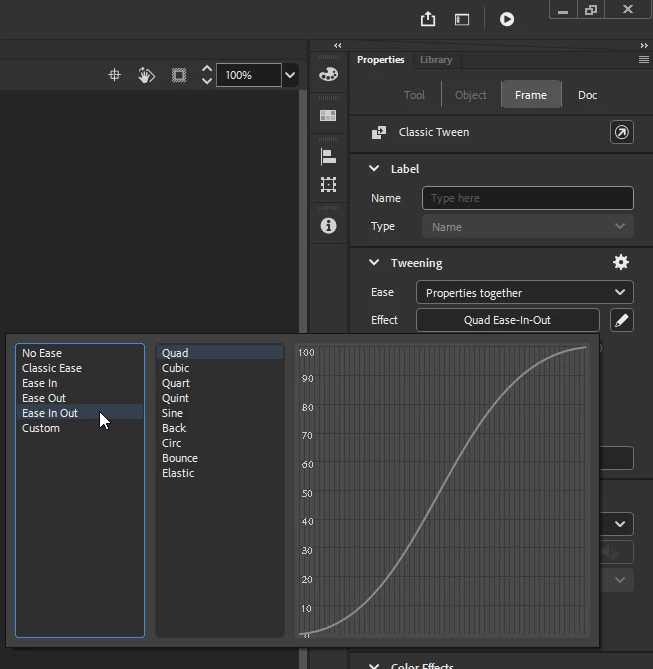
    Hi, what you're looking for is called easing, it's a property that can be applied to classic tweens.

    Select the tween > go to the Properties panel >Effect and choose one of the easing presets;

    Try "Ease In Out (Quad)" to get a motion similar to video #2 .


    3 replies

    Mario_CR
    Community Expert
    Mario_CRCommunity ExpertCorrect answer
    Community Expert
    Dec 14, 2024 5:51 AM UTC

    Hi, what you're looking for is called easing, it's a property that can be applied to classic tweens.

    Select the tween > go to the Properties panel >Effect and choose one of the easing presets;

    Try "Ease In Out (Quad)" to get a motion similar to video #2 .


    Translate
    Zack With A Wack
    Inspiring
    Dec 14, 2024 6:08 AM UTC

    oh ok i will have to try it

    Translate
    Zack With A Wack
    Inspiring
    Dec 14, 2024 7:31 AM UTC

    thank u mario i still need practice on this easing tool, i just wish I could have my origanal account back on the community instead of this old account

    Translate