
Participant
September 30, 2021
Answered

visible in a function is not working

  • September 30, 2021
  • 1 reply
  • 310 views

I am using Animate 21.0.9 - html canvas

I have an image that I am hiding at the beginning of the timeline using:
        this.nextBtn.visible = false;
This hides the image with no issues.


I have a function that shows it:
function CheckComplete_btn()
  {
   if (ButtonVisited == 1)
       {
           console.log("TrackSequence Code Ran");
           this.nextBtn.visible = true;
        }
      else
     {
          console.log("TrackSequence Code ELSE Ran");
      }
   }


When I click the button to run the function, I receive the following error code:

The function is running since I receive my console message, but the visible part is throwing an error.
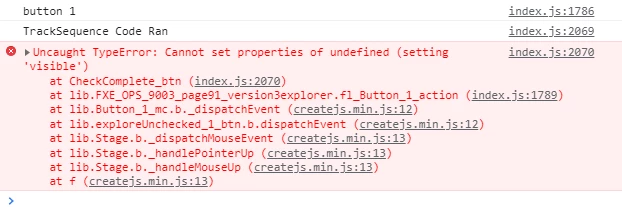

If I take the line this.nextBtn.visible = true; out of the function, it works fine.

Any ideas?

Thanks

    This topic has been closed for replies.
    Correct answer JoãoCésar17023019

    Hi.


    This is a problem of context. The this keyword inside of a function doesn't refer to the current timeline as you're probably expecting.


    You should store a reference to the current timeline in a variable, bind the the function to the current timeline, or use the currentTarget property of the event object.


    Variable approach:

    var _this = this;
    
    function CheckComplete_btn()
    {
    	_this.nextBtn.visible = true;
    }


    Bind approach (addEventListener):

    this.nextBtn.addEventListener("click", CheckComplete_btn.bind(this));
    
    function CheckComplete_btn()
    {
    	this.nextBtn.visible = true;
    }


    Bind approach (on):

    this.nextBtn.on("click", CheckComplete_btn.bind, this);
    
    function CheckComplete_btn()
    {
    	this.nextBtn.visible = true;
    }


    You can use the two approaches below if the button that received the event listener is the same one that will be set to be visible.


    Event.currentTarget (addEventListener):

    this.nextBtn.addEventListener("click", CheckComplete_btn);
    
    function CheckComplete_btn(event)
    {
    	event.currentTarget.visible = true;
    }


    Event.currentTarget (on):

    this.nextBtn.on("click", CheckComplete_btn);
    
    function CheckComplete_btn(event)
    {
    	event.currentTarget.visible = true;
    }


    I hope this helps.


    Regards,

    JC

    1 reply

    JoãoCésar17023019
    Community Expert
    JoãoCésar17023019Community ExpertCorrect answer
    Community Expert
    September 30, 2021

    Hi.


    This is a problem of context. The this keyword inside of a function doesn't refer to the current timeline as you're probably expecting.


    You should store a reference to the current timeline in a variable, bind the the function to the current timeline, or use the currentTarget property of the event object.


    Variable approach:

    var _this = this;
    
    function CheckComplete_btn()
    {
    	_this.nextBtn.visible = true;
    }


    Bind approach (addEventListener):

    this.nextBtn.addEventListener("click", CheckComplete_btn.bind(this));
    
    function CheckComplete_btn()
    {
    	this.nextBtn.visible = true;
    }


    Bind approach (on):

    this.nextBtn.on("click", CheckComplete_btn.bind, this);
    
    function CheckComplete_btn()
    {
    	this.nextBtn.visible = true;
    }


    You can use the two approaches below if the button that received the event listener is the same one that will be set to be visible.


    Event.currentTarget (addEventListener):

    this.nextBtn.addEventListener("click", CheckComplete_btn);
    
    function CheckComplete_btn(event)
    {
    	event.currentTarget.visible = true;
    }


    Event.currentTarget (on):

    this.nextBtn.on("click", CheckComplete_btn);
    
    function CheckComplete_btn(event)
    {
    	event.currentTarget.visible = true;
    }


    I hope this helps.


    Regards,

    JC

    SCTP12345Author
    Participant
    September 30, 2021

    JC
    Thank you for the very quick update. I wish I would have asked this a day and half ago.  🙂

    I did the variable option and it worked like a charm.


    Louis

    JoãoCésar17023019
    Community Expert
    Community Expert
    September 30, 2021

    Awesome!


    I'm glad it worked!