
Known Participant
June 22, 2022
Question

WARP - Classic Tween works only sometimes (??)

  • June 22, 2022
  • 3 replies
  • 931 views

I wonder if anyone else has this same problem. I am WARPing an image. Create a keyframe, WARP tool used, Classic Tween added = perfect. Repeated this and it's all working good. Then, after a few times, for no reason, it decides it doesn't want to tween and you get a dotted line.
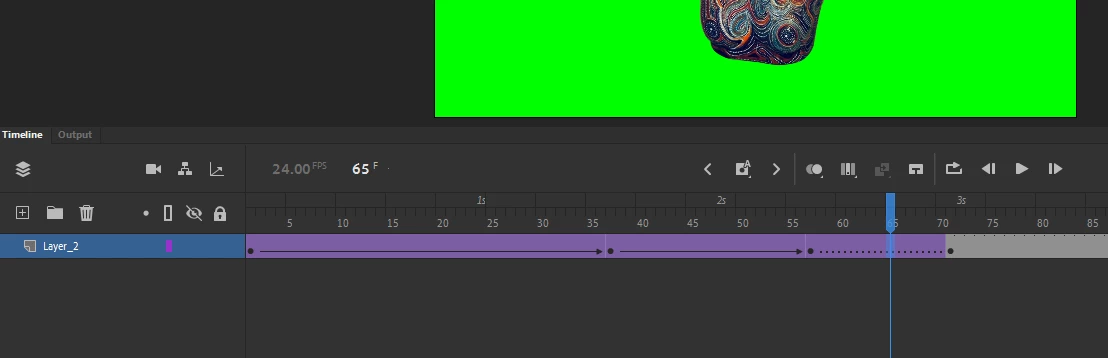
You can see in my sceenshot: I twice moved/WARPed the image slightly and tweened between the keyframes and then the THIRD time it just decided "Nah, I'm not going to do that."

There seems to be NO pattern or reason when it just decides to not apply the tween.


I couldn't understand if it didn't work at all, then I could investigate what's going wrong - but to just work sometimes and not other times is very frustrating.

    This topic has been closed for replies.

    3 replies

    Adobe Employee
    June 24, 2022

    Hi,


    Can you please share a screen recording of the issue with the sample file? You can also share it to abv@adobe.com if you cannot share it here. We will investigate on the same.


    Thanks!.

    evocrimAuthor
    Known Participant
    June 24, 2022

    Thank you for you the reply but I can't really see how that would show any more than the screengrab I have already posted and the very explicit description I have twice given.

    Is there, perhaps, an alternative forum where Non-Adobe Employees can talk over problems?

    _keyframer
    Community Expert
    Community Expert
    June 24, 2022

    Sometimes, and it's rare, I've accidentally drawn on the stage on a frame with a warp asset and not realized it because it was caused by a drawing tool. 
    To verify there isn't something on the stage that is not part of the warped asset, turn the layer to outlines and look on the stage for a random indication of invisible art somewhere. This has caused your exact problem for others in the past.
    This is the best peer-to-peer forum for solving issues with other users which is why we sometimes ask for screen captures, the source FLA and other helpful clues.
     

    Animator and content creator for Animate CC
    _keyframer
    Community Expert
    Community Expert
    June 23, 2022

    Is it possible to upload your FLA somewhere? 

    Animator and content creator for Animate CC
    kglad
    Community Expert
    Community Expert
    June 22, 2022

    remove the frames 57-71 tween

    create a new layer

    cut frames 57 to 71 from your current layer and paste them into the new layer (at frames 57 to 71)

    add your tween


    evocrimAuthor
    Known Participant
    June 22, 2022

    But why is it happening? Warp, tween, warp tween, warp, tween, warp, NO TWEEN.

    There's no rhyme or reason to it failing or when it will fail.

    kglad
    Community Expert
    Community Expert
    June 22, 2022

    i have no idea what you're doing, but putting more than one tween on one layer is problematic.