Perndoe
Known Participant
Jun 1, 2023 8:31 AM UTC
Answered

Weird scroll bar in Brush Menu

When I selected Classic Brush Tool and went to Properties tab, I wanted to change the brush type in brush options but there is a scroll bar covering those brushes.


    This topic is closed to new replies. Start a new post to keep the conversation going.
    Mario_CR
    Mario_CRCorrect answer
    Community Expert
    Jun 1, 2023 3:56 PM UTC

    And yep, still the same


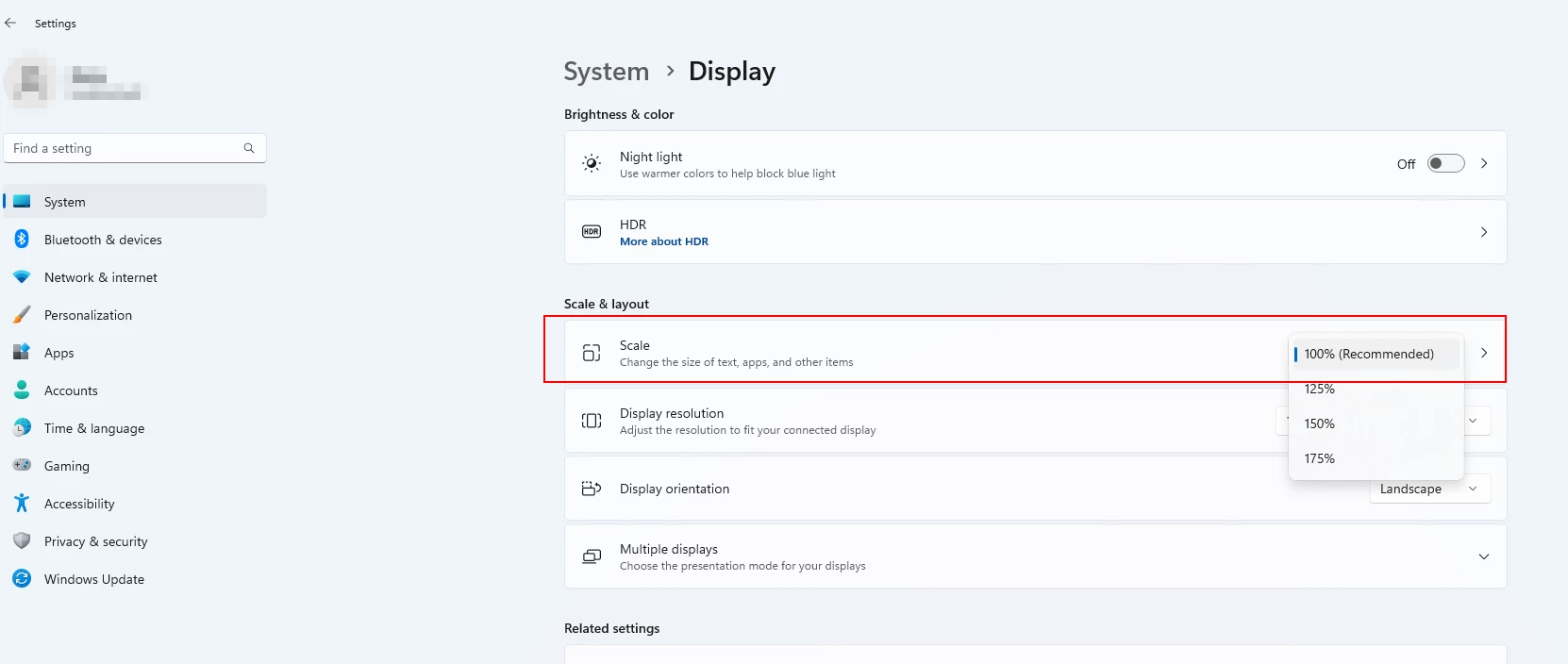
    Are you using Windows Display Scaling? If so keep it at the recomended 100% or else it will cause UI issues.


    22 replies

    kglad
    Community Expert
    Community Expert
    Jun 1, 2023 2:03 PM UTC

    move your properties panel so it has more vertical space (or fiddle with its vertical scrollbar).

    Translate
    Perndoe
    PerndoeAuthor
    Known Participant
    Jun 1, 2023 2:30 PM UTC

    It didn't work sadly 😞

    Translate
    kglad
    Community Expert
    Community Expert
    Jun 1, 2023 2:42 PM UTC

    leave your properties panel where it has vertical space.

    then close and reopen animate.

    check

    Translate