
Participant
January 10, 2020
Answered

What happened to the faded BG when entering a symbol?

  • January 10, 2020
  • 3 replies
  • 606 views

I have used Flash for over a Decade, but Im new to animate. I can´t seem to figure how to get the faded BG I used to get when going inside a symbol. It seems the functions is either turned off by default (why?) or removed completely. This was a really important feature to both know what's inside a symbol and also draw comfortably without too much interference from the BG or other characters or even other parts of the character. I am going crazy here, anyone else talked about this before? any plans relevant to adding this back? do I have to resort to adding a white solid with alpha to every symbol in a guide to get this effect? Man, Animate is even more frustrating than Flash. This adds to a growing list of things I highly dislike about Animate.
This topic has been closed for replies.
Correct answer n. tilcheff

Hi mate,


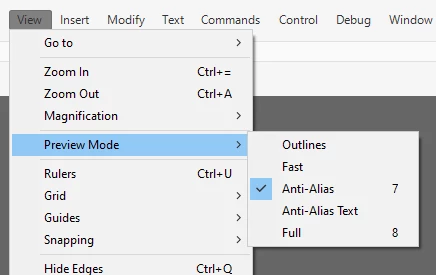
This has not been changed since the days of good old Flash. Obviously you did not know about Preview modes back then and you must have accidentally switched to Full somehow.

Go to your View menu and choose Preview Mode > Anti-Alias.


Better yet, give the two most used ones easy shortcuts, because Full is very useful when you need to do colour design in context.


For a less frustrating Flash/Animate experience, install EDAP Tools: http://flash-powertools.com/


Cheers!


3 replies

Legend
January 10, 2020

I remember what you're talking about, but Flash stopped doing that long before it was renamed to Animate. Like, back in the Flash 8 days. I don't think there's a way to re-enable it.

n. tilcheff
n. tilcheffCorrect answer
Legend
January 10, 2020

Hi mate,


This has not been changed since the days of good old Flash. Obviously you did not know about Preview modes back then and you must have accidentally switched to Full somehow.

Go to your View menu and choose Preview Mode > Anti-Alias.


Better yet, give the two most used ones easy shortcuts, because Full is very useful when you need to do colour design in context.


For a less frustrating Flash/Animate experience, install EDAP Tools: http://flash-powertools.com/


Cheers!


Nick - Character Designer and Animator, Flash user since 1998 | Member of the Flanimate Power Tools team - extensions for character animation
Participant
January 10, 2020

Yes!!! this worked perfectly! thank you so much, I will be checking the tools you sent too!

Joseph Labrecque
Community Expert
Community Expert
January 10, 2020

It works the same as before - you double click and instance on the stage to edit in-context. Editing from the Library will edit in isolation.