
Participating Frequently
July 13, 2017
Answered

When exporting as Animated GIF, is there a way to make animations that are within (graphic) symbols play?

  • July 13, 2017
  • 5 replies
  • 7323 views

When exporting as Animated GIF, is there a way to make animations that are within (graphic) symbols play?

I created an animation on the main time line, and one part of it is a graphic symbol which has its own animation. However, when I export this as an Animated GIF, the symbol's animation doesn't play. Is there a way to export it in such a way that it does play? Or do I have to find a circuitous way of trying to replicate my animation on the main timeline?

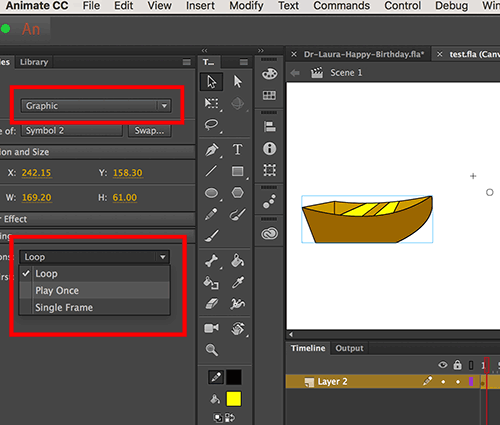
This topic has been closed for replies.
Correct answer mark@headTrix

MOVIECLIPS will NOT export to an Animated GIF.... Graphic Symbols export just fine!

Just make sure it says "LOOP" or "Play Once" and that it has enough frames on the timeline to play"

If the animation inside of the Graphic Symbol is 30 frames... then you will have to give the graphic symbol 30 Frames on the MAIN timeline... they sync frame for frame.

Hope that helps!
mark

5 replies

Known Participant
September 18, 2018

"MOVIECLIPS will NOT export to an Animated GIF.... Graphic Symbols export just fine!"

In Animate CC I have no problem exporting movieclips as a gif animation.

The problem I come across is when exporting gif animations it will only play the animation on the main timeline -- not embedded "nested" movie clips with their own timeline.

Has anyone else found this to be true and found a workaround?

Participant
September 19, 2019
The only workaround I've found is to export as a video and convert it to an animated GIF in Adobe Media Converter
mark@headTrixCommunity ExpertCorrect answer
Community Expert
July 13, 2017

MOVIECLIPS will NOT export to an Animated GIF.... Graphic Symbols export just fine!

Just make sure it says "LOOP" or "Play Once" and that it has enough frames on the timeline to play"

If the animation inside of the Graphic Symbol is 30 frames... then you will have to give the graphic symbol 30 Frames on the MAIN timeline... they sync frame for frame.

Hope that helps!
mark

headTrix, Inc. | Adobe Certified Training & Consulting
Participating Frequently
July 14, 2017

Thanks! I figured out I had a movie clip after all! I'm trying to get the timing fixed now because it messed up somehow. I will try to export it then.

Community Expert
July 13, 2017
Colin Holgate
Inspiring
July 13, 2017

I think that the symbol's animation wouldn't play only if it's a movieclip, or if it's a graphic that is set to only show one frame. If you have ti set to play once, or loop, I would have thought its animation would show up ok.

kglad
Community Expert
Community Expert
July 13, 2017

as long as there are enough frames on the main timeline, the graphics symbol's animation should be veiwable when checking the main timeline and in the exported gif.  ie, if you put a symbol (that contains animation over 30 frames) on a 1 frame main timeline, you'll see no animation.  if the main timeline has 15 frames, you'll see 1/2 the animation (assuming the graphic is on frame 1).