
Participant
July 10, 2017
Answered

When I test my animate project, the whole frame is very slow.

  • July 10, 2017
  • 1 reply
  • 241 views

Hi all,

I'm making a map for fall foliage with about 42 buttons that all link to keyframes with content about that particular place.
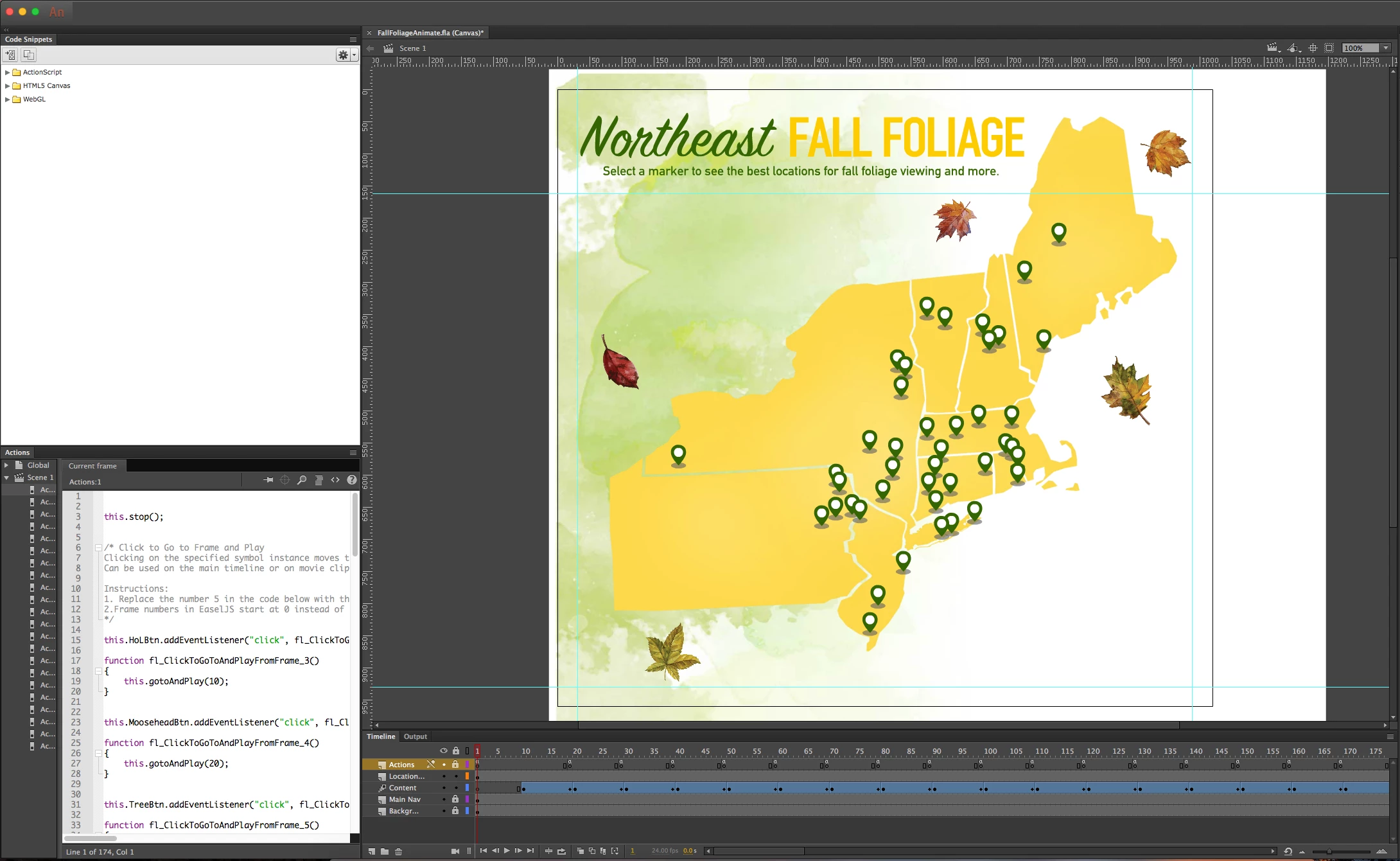
Now that I'm up to around frame 190 and I've linked around half my buttons to their content, I've noticed that when I test the project is very slow in any browser I open it in. I hover over the links and it takes a few seconds for my hover state to show up (a lighter green marker instead of the darker green); I click the buttons only to have the content take double the time to fade in (with the fade tweens I put in for each set of content).

Have I just overwhelmed the project with too much content in one layer, too many keyframes on a layer, or too many buttons? Is there something I can do to make it normal speed again, like moving stuff around?

I also wonder if my image size for some of my content is overwhelming the project? Would reducing all the image sizes down to the actual size in the document make it go faster?

Thank you!

This topic has been closed for replies.
Correct answer Colin Holgate

I think that the problem will be that you're adding listeners every time you go to the contents frame. You can check if the buttons have a listener, before adding another one.

If you have 42 buttons that have their own listener and function, you could make that less demanding by having only one listener and function. Suppose you have named the buttons "b_1", "b_2", up to "b_42", you could have this script:

stage.addEventListener("click", clicked.bind(this));

for (i = 1; i < 43; i++) {

  this["b_" + i].name = "b_" + i;

}

function clicked(e) {

  alert(e.target.name)

}

The function would show the name that has been set for each button. You could use that name to know where to go to, so for example the clicked function could become:

function clicked(e) {

  var nameparts = e.target.name.split("_");

  if(nameparts[0]=="b"){

      this.gotoAndStop("page_"+nameparts[1]);

  }

}

That would get the number of the button and jump to a frame label with the same name.

1 reply

Colin Holgate
Colin HolgateCorrect answer
Inspiring
July 10, 2017

I think that the problem will be that you're adding listeners every time you go to the contents frame. You can check if the buttons have a listener, before adding another one.

If you have 42 buttons that have their own listener and function, you could make that less demanding by having only one listener and function. Suppose you have named the buttons "b_1", "b_2", up to "b_42", you could have this script:

stage.addEventListener("click", clicked.bind(this));

for (i = 1; i < 43; i++) {

  this["b_" + i].name = "b_" + i;

}

function clicked(e) {

  alert(e.target.name)

}

The function would show the name that has been set for each button. You could use that name to know where to go to, so for example the clicked function could become:

function clicked(e) {

  var nameparts = e.target.name.split("_");

  if(nameparts[0]=="b"){

      this.gotoAndStop("page_"+nameparts[1]);

  }

}

That would get the number of the button and jump to a frame label with the same name.