

saarraz1
Participant
July 2, 2022
Question

When shape tweening, one of the vertices disappears during the tween

  • July 2, 2022
  • 1 reply
  • 252 views

I'm trying to create a simple shape tween - right now the shape is the same on both sides of the tween but with different colors - yet the shape tween doesn't work correctly.


Here is a GIF showing the problem.
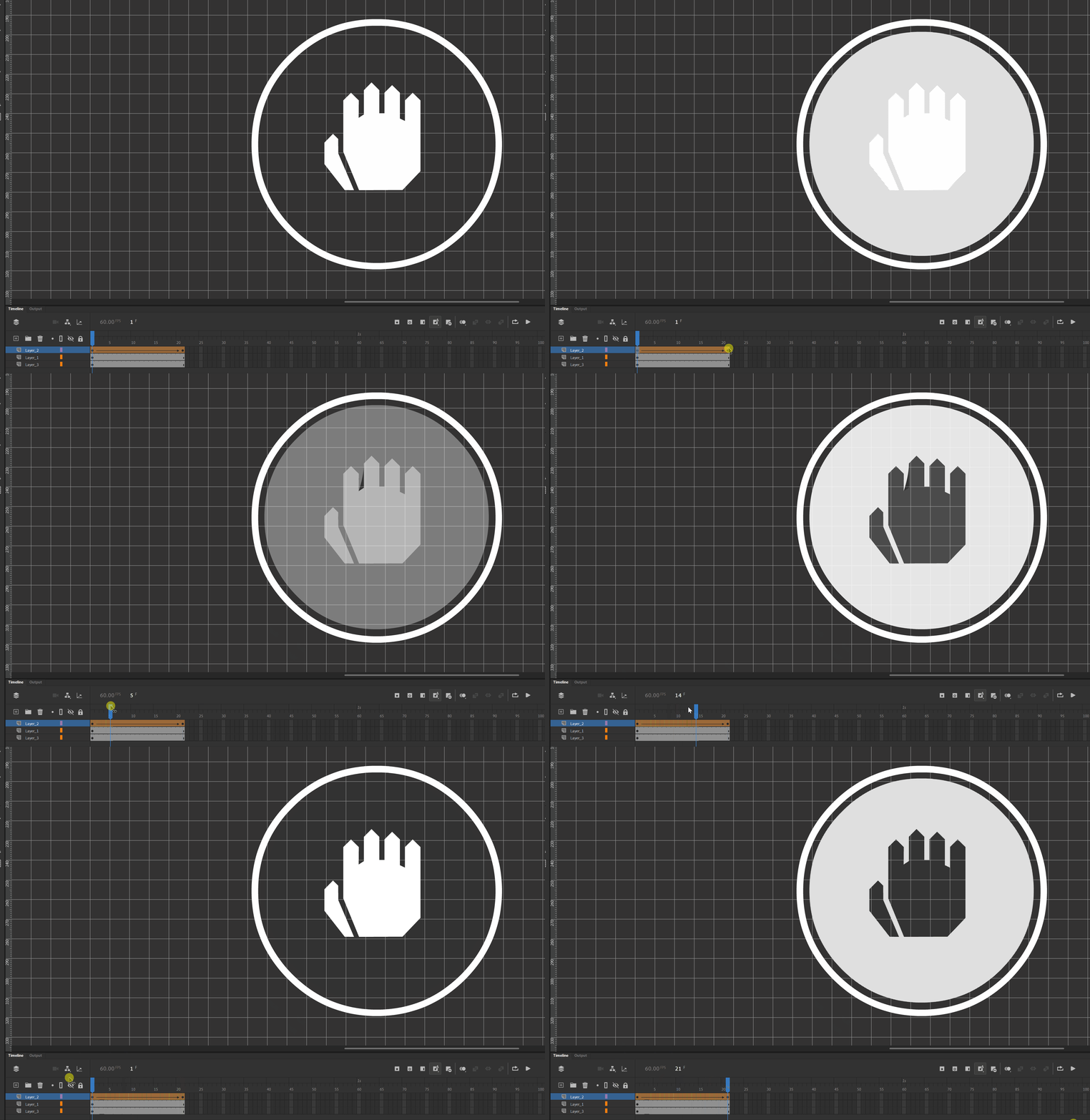
I tried adding shape hints but it doesn't work. I also tried to change the shape and remove vertices from it but it still doesn't work.

Help?

This topic has been closed for replies.

1 reply

JoãoCésar17023019
Community Expert
Community Expert
July 2, 2022

Hi.


As you are not changing the position of any point, I think it works best if you use two classic tweens: one with the hand in the center disappearing and, at the same time, another tween with the inverted/negative version appearing.


Please let us know what you think.


Regards,

JC

saarraz1
saarraz1Author
Participant
July 2, 2022

In a subsequent animation, I am going to change the position of the vertices, so this is not an option for me unfortunately. 

JoãoCésar17023019
Community Expert
Community Expert
July 2, 2022

Got it.


So you will probably need to use shape hints.

https://helpx.adobe.com/animate/using/shape-tweening.html