
Participating Frequently
November 14, 2016
Answered

Where should i do my Characters for Adobe Animate ?

  • November 14, 2016
  • 1 reply
  • 3751 views

Hey dear guys,

i wanna start making my own Serie on Youtube and i am starting buying a Anime Tool, but before i buy one of few Tools that i found, i need to TEST them.

I Tested already few Tools and adobe animate is the last product that i need to test, to see where i get the best results.

Well my Question: I am tryin' to make a "Test" Character. I am drawing Homer Simpson (xD) from the Serie: The Simpsons.

Now there i have 2 Questions:

1.Is the Serie a 2D or 3D Serie now ? if the Characters rotate in the Serie, it looks little like 3D. But after the Characters stop, and just talkin' etc. they look ONLY 2D what confuses me.

And if its 2D: Is adobe animate the best choice ?

And if its 3D: is adobe animate still the best choice ?

2.Where should i start drawing my Character ? My goal is: Making a Character, then let it walk (i want to see if i can really "Move" the Legs,Arms etc. PERFECT with adobe animate) and i dont know if i get the best results if i draw my Character in Photoshop, or in animate and animate it in animate.

Ps. I would try adobe "character animator" too.I have a great camera and i just want to check how it would be, so: Do you recommend it me use character animator ? do i save more time if i use character animator with my camera to animate my character ?
    This topic has been closed for replies.
    Correct answer Myra Ferguson

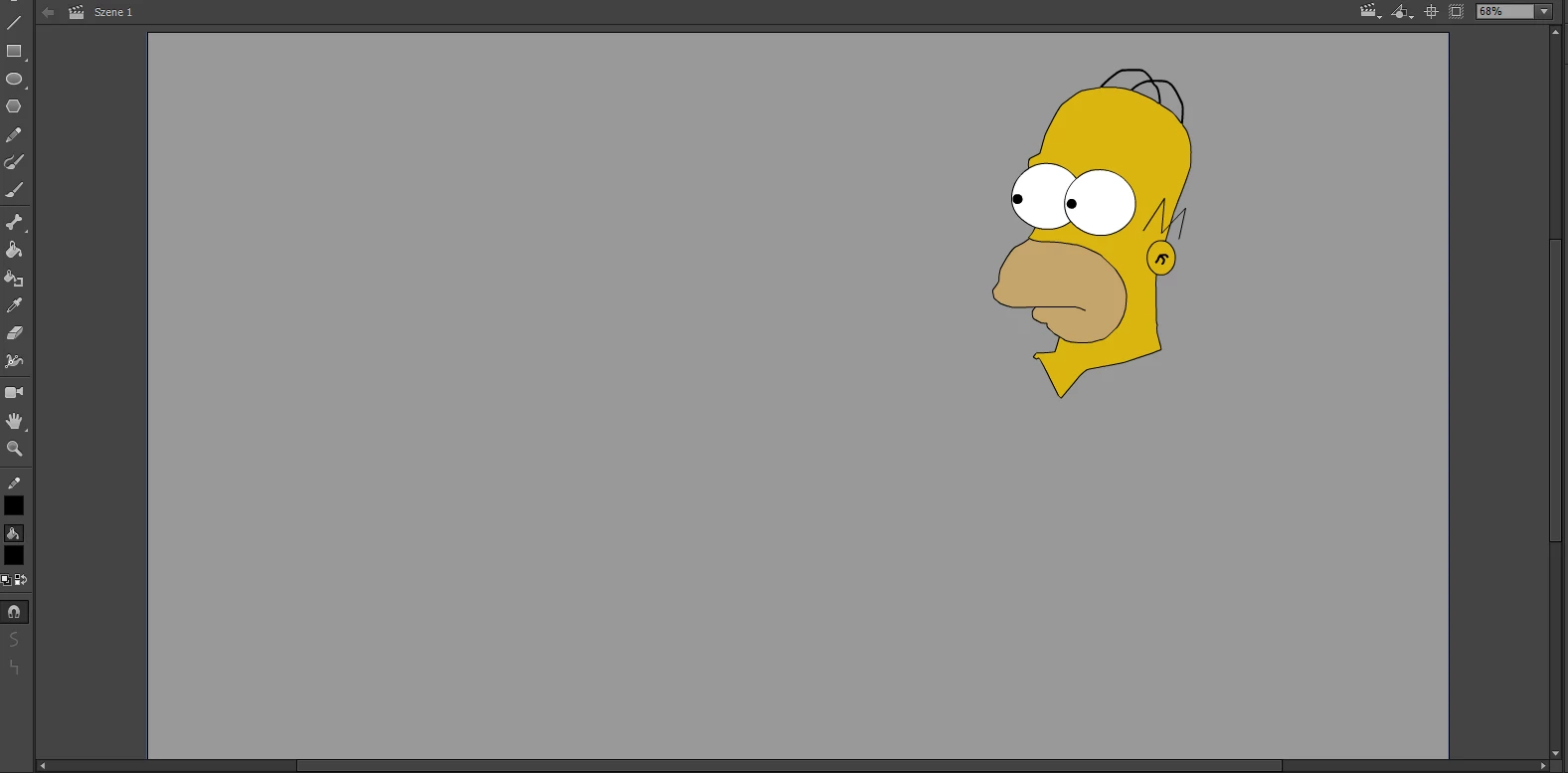
    Okay, check out this Picture @ALL (I hope the Picture has nothing with Copyright etc. to do...i made it by my self in just 3min!):

    I made a good Job i see.

    1. I just made the Head for now. How can i use this in Character Animator ? i draw it in Adobe Animate but only the Head like i said.

    2. One IMPORTANT Question: Lets say i made now the Body (just imagine that) and the Legs too. And lets say Behind Homer is a Door.

    As you see in the Picture, Homer is watching to the Left. Now i want that he turns BACK and walks in front of the "Stage" (From his view we would say its his back, right ?) to open a Door (imagine there is a Door).

    How i would do that ? Is Adobe Animate able to "rotate/turn" my Character ?

    ofc i know i can make frames and move my Character. But i guess i can move my Character only to Left/Right, am i right ? or can i make a Animation where Homer is watching left, then turns back to open a Door behind him and go trough it  ? That i need to draw a Scene B after Homer left the Door is aware.

    3.Is the Original Serie now 2D or 3D ? I have my own Plans, i want to do my own Characters, story etc. but in a Dimensional like The Simpsons. So i need to know if i need a 3D or 2D Tool. If 2D then, adobe Animate is enough and Character Animator and maybe Photoshop.


    1. The only way you can use the head you've drawn in Animate CC in Character Animator (which is in After Effects) would be to copy/paste what you've drawn into either a Photoshop or Illustrator puppet template for Character Animator. Use Character Animator if you want to make your animation based on motion capture from your webcam.

    2. To make Homer move around in Animate CC, you would create the frames to make him move. You can add bones if you want to move parts of him around that way, but if you want to change his angle from the camera you need to create those frames. Check out how to do that with what's known as the 2.5D technique Adobe Flash Character Design & Animation - YouTube.

    3. Animate CC is a 2D program in which you can fake 3D to some extent. The Simpsons is created in 2D.

    1 reply

    kglad
    Community Expert
    Community Expert
    November 14, 2016

    adobe animate isn't a 3d animation tool.  it can be used for 3d animations but you won't be creating any 3d animations in adobe animate.

    you can animate 2d objects in 3d space (easily) in adobe animate, but that's not the same as animating 3d objects in 3d space.

    Participating Frequently
    November 15, 2016

    Thanks. Good to know.

    So, is the simpsons now a 2D or 3D Serie ?

    There are scenes most times where we see as example: Homer Simpson, where he rotates in 3D to turn back to open the door behind him and leave the home.

    That confuses me.

    Can i get the same results in animate in my own Series like the simpsons ?

    and dont forgot my second question (Photoshop or Animate for creating a Character and animating it in animate)

    Participating Frequently
    November 15, 2016

    Okay, check out this Picture @ALL (I hope the Picture has nothing with Copyright etc. to do...i made it by my self in just 3min!):

    I made a good Job i see.

    1. I just made the Head for now. How can i use this in Character Animator ? i draw it in Adobe Animate but only the Head like i said.

    2. One IMPORTANT Question: Lets say i made now the Body (just imagine that) and the Legs too. And lets say Behind Homer is a Door.

    As you see in the Picture, Homer is watching to the Left. Now i want that he turns BACK and walks in front of the "Stage" (From his view we would say its his back, right ?) to open a Door (imagine there is a Door).

    How i would do that ? Is Adobe Animate able to "rotate/turn" my Character ?

    ofc i know i can make frames and move my Character. But i guess i can move my Character only to Left/Right, am i right ? or can i make a Animation where Homer is watching left, then turns back to open a Door behind him and go trough it  ? That i need to draw a Scene B after Homer left the Door is aware.

    3.Is the Original Serie now 2D or 3D ? I have my own Plans, i want to do my own Characters, story etc. but in a Dimensional like The Simpsons. So i need to know if i need a 3D or 2D Tool. If 2D then, adobe Animate is enough and Character Animator and maybe Photoshop.