
December 3, 2016
Answered

Why does the paintbrush tool taper in where the stroke overlaps?

  • December 3, 2016
  • 4 replies
  • 1479 views

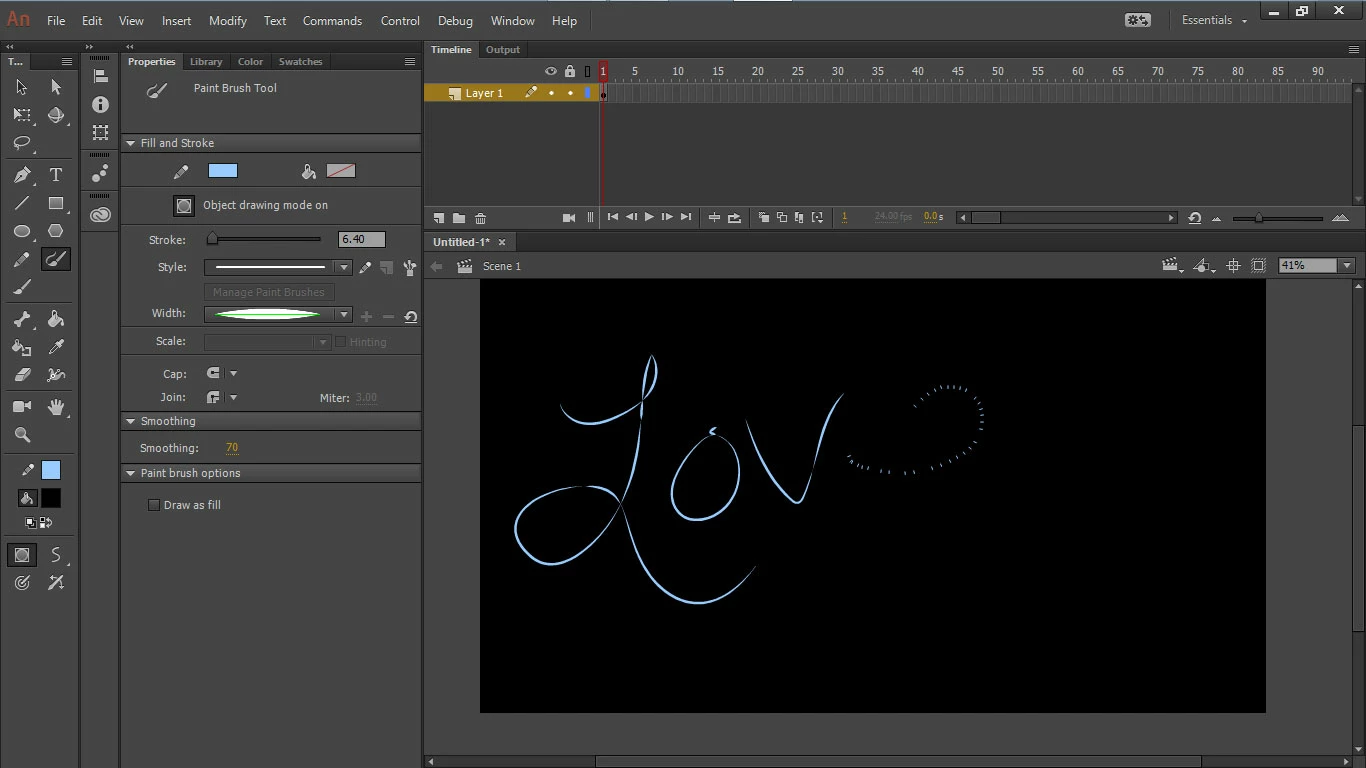
Why does my paintbrush tool do this?  Or more importantly, how do I get it to stop?

it shows my stroke as a bunch of lines while I'm writing instead of showing me actually what I'm really drawing (you can see the beginning of the e as I took this image while I was drawing to show that), and then it also tapers in where the lines intersect.  Is there a setting I am missing?
    This topic has been closed for replies.
    Correct answer Myra Ferguson

    The Paintbrush tool lets you draw a stroke which can have the new vector art brushes applied and lets you edit the size of the stroke and which stroke is applied (until you convert it to a fill). If you want to paint what appears as a solid line as you draw, use the Brush tool which will paint a fill.

    4 replies

    Myra Ferguson
    Community Expert
    Community Expert
    December 3, 2016

    Absolutely, the Pencil tool will also let you draw a stroke and give you options to adjust the stroke afterward including tapering with the Width tool. It just won't let you apply a vector art brush until after the stroke is drawn--but it doesn't seem like you needed that.

    Myra Ferguson
    Community Expert
    Community Expert
    December 3, 2016

    The reason your strokes are tapering where they intersect is because your stroke is set to the Width Profile 1 which is supposed to taper at every segment. If you want to control where it tapers, do use the Paintbrush tool, set the width to the Uniform Profile then use the Width tool to make any portion of the stroke thinner or thicker. If you convert the stroke to a fill or use the Brush tool which paints fills, you won't be able to access stroke options (that's why they were grayed out).  Think of a drawn fill as a shape instead a path.

    Myra Ferguson
    Community Expert
    Myra FergusonCommunity ExpertCorrect answer
    Community Expert
    December 3, 2016

    The Paintbrush tool lets you draw a stroke which can have the new vector art brushes applied and lets you edit the size of the stroke and which stroke is applied (until you convert it to a fill). If you want to paint what appears as a solid line as you draw, use the Brush tool which will paint a fill.

    December 3, 2016

    Thanks for your reply.   I was afraid this was the answer.   Is there a way to make the regular brush add the tapered ends?   When I try to change the width and style of the stroke on the regular brush it's just greyed out and I can't change it.  Is this not a thing I can do in animate?

    John T Smith
    Community Expert
    Community Expert
    December 3, 2016

    The Forum Lounge is not for technical help, please provide the name of the program you are using so your message may be moved to the correct program forum

    Please post the name of the program you use so a Moderator may move this message to the correct program forum

    This forum is not about help with programs... a program would be Photoshop or Dreamweaver or Muse or ???

    December 3, 2016

    I'm confused - the top of my screen tells me I'm in the "Animate CC - General" forum.  Am I in the wrong place?  Maybe I don't know how to use this forum.  I apologize for my ignorance. 

    To answer your question, I am using animate CC - I also provided an image of what my screen looks like.

    Thank you for your response.