
Known Participant
March 28, 2022
Answered

Why isn't a new layer created when moving something?

  • March 28, 2022
  • 2 replies
  • 459 views

Why isn't a new layer created when moving something? Before, it made things straightforward to move frame by frame. I would just touch an object or anything and move however much I want; a new frame will be created.

Now when I move something, it doesn't create a new layer and just changes it all the way back to the origin point of that layer. 

It makes doing the most simple thing a major inconvenience. And it didn't work like this last time I opened the app. 
    This topic has been closed for replies.
    Correct answer n. tilcheff

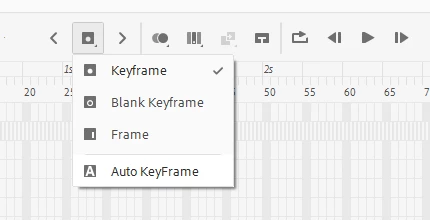
    Check the state of Auto KeyFrame and set it the way you like.

    2 replies

    Legend
    March 28, 2022

    You really need to stop using the words layer and frame interchangeably. They mean completely different things.

    n. tilcheff
    n. tilcheffCorrect answer
    Legend
    March 28, 2022

    Check the state of Auto KeyFrame and set it the way you like.

    Nick - Character Designer and Animator, Flash user since 1998 | Member of the Flanimate Power Tools team - extensions for character animation
    Rob6556Author
    Known Participant
    March 28, 2022

    Thank you, that was it! I was losing my mind over this.