Inspiring
May 31, 2014
Question

Why would FLVPlayback throw a null reference exception from an internal method originating from a timer event?

  • May 31, 2014
  • 2 replies
  • 1741 views

Why would the FLVPlayback class throw a null reference exception from an internal method originating from a timer event?

As far as I can tell, this code path is not originating from within any of my code, so I cannot even determine why it is happening or what is causing it.  Here is the stack trace in FlashDevelop:
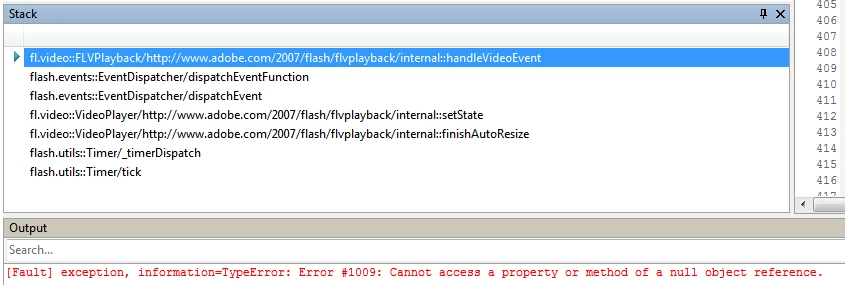
This topic has been closed for replies.

2 replies

Ned Murphy
Legend
May 31, 2014

I've seen internal 1009 errors when the component is not in the library but the class is imported and it can't find the piece it is trying to target.

kglad
Community Expert
Community Expert
May 31, 2014

you may have an flvplayback component on stage starting to do something but the component is removed before the task is complete.

Inspiring
June 2, 2014

It's not a library issue; everything is functional under normal circumstances, but these circumstances aren't typical.

I'll investigate to see if kglad's suggestion leads anywhere, because I am stopping/unloading the FLV immediately upon the completion of its download, instead of letting it play to completion as it normally would.  This is part of  an automated testing program.  We have schools across the U.S. using our system and have an automated test program that rapidly runs through part of the program by hooking different events to skip time-consuming tasks like actual playback of FLVs after downloading them and logging the download times.  They simply visit a URL on a lab full of computers all at the same time, and the test program runs through everything (fills in and submits questions, downloads playback files, etc.), which covers all our bases like making sure they have an acceptable version of Flash, that everything is working, and that they have sufficient network bandwidth.

So, I'm not removing anything from the stage, but I am closing the video player very early, immediately after the download completes, as far as I can tell.   My VideoPlayer class (custom class, not Flash's class), handles loading of SWFs and FLVs alike and unifies their events into clear and common events.  I've posted the "unload" code path below, so you can see how it unloads an FLV file. I noticed I have code commented out that used to obtain the internal VideoPlayer object and call close on it, but instead I opted to use the closeVideoPlayer method of the FLVPlayback component, because that's what the documentation says to use.  Perhaps I should switch back to closing the internal video player as well?  Or nulling the "source" property?  Or perhaps there is no way I can avoid this error.

public function unload():void

{

    _videoWidth = NaN;

    _videoHeight = NaN;

    if (_playbackType != null)

    {

        switch (_playbackType)

        {

            case PLAYBACKTYPE_SWF:

                swfPlayer_scaler.visible = false;

                try { swfPlayer.unloadAndStop(); } catch (e:Error) { Tracer.write("Error unloading SWF:"); Tracer.writeError(e ); }

                break;

            case PLAYBACKTYPE_FLV:

                flvPlayer_scaler.visible = false;

                if (flvPlayer.activeVideoPlayerIndex == 1)

                {

                    try

                    {

                        flvPlayer.closeVideoPlayer( 1 );

                    }

                    catch (e2:Error)

                    {

                        Tracer.write( "unload: error closing video player 1: " + e2.message );

                    }

                }

                /*if (!StringUtils.isEmpty( StringUtils.trim( flvPlayer.source ) ))

                {

                    try

                    {

                        flvPlayer.stop();

                    }

                    catch (e0:Error)

                    {

                        Tracer.write( "unload: error stopping FLV playback: " + e0.message );

                    }


                    try

                    {

                        var vp:fl.video.VideoPlayer = flvPlayer.getVideoPlayer( flvPlayer.activeVideoPlayerIndex );

                        if (vp != null)

                            vp.close();

                    }

                    catch (e1:Error)

                    {

                        Tracer.write( "unload: error closing video file stream: " + e1.message );

                    }


                    //vp.source = ""; //unload the video

                }

                else

                {

                    Tracer.write( "unload: flvPlayer source is empty; nothing to unload" );

                }*/

                break;

        }

        unwireLoadEvents( _playbackType );

        _playbackType = null; //NOTHING LOADED

        _bytesLoaded = 0;

        _bytesTotal = 0;

    }

}

private function unwireLoadEvents( type:String ):void

        {

            if (eventswired)

            {

                switch (type)

                {

                    case PLAYBACKTYPE_SWF:

                        //SWFPlayback events

                        var loader_info:LoaderInfo = swfPlayer.contentLoaderInfo;

                        loader_info.removeEventListener( Event.OPEN, SWFPlayback_open, false ); //download started

                        loader_info.removeEventListener( ProgressEvent.PROGRESS, SWFPlayback_progress, false ); //download progress

                        loader_info.removeEventListener( IOErrorEvent.IO_ERROR, SWFPlayback_error, false ); //error

                        loader_info.removeEventListener( Event.COMPLETE, SWFPlayback_complete, false ); //download complete

                        loader_info.removeEventListener( Event.INIT, SWFPlayback_init, false ); //video ready for playback

                        loader_info.removeEventListener( HTTPStatusEvent.HTTP_STATUS, SWFPlayback_httpstatus, false ); //informational event

                        loader_info.removeEventListener( Event.UNLOAD, SWFPlayback_unload, false ); //swf unloaded

                        swfPlayer.removeEventListener( SWFPlaybackEvent.PLAYHEAD_UPDATE, SWFPlayback_playheadupdate, false ); //swf frame changed

                        swfPlayer.removeEventListener( SWFPlaybackEvent.PLAYBACK_COMPLETE, SWFPlayback_playbackcomplete, false ); //swf playback completed

                        swfPlayer.removeEventListener( SWFPlaybackEvent.PLAYING, SWFPlayback_playing, false ); //swf entered playing state

                        swfPlayer.removeEventListener( SWFPlaybackEvent.PAUSED, SWFPlayback_paused, false ); //swf entered paused state

                        swfPlayer.removeEventListener( SWFPlaybackEvent.STOPPED, SWFPlayback_stopped, false ); //swf playback stopped/reset

                        eventswired = false;

                        break;


                    case PLAYBACKTYPE_FLV:

                        //FLVPlayback events

                        flvPlayer.removeEventListener( VideoEvent.CLOSE, FLVPlayback_close, false ); //flv closed

                        flvPlayer.removeEventListener( VideoProgressEvent.PROGRESS, FLVPlayback_progress, false ); //flv download progress

                        flvPlayer.removeEventListener( VideoEvent.READY, FLVPlayback_ready, false ); //flv ready to play

                        flvPlayer.removeEventListener( VideoEvent.COMPLETE, FLVPlayback_complete, false ); //flv playback has completed

                        flvPlayer.removeEventListener( MetadataEvent.METADATA_RECEIVED, FLVPlayback_metadata, false ); //cuepoint metadata received

                        flvPlayer.removeEventListener( MetadataEvent.CUE_POINT, FLVPlayback_cuepoint, false ); //flv cue point encountered during playback

                        flvPlayer.removeEventListener( VideoEvent.PLAYHEAD_UPDATE, FLVPlayback_playheadupdate, false ); //flv playhead position changed

                        flvPlayer.removeEventListener( VideoEvent.PLAYING_STATE_ENTERED, FLVPlayback_playing, false ); //flv entered playing state

                        flvPlayer.removeEventListener( VideoEvent.PAUSED_STATE_ENTERED, FLVPlayback_paused, false ); //flv entered paused state

                        flvPlayer.removeEventListener( VideoEvent.STOPPED_STATE_ENTERED, FLVPlayback_stopped, false ); //flv entered stopped state

                        flvPlayer.removeEventListener( VideoEvent.BUFFERING_STATE_ENTERED, FLVPlayback_buffering, false ); //flv entered buffering state

                        flvPlayer.removeEventListener( VideoEvent.STATE_CHANGE, FLVPlayback_statechange, false ); //flv state changed to one of various available states (e.g. LOADING, CONNECTION_ERROR, DISCONNECTED, etc.

                        flvPlayer.removeEventListener( VideoEvent.SEEKED, FLVPlayback_seeked, false ); //flv playhead moved to new location by user

                        eventswired = false;

                        break;

                }

            }

        }

So back to FLVPlayback... I had a difficult time trying to figure out what event signals completion of the download of an FLV, and there doesn't seem to be one at all.  I'm basing the completion event off of the VideoProgressEvent, when bytesDownloaded == bytesTotal.  At that point I close the video player via the unload method posted above.  The odd thing is... the error doesn't occur consistently, so it may be a timing issue.  Maybe calling closeVideoPlayer is not sufficient, and I should call some other method such as stop first.

Inspiring
June 2, 2014

The annoying part is, there's nothing that can be done to prevent the error, since it's occurring in a timer event in a close-source component (FLVPlayback).
The error shouldn't be occurring at all, so my only workaround is to perform a fuzzy match for this particular error on its stack trace in my UncaughtErrorEvent handler: see comment starting with "Fuzzy identification of a particular error/bug..."