
tailedstories
Known Participant
October 17, 2021
Question

XML motion rotation slides out

  • October 17, 2021
  • 4 replies
  • 627 views

Hi, I am exploring ways to automate animation with video motion capture. I worked with a Character Animator and saw that Animate could help me with the final polish parts.


I do motion capture by calculating joint angles from the video and creating and sending it to the program (e.g., if person in the video moves shoulder -15 degrees, rotate shoulder -15 degrees).


I created an XML file with keyframes and import rotation for the elbow. So I have the symbol for the elbow
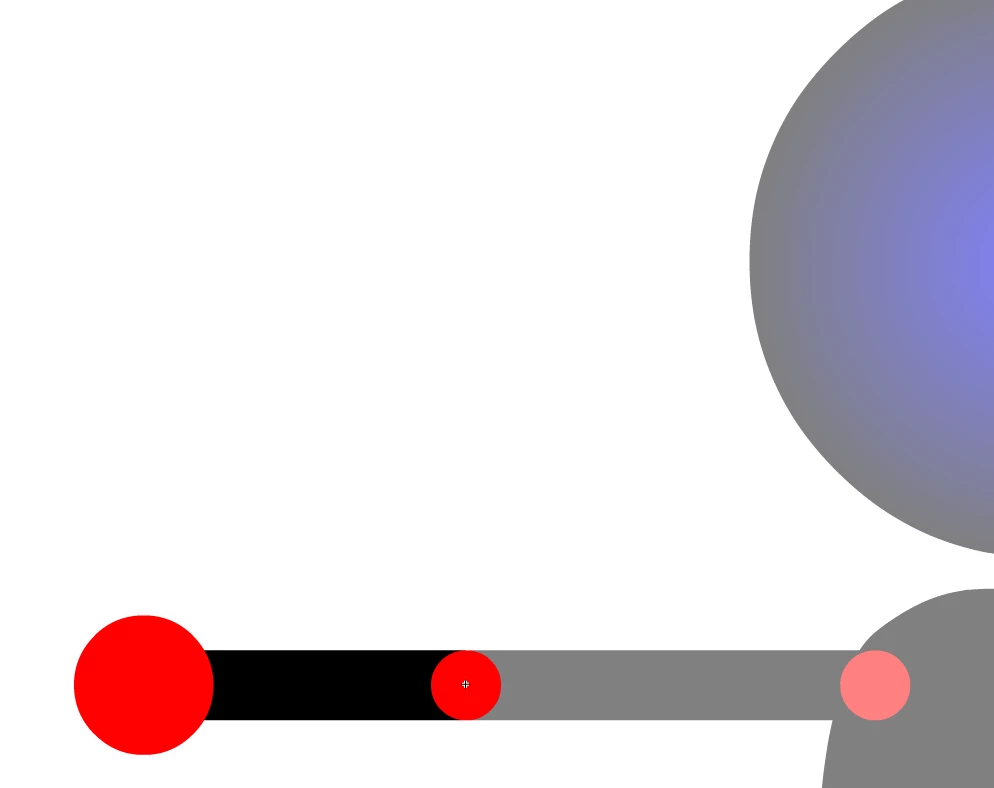
 

Since the transform point is in the center if the circle, I make sure that my arm don't slide away when I rotate it
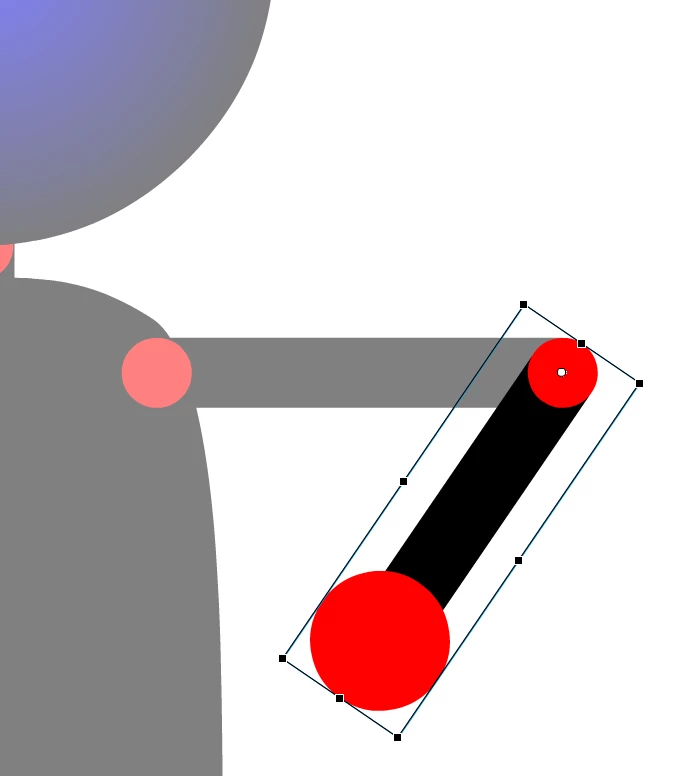


But when import the XML motion it accumulates an error with each frame and arm slides out (transform point is to the left of center and go further the longer animation I import)
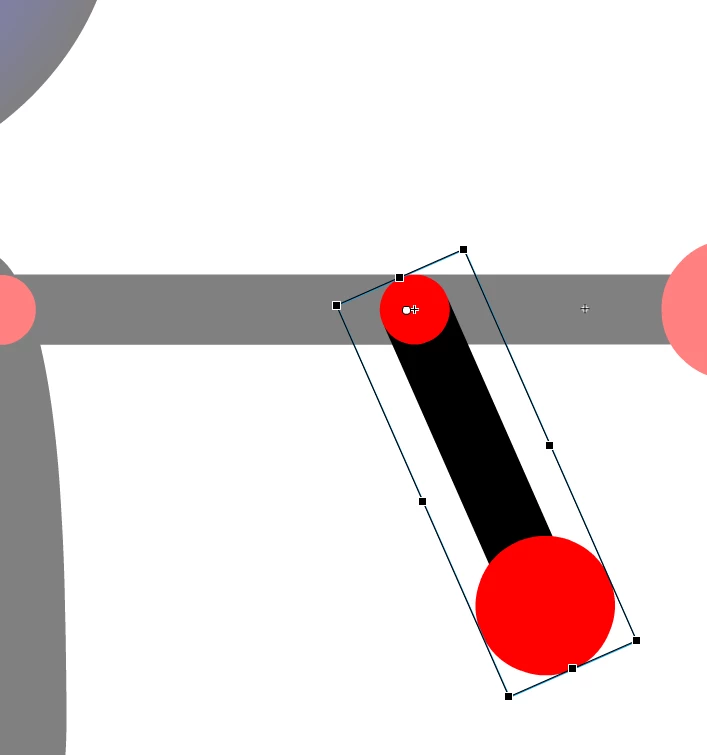


I tried to play around with the transformation point. If I set it to zero and just animate the test sphere or cube, I have the same result.
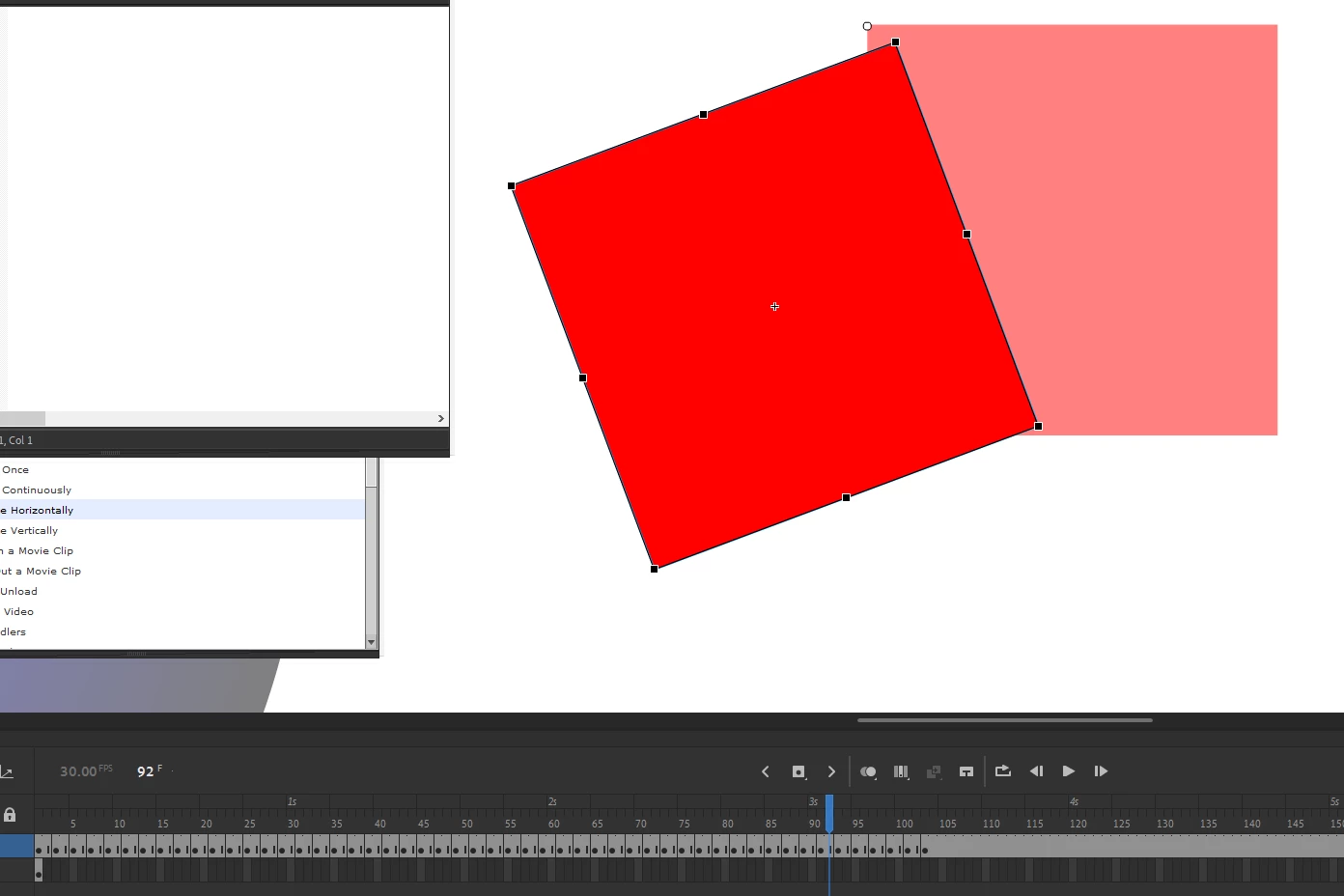
 

What do I do wrong? Is there a better way? When I use the HTML/action script rotation works fine, but I cannot find a way to create the keyframes instead of just animation.


Any advice what to check out?


XML file

<Motion xmlns:filters="flash.filters.*" xmlns:geom="flash.geom.*" xmlns="fl.motion.*" duration="102">
<source>
	<Source symbolName="Stickman_Elbow_Far" elementType="graphic" rotation="0" scaleY="1" scaleX="1" y="1.7" x="-1.5" frameRate="30">
		<dimensions>
			<geom:Rectangle xmlns:geom="Rectangle" height="80" width="246" top="-40" left="-20" rotation="0.0"/>
		</dimensions>
		<transformationPoint>
			<geom:Point xmlns:geom="Point" y="0" x="0"/>
		</transformationPoint>
	</Source>
</source>
	<Keyframe rotation="5" loop="play once" index="2" y="0" x="0" firstFrame="1" blank="false"/>
	<Keyframe rotation="126.31" loop="play once" index="4" y="0" x="0" firstFrame="1" blank="false"/>
	<Keyframe rotation="142.18" loop="play once" index="6" y="0" x="0" firstFrame="1" blank="false"/>
	<Keyframe rotation="150.92" loop="play once" index="8" y="0" x="0" firstFrame="1" blank="false"/>
	<Keyframe rotation="149.53" loop="play once" index="10" y="0" x="0" firstFrame="1" blank="false"/>
	<Keyframe rotation="142.99" loop="play once" index="12" y="0" x="0" firstFrame="1" blank="false"/>
	<Keyframe rotation="133.61" loop="play once" index="14" y="0" x="0" firstFrame="1" blank="false"/>
	<Keyframe rotation="115.97" loop="play once" index="16" y="0" x="0" firstFrame="1" blank="false"/>
	<Keyframe rotation="93.6" loop="play once" index="18" y="0" x="0" firstFrame="1" blank="false"/>
	<Keyframe rotation="82.3" loop="play once" index="20" y="0" x="0" firstFrame="1" blank="false"/>
	<Keyframe rotation="76.97" loop="play once" index="22" y="0" x="0" firstFrame="1" blank="false"/>
	<Keyframe rotation="69.95" loop="play once" index="24" y="0" x="0" firstFrame="1" blank="false"/>
	<Keyframe rotation="61.14" loop="play once" index="26" y="0" x="0" firstFrame="1" blank="false"/>
	<Keyframe rotation="54.78" loop="play once" index="28" y="0" x="0" firstFrame="1" blank="false"/>
	<Keyframe rotation="50.1" loop="play once" index="30" y="0" x="0" firstFrame="1" blank="false"/>
	<Keyframe rotation="47.06" loop="play once" index="32" y="0" x="0" firstFrame="1" blank="false"/>
	<Keyframe rotation="46.97" loop="play once" index="34" y="0" x="0" firstFrame="1" blank="false"/>
	<Keyframe rotation="49.65" loop="play once" index="36" y="0" x="0" firstFrame="1" blank="false"/>
	<Keyframe rotation="54.33" loop="play once" index="38" y="0" x="0" firstFrame="1" blank="false"/>
	<Keyframe rotation="61.03" loop="play once" index="40" y="0" x="0" firstFrame="1" blank="false"/>
	<Keyframe rotation="70.53" loop="play once" index="42" y="0" x="0" firstFrame="1" blank="false"/>
	<Keyframe rotation="82.33" loop="play once" index="44" y="0" x="0" firstFrame="1" blank="false"/>
	<Keyframe rotation="93.36" loop="play once" index="46" y="0" x="0" firstFrame="1" blank="false"/>
	<Keyframe rotation="104.57" loop="play once" index="48" y="0" x="0" firstFrame="1" blank="false"/>
	<Keyframe rotation="109.1" loop="play once" index="50" y="0" x="0" firstFrame="1" blank="false"/>
	<Keyframe rotation="112.48" loop="play once" index="52" y="0" x="0" firstFrame="1" blank="false"/>
	<Keyframe rotation="115.3" loop="play once" index="54" y="0" x="0" firstFrame="1" blank="false"/>
	<Keyframe rotation="117.97" loop="play once" index="56" y="0" x="0" firstFrame="1" blank="false"/>
	<Keyframe rotation="117.21" loop="play once" index="58" y="0" x="0" firstFrame="1" blank="false"/>
	<Keyframe rotation="112.26" loop="play once" index="60" y="0" x="0" firstFrame="1" blank="false"/>
	<Keyframe rotation="102.93" loop="play once" index="62" y="0" x="0" firstFrame="1" blank="false"/>
	<Keyframe rotation="86.66" loop="play once" index="64" y="0" x="0" firstFrame="1" blank="false"/>
	<Keyframe rotation="66.1" loop="play once" index="66" y="0" x="0" firstFrame="1" blank="false"/>
	<Keyframe rotation="54.05" loop="play once" index="68" y="0" x="0" firstFrame="1" blank="false"/>
	<Keyframe rotation="65.64" loop="play once" index="70" y="0" x="0" firstFrame="1" blank="false"/>
	<Keyframe rotation="74.38" loop="play once" index="72" y="0" x="0" firstFrame="1" blank="false"/>
	<Keyframe rotation="75.64" loop="play once" index="74" y="0" x="0" firstFrame="1" blank="false"/>
	<Keyframe rotation="52.21" loop="play once" index="76" y="0" x="0" firstFrame="1" blank="false"/>
	<Keyframe rotation="52.34" loop="play once" index="78" y="0" x="0" firstFrame="1" blank="false"/>
	<Keyframe rotation="55.21" loop="play once" index="80" y="0" x="0" firstFrame="1" blank="false"/>
	<Keyframe rotation="59.19" loop="play once" index="82" y="0" x="0" firstFrame="1" blank="false"/>
	<Keyframe rotation="64.0" loop="play once" index="84" y="0" x="0" firstFrame="1" blank="false"/>
	<Keyframe rotation="68.87" loop="play once" index="86" y="0" x="0" firstFrame="1" blank="false"/>
	<Keyframe rotation="71.07" loop="play once" index="88" y="0" x="0" firstFrame="1" blank="false"/>
	<Keyframe rotation="69.51" loop="play once" index="90" y="0" x="0" firstFrame="1" blank="false"/>
	<Keyframe rotation="66.21" loop="play once" index="92" y="0" x="0" firstFrame="1" blank="false"/>
	<Keyframe rotation="67.01" loop="play once" index="94" y="0" x="0" firstFrame="1" blank="false"/>
	<Keyframe rotation="74.08" loop="play once" index="96" y="0" x="0" firstFrame="1" blank="false"/>
	<Keyframe rotation="83.16" loop="play once" index="98" y="0" x="0" firstFrame="1" blank="false"/>
	<Keyframe rotation="89.24" loop="play once" index="100" y="0" x="0" firstFrame="1" blank="false"/>
	<Keyframe rotation="90.31" loop="play once" index="102" y="0" x="0" firstFrame="1" blank="false"/>
</Motion>


    This topic has been closed for replies.

    4 replies

    tailedstories
    Known Participant
    October 21, 2021

    Hi. Here is the process so far


    https://youtu.be/6vh7li4GNUY


    Also put the code, XLM and Flash file I use to github. Any feedback welcome


    https://github.com/tailedstories/adobe_animate_motion_capture


    tailedstories
    Known Participant
    October 19, 2021

    I also can see this

    https://help.adobe.com/en_US/FlashPlatform/reference/actionscript/3/spark/effects/AnimateTransform3D.html

    It describes

      <s:AnimateTransform
        Properties
        id="ID"
        applyChangesPostLayout="true"
        applyLocalProjection="false"
        autoCenterProjection="true"
        fieldOfView="no default"
        focalLength="no default"
        projectionX="0"
        projectionY="0"
        removeLocalProjectionWhenComplete="false"
      />

    So, I will be able to fit the 3D position after the rotation part.


    So the process to import rotation to symbols using XML seems to be:

    1. Create a symbol
    2. Import XML rotation - it will change the 3D center point, but will create frames of animation in the timeline with desired rotation

    3. Use *below* for each frame of newly created animation to bring everything back to place.

    <s:AnimateTransform id="102" applyChangesPostLayout="true" applyLocalProjection="false" projectionX="640" projectionY="580"/>


    Seems clunky, but it will work. This will allow me to animate the joints of the character (shoulder, elbow, knee, neck, etc.). And I already have the part that recognizes the video ready.


    If there are suggestions on how to make it better, let me know.

    tailedstories
    Known Participant
    October 19, 2021

    I think I am starting to zoom in on the issue. If I rotate the art object instead of the symbol using the "Import XML" function, then it works fine. Here is my research example:


    1. I created a new scene, added a circle and oval.


    2. I made a circle a movie clip symbol, and I did not do anything with oval.


    3. I imported the same XML (below) for circle and oval. Here is how later frames look


    As you can see, the oval that was not a symbol worked fine. Guides represent the starting center, while a circle that was a symbol ended up in the X/Y spot.


    Is there something special I need to do with symbols and XML, or should I treat it as art only?


    Here is the one I use based on the one Isee when I hit export template. I am just starting with this area, so everything new and confusing (= Sorry if cannot explain propperly


    XML

    <Motion duration="207" xmlns="fl.motion.*" xmlns:geom="flash.geom.*" xmlns:filters="flash.filters.*">
    	<source>
    		<Source frameRate="30" x="640" y="580" scaleX="1" scaleY="1" rotation="0" elementType="movie clip" symbolName="Circle">
    			<dimensions>
    				<geom:Rectangle left="-160" top="-160" width="320" height="320"/>
    			</dimensions>
    			<transformationPoint>
    				<geom:Point x="0.5" y="0.5"/>
    			</transformationPoint>
    		</Source>
    	</source>
    	<Keyframe rotation="5" loop="play once" index="2" y="0" x="0" firstFrame="1" blank="false"/>
    	<Keyframe rotation="126.31" loop="play once" index="4" y="0" x="0" firstFrame="1" blank="false"/>
    	<Keyframe rotation="142.18" loop="play once" index="6" y="0" x="0" firstFrame="1" blank="false"/>
    	<Keyframe rotation="150.92" loop="play once" index="8" y="0" x="0" firstFrame="1" blank="false"/>
    	<Keyframe rotation="149.53" loop="play once" index="10" y="0" x="0" firstFrame="1" blank="false"/>
    	<Keyframe rotation="142.99" loop="play once" index="12" y="0" x="0" firstFrame="1" blank="false"/>
    	<Keyframe rotation="133.61" loop="play once" index="14" y="0" x="0" firstFrame="1" blank="false"/>
    	<Keyframe rotation="115.97" loop="play once" index="16" y="0" x="0" firstFrame="1" blank="false"/>
    	<Keyframe rotation="93.6" loop="play once" index="18" y="0" x="0" firstFrame="1" blank="false"/>
    	<Keyframe rotation="82.3" loop="play once" index="20" y="0" x="0" firstFrame="1" blank="false"/>
    	<Keyframe rotation="76.97" loop="play once" index="22" y="0" x="0" firstFrame="1" blank="false"/>
    	<Keyframe rotation="69.95" loop="play once" index="24" y="0" x="0" firstFrame="1" blank="false"/>
    	<Keyframe rotation="61.14" loop="play once" index="26" y="0" x="0" firstFrame="1" blank="false"/>
    	<Keyframe rotation="54.78" loop="play once" index="28" y="0" x="0" firstFrame="1" blank="false"/>
    	<Keyframe rotation="50.1" loop="play once" index="30" y="0" x="0" firstFrame="1" blank="false"/>
    	<Keyframe rotation="47.06" loop="play once" index="32" y="0" x="0" firstFrame="1" blank="false"/>
    	<Keyframe rotation="46.97" loop="play once" index="34" y="0" x="0" firstFrame="1" blank="false"/>
    	<Keyframe rotation="49.65" loop="play once" index="36" y="0" x="0" firstFrame="1" blank="false"/>
    	<Keyframe rotation="54.33" loop="play once" index="38" y="0" x="0" firstFrame="1" blank="false"/>
    	<Keyframe rotation="61.03" loop="play once" index="40" y="0" x="0" firstFrame="1" blank="false"/>
    	<Keyframe rotation="70.53" loop="play once" index="42" y="0" x="0" firstFrame="1" blank="false"/>
    	<Keyframe rotation="82.33" loop="play once" index="44" y="0" x="0" firstFrame="1" blank="false"/>
    	<Keyframe rotation="93.36" loop="play once" index="46" y="0" x="0" firstFrame="1" blank="false"/>
    	<Keyframe rotation="104.57" loop="play once" index="48" y="0" x="0" firstFrame="1" blank="false"/>
    	<Keyframe rotation="109.1" loop="play once" index="50" y="0" x="0" firstFrame="1" blank="false"/>
    	<Keyframe rotation="112.48" loop="play once" index="52" y="0" x="0" firstFrame="1" blank="false"/>
    	<Keyframe rotation="115.3" loop="play once" index="54" y="0" x="0" firstFrame="1" blank="false"/>
    	<Keyframe rotation="117.97" loop="play once" index="56" y="0" x="0" firstFrame="1" blank="false"/>
    	<Keyframe rotation="117.21" loop="play once" index="58" y="0" x="0" firstFrame="1" blank="false"/>
    	<Keyframe rotation="112.26" loop="play once" index="60" y="0" x="0" firstFrame="1" blank="false"/>
    	<Keyframe rotation="102.93" loop="play once" index="62" y="0" x="0" firstFrame="1" blank="false"/>
    	<Keyframe rotation="86.66" loop="play once" index="64" y="0" x="0" firstFrame="1" blank="false"/>
    	<Keyframe rotation="66.1" loop="play once" index="66" y="0" x="0" firstFrame="1" blank="false"/>
    	<Keyframe rotation="54.05" loop="play once" index="68" y="0" x="0" firstFrame="1" blank="false"/>
    	<Keyframe rotation="65.64" loop="play once" index="70" y="0" x="0" firstFrame="1" blank="false"/>
    	<Keyframe rotation="74.38" loop="play once" index="72" y="0" x="0" firstFrame="1" blank="false"/>
    	<Keyframe rotation="75.64" loop="play once" index="74" y="0" x="0" firstFrame="1" blank="false"/>
    	<Keyframe rotation="52.21" loop="play once" index="76" y="0" x="0" firstFrame="1" blank="false"/>
    	<Keyframe rotation="52.34" loop="play once" index="78" y="0" x="0" firstFrame="1" blank="false"/>
    	<Keyframe rotation="55.21" loop="play once" index="80" y="0" x="0" firstFrame="1" blank="false"/>
    	<Keyframe rotation="59.19" loop="play once" index="82" y="0" x="0" firstFrame="1" blank="false"/>
    	<Keyframe rotation="64.0" loop="play once" index="84" y="0" x="0" firstFrame="1" blank="false"/>
    	<Keyframe rotation="68.87" loop="play once" index="86" y="0" x="0" firstFrame="1" blank="false"/>
    	<Keyframe rotation="71.07" loop="play once" index="88" y="0" x="0" firstFrame="1" blank="false"/>
    	<Keyframe rotation="69.51" loop="play once" index="90" y="0" x="0" firstFrame="1" blank="false"/>
    	<Keyframe rotation="66.21" loop="play once" index="92" y="0" x="0" firstFrame="1" blank="false"/>
    	<Keyframe rotation="67.01" loop="play once" index="94" y="0" x="0" firstFrame="1" blank="false"/>
    	<Keyframe rotation="74.08" loop="play once" index="96" y="0" x="0" firstFrame="1" blank="false"/>
    	<Keyframe rotation="83.16" loop="play once" index="98" y="0" x="0" firstFrame="1" blank="false"/>
    	<Keyframe rotation="89.24" loop="play once" index="100" y="0" x="0" firstFrame="1" blank="false"/>
    	<Keyframe rotation="90.31" loop="play once" index="102" y="0" x="0" firstFrame="1" blank="false"/>
    </Motion>
    kglad
    Community Expert
    Community Expert
    October 18, 2021

    i don't understand what you're doing nor what you're trying to do, but automation of adobe animate is done with jsfl.

    tailedstories
    Known Participant
    October 18, 2021

    Hi, I don't understand. Does that mean that the button "Import Motion XML" does not work and is just there to confuse people?


    I am trying to import rotation XML with this button

    But when I import rotate like rotation = "60" instead of rotating in place object slides out on both X and Y axis. The longer animation, the more it slides.


    JSFL will also work for me, but I cannot figure out how to make keyframes with it, so I can create motion capture from the video --> import it to Animate --> Fix frames with weird animation due to imperfect motion recognition.

    kglad
    Community Expert
    Community Expert
    October 18, 2021

    i didn't understand what you were doing.  


    this line looks problematic with that x and y:


    <Source symbolName="Stickman_Elbow_Far" elementType="graphic" rotation="0" scaleY="1" scaleX="1" y="1.7" x="-1.5" frameRate="30">


    where did those x and y come from?