


Known Participant
November 14, 2018
Question

ACR 11 - weird transparent red / pink box shows up on images sometimes

  • November 14, 2018
  • 3 replies
  • 1793 views

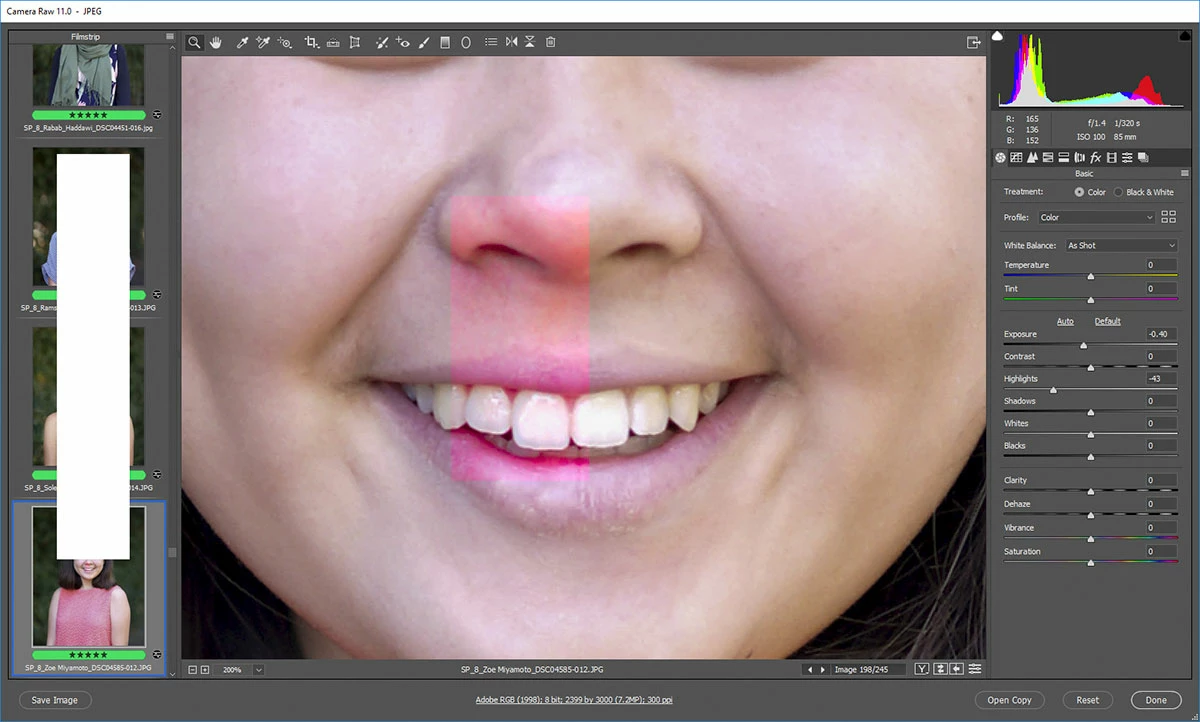
We updated ACR, Bridge and PS last week, since then we have seen a weird redish or magenta-ish box show up on top of the image sometimes - I think we have seen it on 10-12 images so far (out of a thousand maybe). I can't reproduce it unfortunately.

It will show up on the rendered jpeg. The images we are working on are jpgs to begin with- not RAW files.

It will go away if we notice it in ACR - just fiddling with some of the sliders will make it go away.

It shows on both the thumbnail and the main image.

I just saw it on one image where the pink box showed for a split second and then went away. We kept going back and forth between images and it kept doing it.

The pink box seems to show up on top of either skin tones or reddish clothing.

We are a photo lab, so they are not my images, it has happened to multiple different customers images.

(white box over thumbnails is on purpose to protect the innocent)
    This topic has been closed for replies.

    3 replies

    fpl619Author
    Known Participant
    December 11, 2018

    latest ACR update is supposed to fix this. So far so good.

    Kukurykus
    Legend
    November 17, 2018
    JP Hess
    Inspiring
    November 15, 2018

    Have you tried disabling the graphics processor option in the Camera Raw preferences?

    fpl619Author
    Known Participant
    November 15, 2018

    Looks like there are 2 places do that - in bridge and also in Photoshop >> ACR preferences.

    The one found in bridge was already off, and I think we have it set to use bridge for ACR. The one in PS was on, and so was the general performance one, I turned them both off just in case.

    I doubt this will change it as it was already off in bridge but who knows. I wish we could reproduce it so we would know.

    JP Hess
    Inspiring
    November 15, 2018

    Since I'm not really an expert in this area, the only other possibility I can think of would be a faulty monitor profile. You could try switching to a sRGB profile temporarily to see that resolves the issue, but I don't know if it would make any difference.