Participating Frequently
December 31, 2021
Answered

ACR background color

  • December 31, 2021
  • 1 reply
  • 573 views

Hi all,

Is it possible to change the background color of the Camera Raw workspace to white? 

There is no "Custom Color" option in the prefs, as there is in Photoshop.  One has to choose between 5 shades of gray, but no white.  I like comparing my highlights to "paper white" and have it set up that way in Ps.  But when I call for the Camera Raw filter (or just when opening a RAW file), there is only the gray, the bloody gray.

Any solution?

Thanks,

WV

This topic has been closed for replies.
Correct answer Per Berntsen

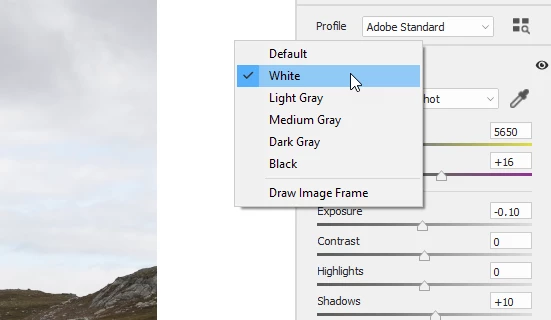
Right-click on the background, and choose White.

It's actually the same as in Photoshop, except that in PS you have to choose Custom, and then define white.


1 reply

Per Berntsen
Community Expert
Per BerntsenCommunity ExpertCorrect answer
Community Expert
December 31, 2021

Right-click on the background, and choose White.

It's actually the same as in Photoshop, except that in PS you have to choose Custom, and then define white.


Participating Frequently
December 31, 2021
Many thanks. The discrepancy has been aggravating to work around. I appreciate your help.

WV