


Participant
April 26, 2018
Answered

ACR not displaying full image
  • April 26, 2018
  • 1 reply
  • 910 views

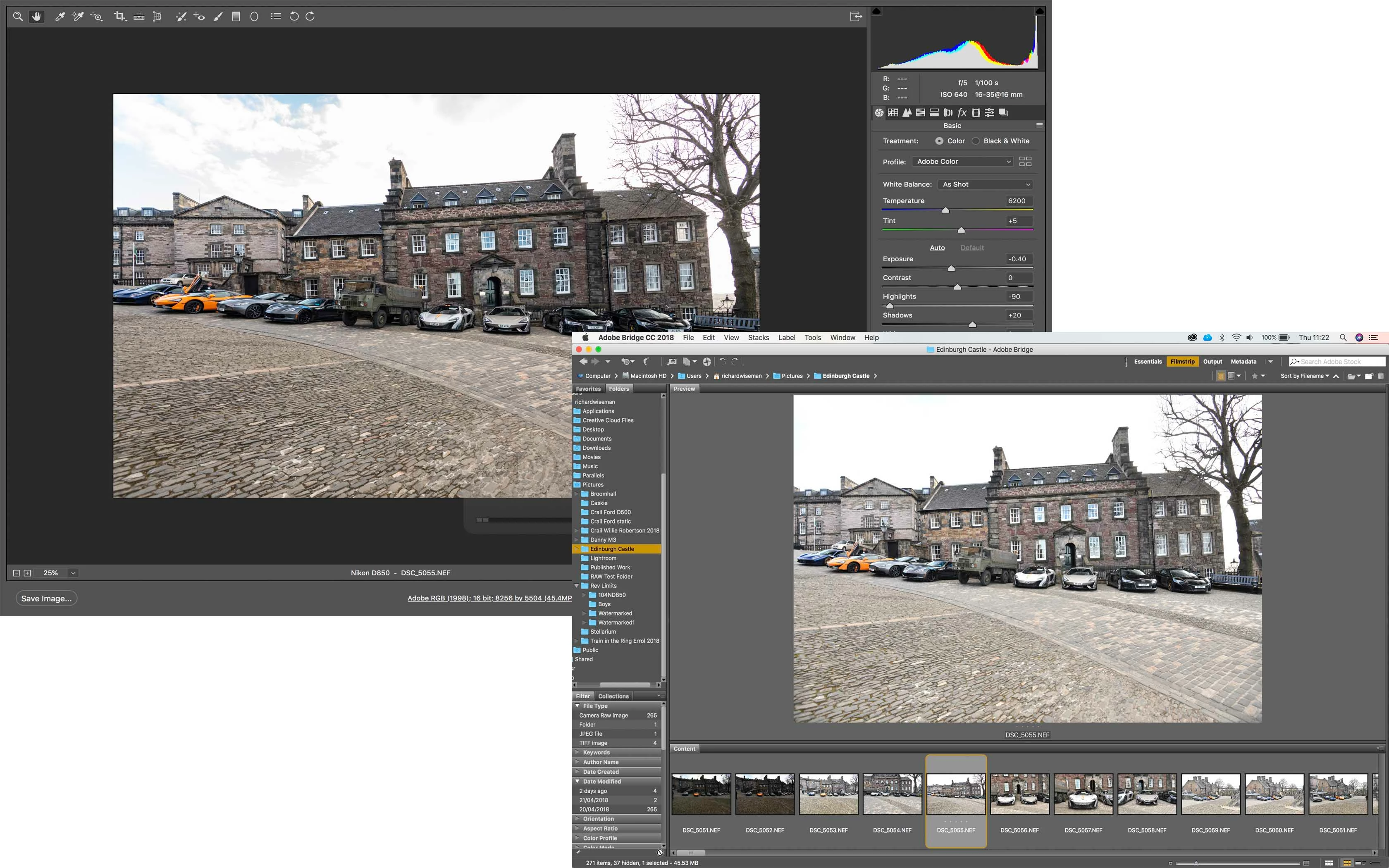
Hi, I have noticed a strange issue with Adobe Camera Raw. When I preview the image in Bridge, I can see the full image, as taken with the camera, but when I open in ACR, it clips both sides of the image?

There is no crop, it just chops the ends off? As you can see the blue car on the left is in shot, but in ACR it is clipped.

Has anyone experienced this?

Nikon D850

Mac OS High Sierra

Bridge CC 2018 8.0.1.282

ACR 10.3.0.993

    This topic has been closed for replies.
    Correct answer Richard Southworth

    It's worse than that, the ACR image is distorted, lengthened horizontally.  Look for auto lens correction either on or off, or something having to do with horizontal perspective.  Perhaps Bridge is showing the embedded jpeg, corrected by the camera?

    Richard Southworth

    1 reply

    Richard SouthworthCorrect answer
    Inspiring
    April 26, 2018

    It's worse than that, the ACR image is distorted, lengthened horizontally.  Look for auto lens correction either on or off, or something having to do with horizontal perspective.  Perhaps Bridge is showing the embedded jpeg, corrected by the camera?

    Richard Southworth

    Participant
    April 26, 2018

    Yes, if I deselect the lens correction, it reverts back to the full image. I always have lens correction on.

    The image bends with lens correction on.

    I will try and shoot jpeg in camera and see if the lens distortion in camera is the same.

    Thanks for the information.

    Inspiring
    April 26, 2018

    The problem still confuses me.  I just noticed the image was shot at 16mm on a full-frame camera, one would expect lengthening of the cars at the edges with this extreme wide angle, as shown in the ACR image.  In other words, to me the ACR image looks correct and the Bridge image looks like it has had some sort of horizontal perspective correction applied.

    Richard Southworth