


studiomoran
Participant
March 16, 2021
Answered

ACR saying graphics card isn't supported when it should be

  • March 16, 2021
  • 2 replies
  • 624 views

Just updated to the new ACR and wanted to use the enchance feature. When I go to use it I get the following error:
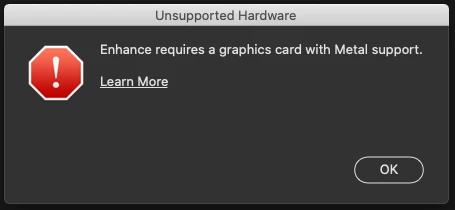


When I check the graphics card it says it supports metal and is 64gb quad core (2015 MacBook Pro i7 running Catalina 10.15.7)

I have checked in both Bridge and PS preferences and I don't have the option to switch the GPU.
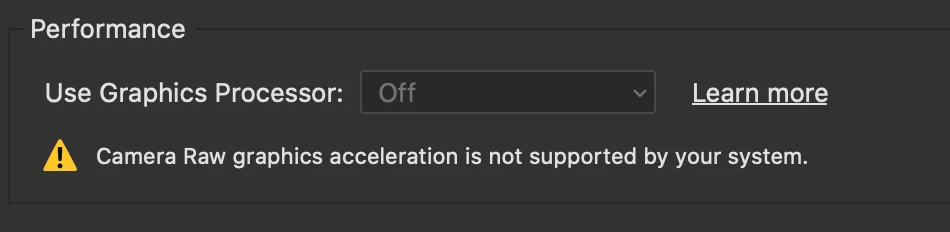


Any ideas why this isn't working?

This topic has been closed for replies.
Correct answer MorganC

Hello,

I was having the same problem an was going nuts trying to figure out why. Here's how I was able to get it to work.

Go to your the following folder:

/Users/youraccountname/Library/Application Support/Adobe/CameraRaw/GPU/Adobe Photoshop Camera Raw/

Inside this folder you should see 2 files:

Camera Raw GPU Config

TempDisableGPU2 (this file might have a different number on the end)


Drag the Temp file to desktop (trash if everything works)


Restart Photoshop and it should work. Let me know if this works for you.


2 replies

creativebloke
Participant
March 22, 2021

Lifesaver, i thpught my iMac Pro was obsolete 😄

MorganCCorrect answer
Participant
March 16, 2021

Hello,

I was having the same problem an was going nuts trying to figure out why. Here's how I was able to get it to work.

Go to your the following folder:

/Users/youraccountname/Library/Application Support/Adobe/CameraRaw/GPU/Adobe Photoshop Camera Raw/

Inside this folder you should see 2 files:

Camera Raw GPU Config

TempDisableGPU2 (this file might have a different number on the end)


Drag the Temp file to desktop (trash if everything works)


Restart Photoshop and it should work. Let me know if this works for you.


studiomoran
Participant
March 16, 2021

Hi Morgan,


Thanks so much, that's fixed it! Really appreciate your help.