


Participating Frequently
November 5, 2020
Question

ACR since 12.2.1

  • November 5, 2020
  • 3 replies
  • 393 views

Since Adobe forced the new design of ACR onto users, I've been doing all I can to avoid using the software but with a new camera, I've just returned to download the latest version, hoping that some of the issues have been addressed. I can't believe how badly you've messed up a perfectly good UI.


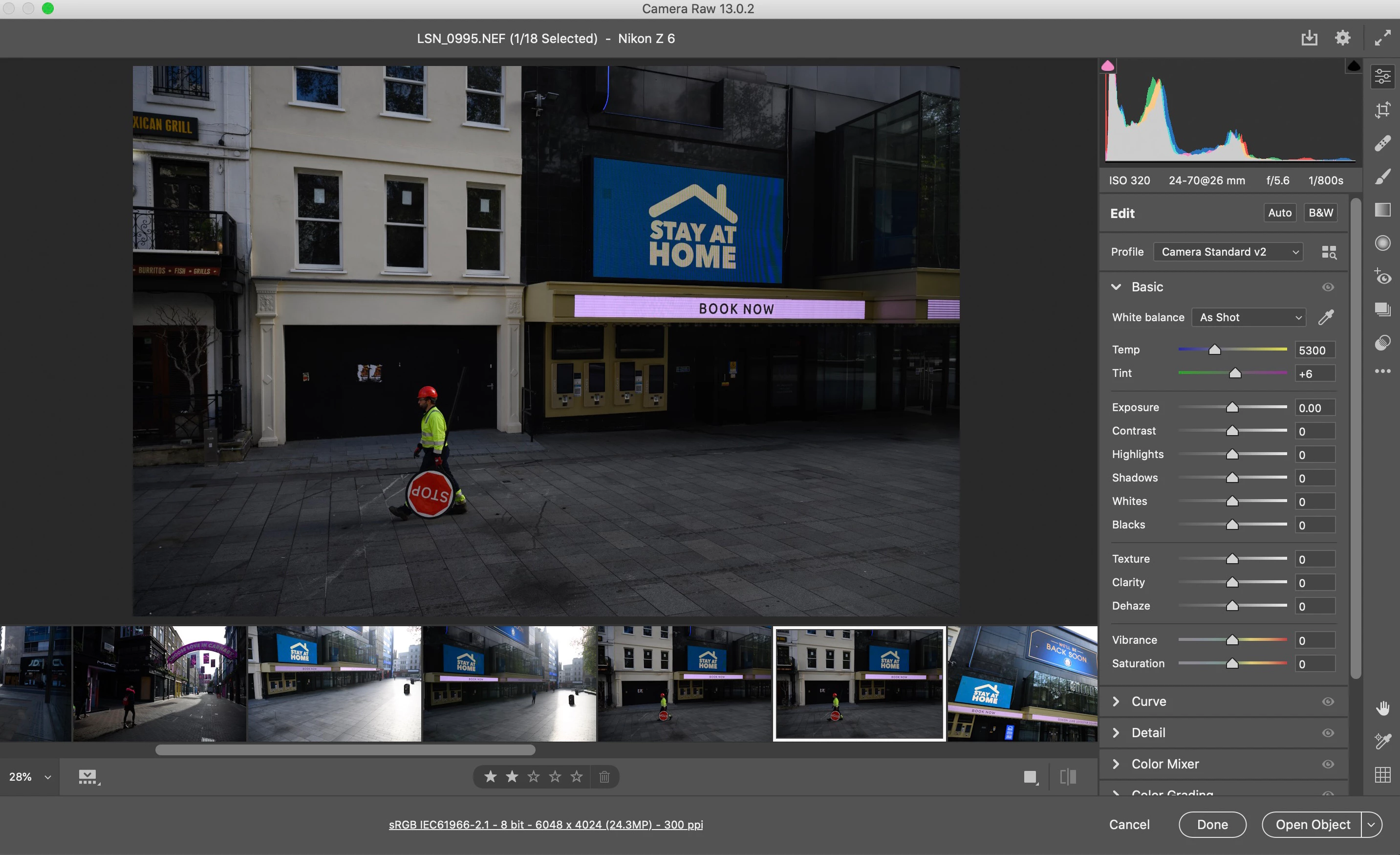
Here's an example screen. Do I really have to point out to Adobe how much wasted screen space there is with this current layout? Working on a Macbook Pro with a 13" screen, to see the full image, it's barely bigger than my mobile phone screen. Why is there OVER an inch of screen space dedicated to the RAW options, that I can also access via the cogwheel at top right? Why is there half an inch of lower screen space dedicated to the ranking option bar? Look at the enormous amount of options on the right that I don't need to see. The software is supposed to be for editing images and yet the image is forced into a tiny box due to poor design. Look at all the wasted space to the left and right of the image, purely because the team behind this design appear to have disregarded all of the knowledge that had previously been amassed through many versions of the pre-12.3 ACR.


What used to be a really slim, really slick bit of software that adapted well to a small screen looks like a bit of freeware by a start-up software company.


I'm sure this will get overlooked and ignored but please please reconsider this design. It's slow, wasteful, unintuitive and an enormous step backwards.
This topic has been closed for replies.

3 replies

Chuck Uebele
Community Expert
Community Expert
November 11, 2020

Also, in the preferences, are you using "Use Compact Layout?"

Chuck Uebele
Community Expert
Community Expert
November 6, 2020

After using the new workspace for a while, I went back to the old one, and hated it. I guess it's all a matter of your particular workflow. I don't like having the film strip on the bottom, like you have it, so I put it on the side. Doesn't take up so much room. 

TheDigitalDog
Inspiring
November 5, 2020

Are you trying to convince Adobe or users of the products? The former is more effective by providing such comments in the appropriate venue: This is a user to user support forum. To provide feedback and suggestions about what you desire for Adobe, you should go here and comment:
https://www.adobe.com/products/wishform.html
Use the Photoshop feedback area for ACR.

 
Author “Color Management for Photographers" & "Photoshop CC Color Management/pluralsight"
Participating Frequently
November 5, 2020

Thanks for the suggestion. I've posted on the page you mentioned.

JP Hess
Inspiring
November 5, 2020

I saw your post on the other forum. Unfortunately, it was closed before anyone had the opportunity to comment on it. Your frustrations have been voiced profusely on that forum as well as this one. Many have requested changes and have asked Adobe to revert to the old user interface. That doesn't seem to be the direction Adobe is taking. I can't comment because I don't work for Adobe, I'm not a beta tester, I have no communication with company. I only observe. Camera Raw is what it is, and you will have to decide how you are going to deal with it.