



ACR Version 10.3.0.933 colours are distorted
I am running Windows 8.1 64 bit v 8.1 6.3.9600.17415. I have an nVidia Quadro K600 graphics card. I have recently upgraded to Bridge 8.0.1.282x64 and Photoshop 19.1.3. My issue is when I view a raw file in Bridge the colours look fine but when I open it in Camera Raw the colours are horribly distorted (magentas on skin tones are revolting). However, when I then open the image in Photoshop the colours are fine again. I have turned graphic processor acceleration OFF in ACR preferences but this hasn't helped. The odd thing is that if I toggle away from ACR then back to it, the colours shift back to normal (ie the same as appears in Bridge and Photoshop). See the snip below which shows 1. the appearance the first time I open in ACR and 2. after I toggle to another program then toggle back to ACR. Can anyone help?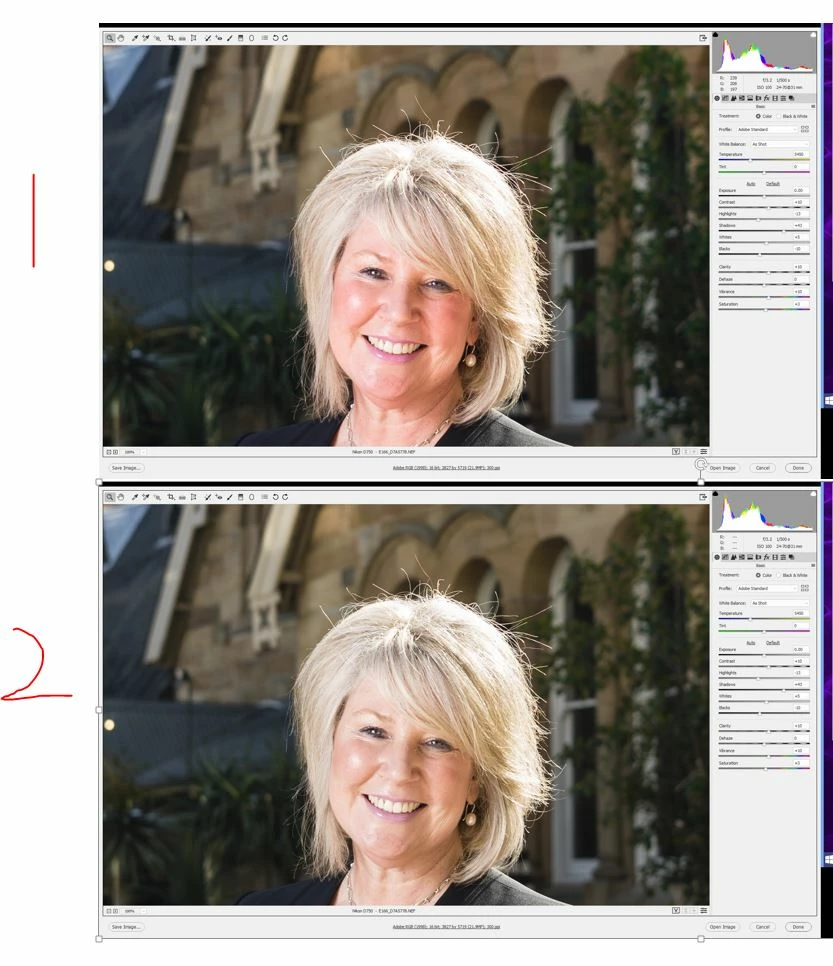
 AdChoices