


Inspiring
July 20, 2019
Question

Adobe Photodownloader Does Not Recognize Canon 50D

  • July 20, 2019
  • 2 replies
  • 391 views

I have just started having this problem. I am using Windows 7x64. Cannot upgrade to W10 because of conflicts with Adobe and Ps programs.

I have 4 Canon bodies, 50D,1DsMKII, 1DX, 5DSr. When I plug the USB cable into the 50D only I get this error:
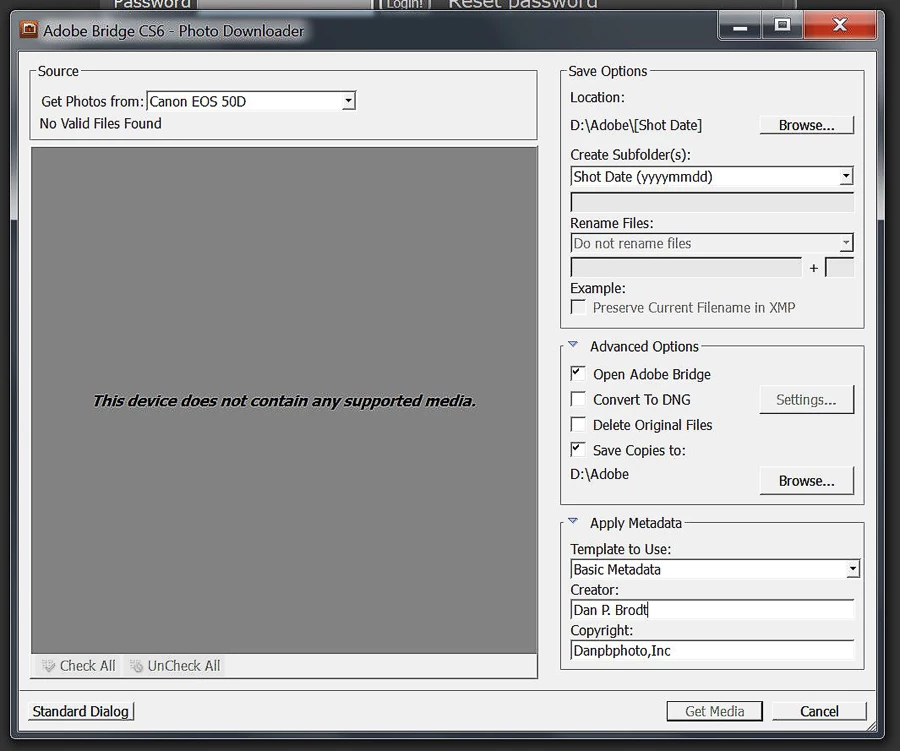
But 50D will download fine to any other camera software. CF card is fine. LCD shows images are there.

Any suggestions?

Thanks!

Dan

    This topic has been closed for replies.

    2 replies

    Akash Sharma
    Legend
    July 22, 2019

    Hi Dan,

    Sorry that Bridge Photo Downloader is not recognizing your camera Canon 50D.

    May I know which version of Bridge are you using?

    I assume that you've already gone through the suggestions listed in  Adobe Bridge Photo Downloader does not recognize some devices on Mac OS 10.11 (El Capitan)

    However, I'll recommend you to take a look at this article Download photos from your camera device using Adobe Bridge CC Photo Downloader to make sure that the requirements are fulfilled:

    Feel free to update this discussion with the outcome anytime.

    Thanks,

    Akash

    gary_sc
    Community Expert
    Community Expert
    July 20, 2019

    Hi Dan,

    Are you connecting directly to the camera or are you using a card reader?

    There are many reasons to use a card reader and this might very well be one of them. If you are using a card reader, and this is failing, you might consider just manually dragging the images from the card to a folder on your computer. Before there was ingestion software, that's what I did.

    BTW, CS6 is no longer supported and Windows 7 is also a bit long in the tooth. You might be running out of options and may have to upgrade your software one of these days. Obviously that's your call.

    Please let us know if anything here is of help.