Participating Frequently
October 31, 2019
Answered

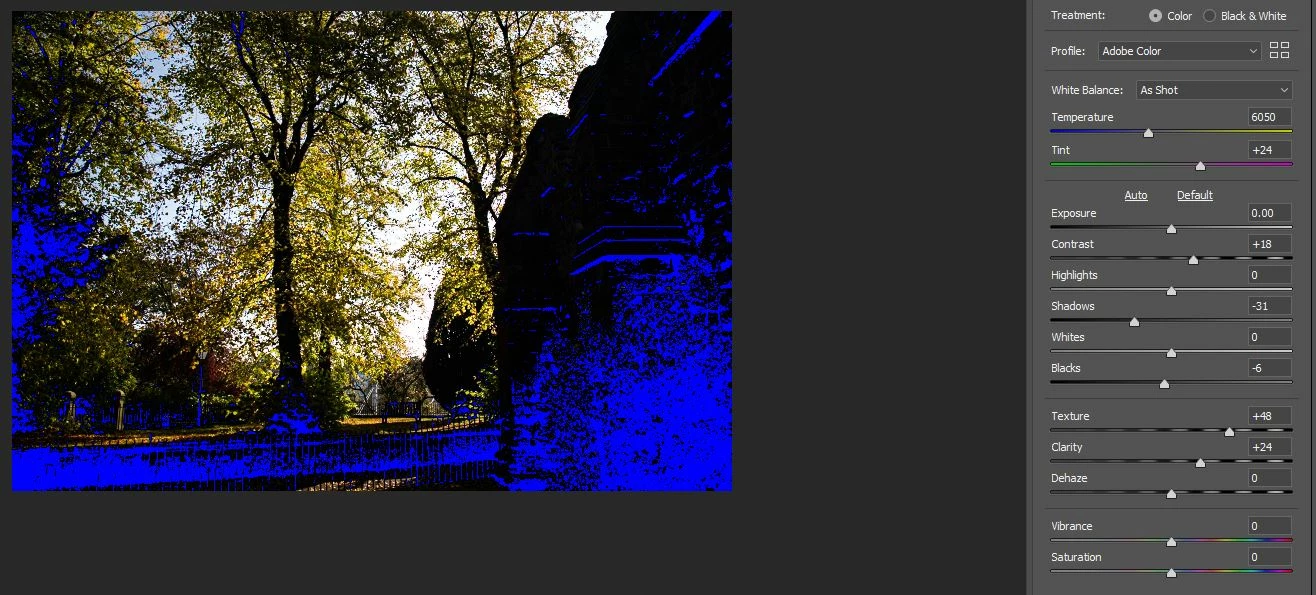
Blue appears in black areas when increasing contrast/shadow/black values in Camera Raw Filter

  • October 31, 2019
  • 1 reply
  • 5488 views

Blacks turn bright blue in Camera Raw Filter when I increase values for Shadow/Contrast/Black and even in many cases Texture and Clarity.... This has been going on for a while now and wasn't fixed after the last update. I use Photoshop CC 20.0.7. Camera Raw Filter settings are all default.


System info: Windows 10 Pro, GeForce MTX graphics card.


Thanks for any help, cheers.

Correct answer Chuck Uebele

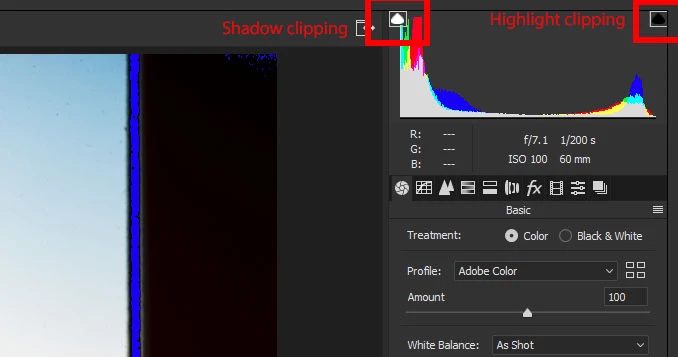
That is the clipping indicator. To turn it off, click on the square on the top left side of the histogram.


Moving to the camera raw forum from the PS forum.

1 reply

Chuck Uebele
Community Expert
Chuck UebeleCommunity ExpertCorrect answer
Community Expert
October 31, 2019

That is the clipping indicator. To turn it off, click on the square on the top left side of the histogram.


Moving to the camera raw forum from the PS forum.

Participating Frequently
October 31, 2019

thanks. Must have clicked on it by mistake d'oh.

Chuck Uebele
Community Expert
Community Expert
October 31, 2019

Easy to do.