

beterlaatdannoglater
Known Participant
October 15, 2025
Question

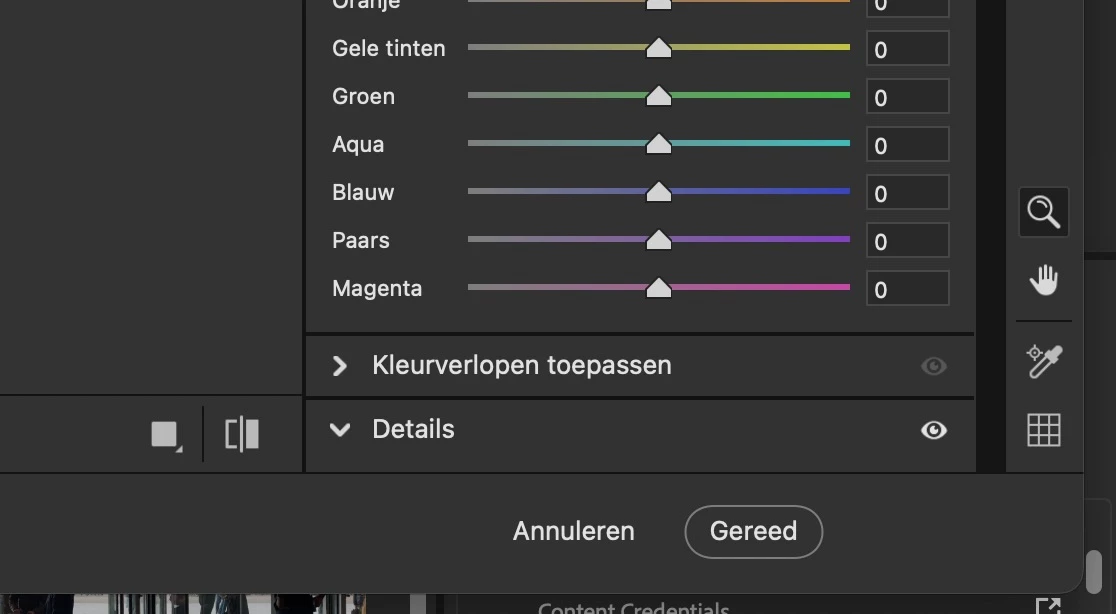
Button for opening a camera raw file into photoshop is gone

  • October 15, 2025
  • 1 reply
  • 45 views

The button for opening a camera raw file into photoshop is gone. Next to ‘annuleren’ and ‘gereed’ (Dutch 🙂 .Mac Studio and camera raw 17.5. How to fix this?

1 reply

Conrad_C
Community Expert
Community Expert
October 16, 2025

How was Camera Raw opened, which of the following ways was used?

A. In Adobe Bridge, select an image, then choose File > Open in Camera Raw.

B. In Photoshop, choose File > Open (or File > Open as Smart Object), and open a raw file.

C. In Photoshop, select a layer, then choose Filter > Camera Raw Filter. Or, double-click a Camera Raw Smart Object layer.


A and B should show three buttons: Cancel, Done, Open. This is because Camera Raw opened an independent file, so the Open button can send it on to Photoshop as a new open document.


C should show only Cancel and OK. It will not offer an Open button for Photoshop, because what’s open in Camera Raw is already a layer in a Photoshop document. Click OK to return to the Photoshop document containing that layer.