C.Cella
Inspiring
December 4, 2019
Answered

Camera Raw 12.0 doesn't work anymore - Crashes while opening images through Bridge on Windows 10

  • December 4, 2019
  • 1 reply
  • 897 views

Hi, 

I literally can't open any photo/file in Adobe Camera Raw from Bridge.

I tried everything, disinstalled, reinstalled, etc...

I am on Win 10, all latest versions installed, all up to date but ACR doesn't work anymore and crahses all the times no matter what I do.


{Thread title edited by moderator}



This topic has been closed for replies.
Correct answer nikunj.m

Hi there,


We are sorry about the experience with Camera Raw.


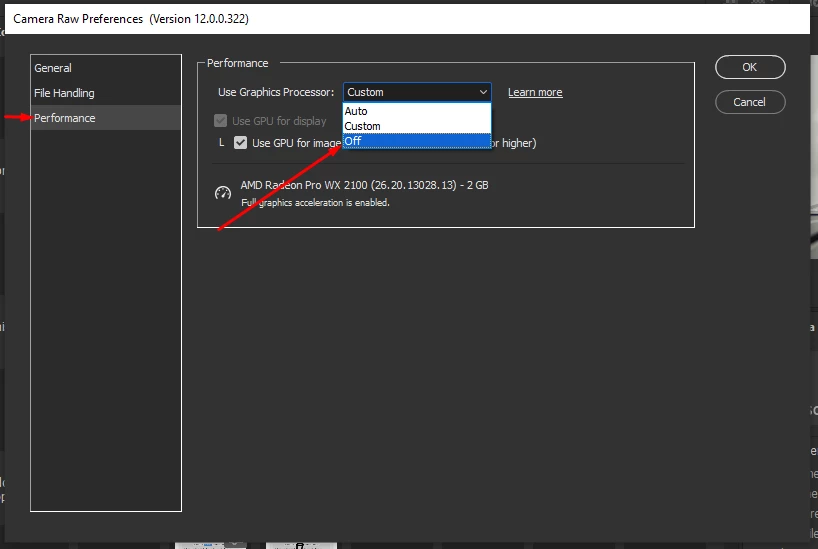
Please go to the Edit menu and Bridge and Select Camera Raw Preferences. Then select Performance and select OFF from the drop down for Use Graphics Processor. Once you have made the change, click on OK and relaunch Bridge to check if the issue persists.


If you are able to launch and work with Camera Raw, you can check the troubleshooting steps mentioned in the article below.

https://helpx.adobe.com/in/photoshop/kb/troubleshoot-gpu-graphics-card.html


Regards,

Nikunj

1 reply

nikunj.m
Community Manager
nikunj.mCommunity ManagerCorrect answer
Community Manager
December 4, 2019

Hi there,


We are sorry about the experience with Camera Raw.


Please go to the Edit menu and Bridge and Select Camera Raw Preferences. Then select Performance and select OFF from the drop down for Use Graphics Processor. Once you have made the change, click on OK and relaunch Bridge to check if the issue persists.


If you are able to launch and work with Camera Raw, you can check the troubleshooting steps mentioned in the article below.

https://helpx.adobe.com/in/photoshop/kb/troubleshoot-gpu-graphics-card.html


Regards,

Nikunj

C.Cella
C.CellaAuthor
Inspiring
December 4, 2019

@Nikunj


Hi thanks for the quick reply, I did as you said and now it works.

Many thanks


This said it's really strange because it was working few days ago with GPU acceleration on.

Perhaps the latest update form Windows messed with ACR;be in any case it should be checked and fixed.


(GPU acceleration works fine in Lightroom btw)


nikunj.m
Community Manager
Community Manager
December 4, 2019

It may be something to do with the Graphic drivers. You can download the latest drivers from the manufacturers website and check if that makes a difference.