


Camera Raw 18.4.x regression: Subject Mask fails with "The AI selection model cannot be downloaded" while all other masking features work
Description
Since updating from Camera Raw 18.3.2 to 18.4.0 and 18.4.1, the Subject masking feature no longer works.
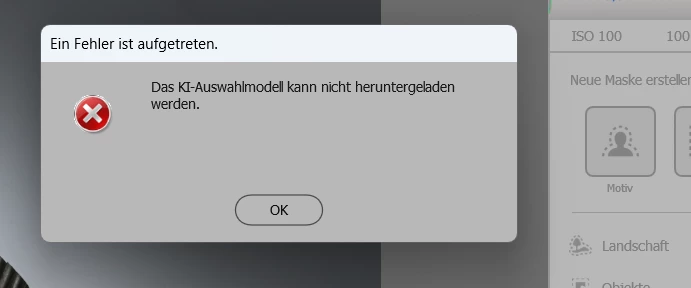
When clicking Masking → Subject, Camera Raw immediately displays the error:
"The AI selection model cannot be downloaded."
No subject mask is created.
System
- Windows 11 (latest updates installed)
- Adobe Photoshop (current version)
- Adobe Camera Raw 18.4.1
- Intel Graphics (Geekom GT1 MEGA)
- Intel Graphics Driver 32.0.101.8801
- Internet connection available
- Creative Cloud Desktop running and signed in
Steps to reproduce
- Open any RAW file in Camera Raw.
- Open the Masking panel.
- Click Subject.
- Camera Raw immediately displays:
"The AI selection model cannot be downloaded."
Expected result
The Subject mask should be created normally.
Actual result
Only the Subject mask fails.
No mask is created.
Additional information
This issue is 100% reproducible on my system.
The following comparison was performed on the same computer, with the same RAW files and no hardware or operating system changes.
| Camera Raw Version | Result |
|---|---|
| 18.3.2 | Subject Mask works correctly |
| 18.4.0 | Subject Mask fails |
| 18.4.1 | Subject Mask fails |
Additional observations:
- Only the Subject mask is affected.
- All other masking features work normally.
- Photoshop's Select Subject feature works perfectly on the same computer and with the same installation.
- GPU Reset was tested without any improvement.
- Reinstalling Camera Raw does not solve the problem.
- The problem started immediately after updating from Camera Raw 18.3.2 to 18.4.x.
Because Photoshop can still perform Subject Selection successfully, and Camera Raw 18.3.2 works correctly on the same hardware, this appears to be a regression introduced in Camera Raw 18.4.x, rather than a local installation or AI model download problem.
Could someone from the Camera Raw engineering team please investigate this issue?
Thank you.
 AdChoices