Participant
June 1, 2021
Answered

CAMERA RAW

  • June 1, 2021
  • 4 replies
  • 1383 views

Hello, when i was recently using and correcting my picture with camera raw, there was an active button called: REPAIR. Thanks to this button i get avoid having some spots overburned. Pleas, tell me where is the botton now? I cant find it. I use ps 2020 and ps 2021.


This topic has been closed for replies.
Correct answer davescm

Are you sure you are not thinking of the "Recovery" slider which used to be in earlier Camera raw conversion processes (specifically conversion process 1 and 2)
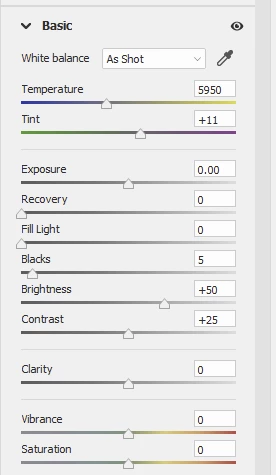


In process version 3 onwards ( current is 5) , Recovery is replaced with Highlights and Whites, which function differently but can achieve the same thing, recovering mildly blown highlights by using the info from channels which have not blown.
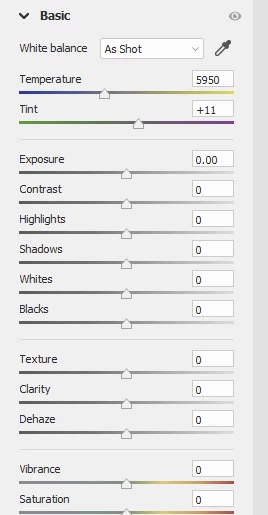
 

If you ever want to compare the different process, go to the calibration tab and choose from there. This of course also allows you to reprocess older raw images using the new process versions.

Dave

4 replies

Chuck Uebele
Community Expert
Community Expert
June 3, 2021

Moved to the Camera Raw forum, from the Photoshop forum.

Trevor.Dennis
Community Expert
Community Expert
June 3, 2021

Any time you are not sure where to find a feature, try using the Discover feature. Click on the magnifying glass icon in the top right corner, and start typing.  It can be an incredibly useful tool, and even experienced users can find it useful at times.  It's a sadly underused tool.

davescm
Community Expert
davescmCommunity ExpertCorrect answer
Community Expert
June 1, 2021

Are you sure you are not thinking of the "Recovery" slider which used to be in earlier Camera raw conversion processes (specifically conversion process 1 and 2)


In process version 3 onwards ( current is 5) , Recovery is replaced with Highlights and Whites, which function differently but can achieve the same thing, recovering mildly blown highlights by using the info from channels which have not blown.


If you ever want to compare the different process, go to the calibration tab and choose from there. This of course also allows you to reprocess older raw images using the new process versions.

Dave

jane-e
Community Expert
Community Expert
June 2, 2021

You have a good memory, Dave. I had forgotten about Recovery and Fill Light.


~ Jane

davescm
Community Expert
Community Expert
June 3, 2021

Hi Jane,

If I open an old file which was processed using an early ACR version, Revovery and Fill Light appear and are still usable, although if I want to process further I tend to switch to the current process.


Dave

TheDigitalDog
Inspiring
June 1, 2021

Never been a "Repair" button in ACR. 

What are you trying to actually do? 

If you type the K key, or B key, do you now see in the UI the tools you are looking for? 

Author “Color Management for Photographers" & "Photoshop CC Color Management/pluralsight"

