


Participant
November 15, 2022
Answered

Camera Raw 6.7 not opening jpg

  • November 15, 2022
  • 3 replies
  • 673 views

Had to get a new computer and it has win 11. Got Photoshop CS 5 reinstalled. Installed CR 6.7. I use a Nikon D300 which is supported. I can't get camera raw to open jpg by just opening image. As in I could open image and camera raw would automatically open.

Camera raw will open in Bridge, but I don't use bridge. I can use Open As camera raw and it will open in camera raw. Would like to take out the extra step and have things the way I am used to. I have searched the forum and elsewhere for suggestions.

This topic has been closed for replies.
Correct answer Jeff Arola

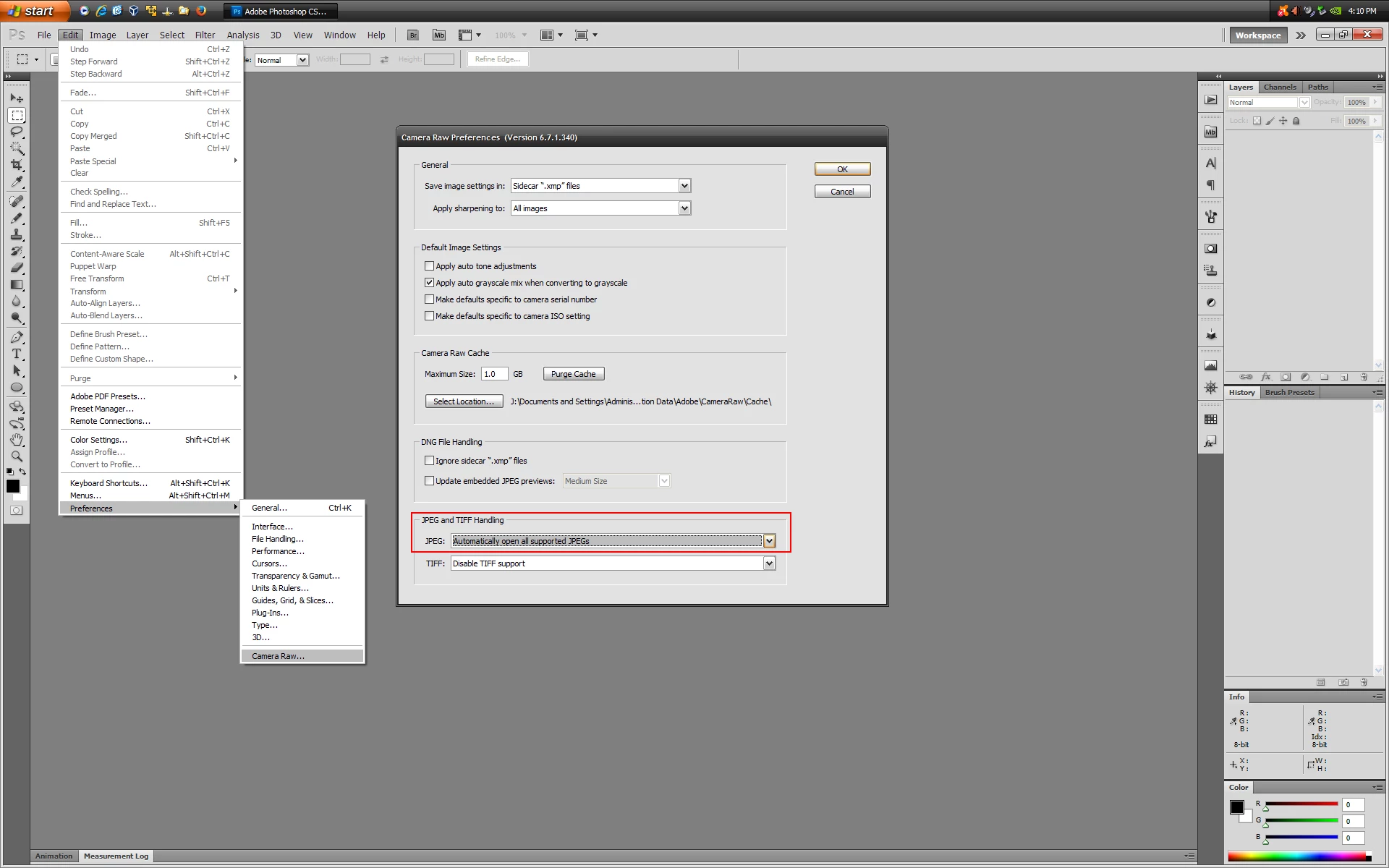
In photoshop cs5 go to Edit>Preferences>Camera Raw and set the JPEG and TIFF Handling to

JPEG>Automatically open all supported JPEGs


3 replies

Jeff Arola
Community Expert
Jeff ArolaCommunity ExpertCorrect answer
Community Expert
November 15, 2022

In photoshop cs5 go to Edit>Preferences>Camera Raw and set the JPEG and TIFF Handling to

JPEG>Automatically open all supported JPEGs


TheDigitalDog
Inspiring
November 15, 2022

Try forcing ACR (not ACR as a filter) to open them as if they were raw (which they are not of course). You do this by selecting the Format menu as Camera Raw. TIFFs, JPEGs, etc, open in ACR but again, depending on your ACR preferences (do check), you can set it to open a JPEG directly. 


Author “Color Management for Photographers" & "Photoshop CC Color Management/pluralsight"
shelley64Author
Participant
November 15, 2022
Thanks for the help, but I didn't quite understand your last response.

I am not trying to open ACR as a filter (which it doesn't show under filters anyway). I am right clicking on image file and selecting open. If you meant set File Handling/File Compatibility and it says camera raw preferences and in that, JPG handling is automatically set to open jpg with settings, then I have that set. I have restarted CS5, but no changes.
TheDigitalDog
Inspiring
November 15, 2022

The instructions I provided allow you to open a TIFF or JPEG in ACR proper, not as a plug-in. Otherwise, a raw/DNG should open just fine in ACR by simply double-clicking on it to launch Photoshop first and then ACR with the raw.

Author “Color Management for Photographers" & "Photoshop CC Color Management/pluralsight"
TheDigitalDog
Inspiring
November 15, 2022

Try resetting the Camera Raw preferences:
Hold down the Command key and select Photoshop > Preferences > Camera Raw (macOS) or hold down the Ctrl key and select Edit > Preferences > Camera Raw (Windows).
Click Yes in the dialog that asks "Delete the Camera Raw Preferences?"
See also:
https://helpx.adobe.com/camera-raw/using/camera-raw-settings.html 

Author “Color Management for Photographers" & "Photoshop CC Color Management/pluralsight"
shelley64Author
Participant
November 15, 2022
Thanks, but that did not work. I checked out the link you sent, but did not find anything that helped. Seems if I can open in bridge I should be able to open in CS5.