Participant
October 6, 2021
Answered

Camera raw 9.1.1

  • October 6, 2021
  • 4 replies
  • 5796 views

Hello!

i have just upgraded my camera to a canon 6D and my ps version is not reading the Raw files.


I have PS CS6 and Camera raw plug in version 7.0.0.308 ( working on a MAC )


I need to download and install Camera Raw 9.1.1, which is the last version that is compatible with Photoshop CS6.


Where can I download camera raw 9.1.1 for my Mac OS X version 10.6.8

i mac5,1 intel core 2 Duo

Please assist

Thank you kindly 

This topic has been closed for replies.
Correct answer Jeff Arola

Hi Jeff,

I will definitely use your latest link

http://swupdl.adobe.com/updates/oobe/aam20/mac/PhotoshopCameraRaw7-7.0/8.3.52/setup.dmg

Just need to know how to install please 

Thank you


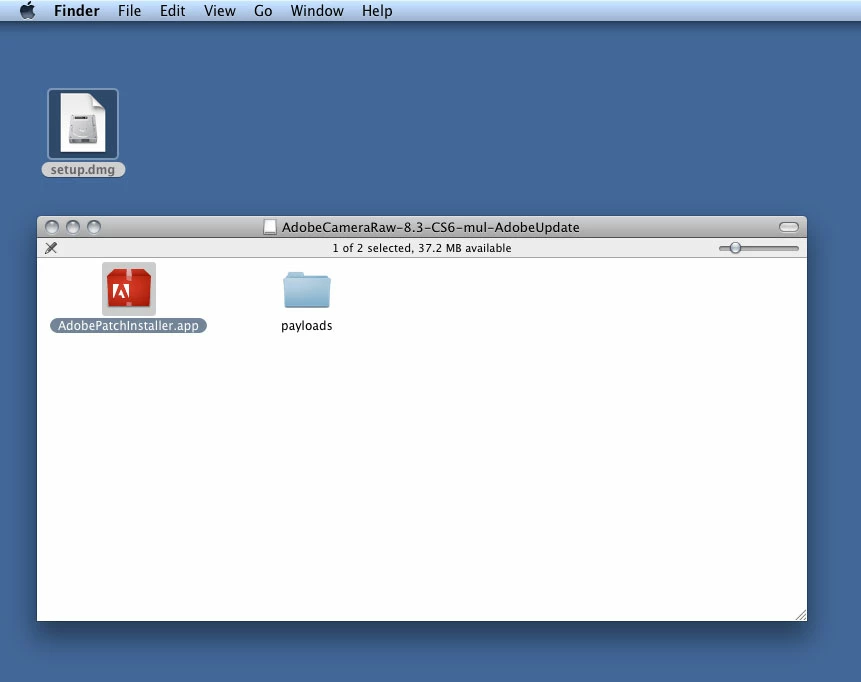
After you download the setup.dmg file, just double click on it and then double click on the AdobePatchInstaller.app.


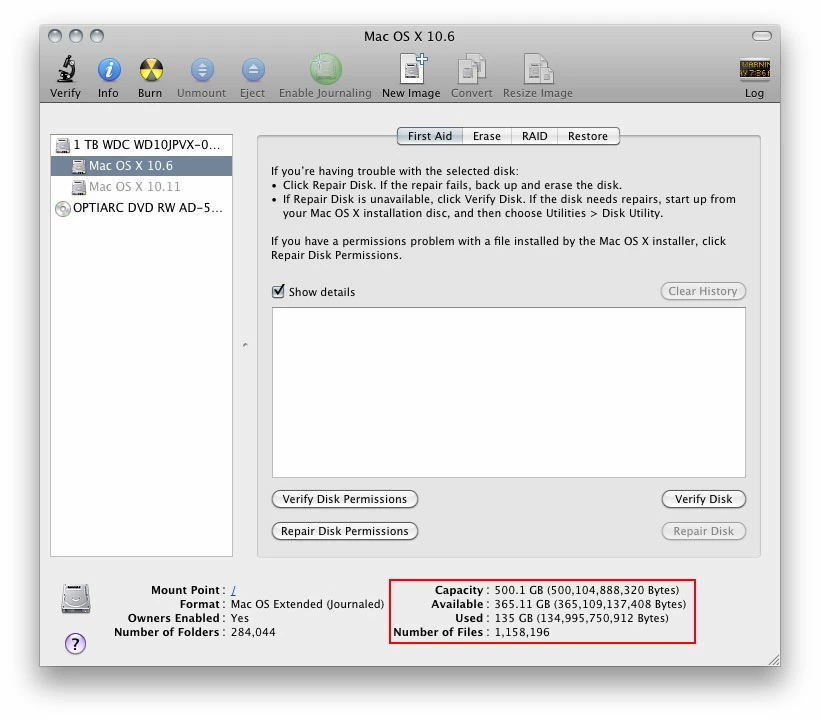
If you get the "File to Large" message, perhaps your hard drive is getting full and doesn't have enough room.


To see how much free space your drive has go to Applications>Utilities>Disc Utility and look in the lower right for

Available.


4 replies

Legend
October 7, 2021

An iMac 5,1 is from 2006! Way out of date and obsolete, it will struggle with those 6D RAW files.

You can update to Lion OS X 10.7.5, but you are still way out of date and unsafe to be on the Internet.

My suggestion is to find a newer computer. For well under US$1000 you can get a current Mac mini or a used iMac.

Participant
October 7, 2021

Hi,

Will have to look at a newer computer or upgrade the harddrive. Hope this works. Thank you for your message. 
Kind Regards

Henry

Jeff Arola
Community Expert
Community Expert
October 7, 2021

I'm sorry i made a mistake about the camera raw version after realizing you have Mac OS X 10.6.8 Snow Leopard, since that operating system can only use up to camera raw 8.3 which should still work for your Canon 6D.


http://swupdl.adobe.com/updates/oobe/aam20/mac/PhotoshopCameraRaw7-7.0/8.3.52/setup.dmg


Participant
October 7, 2021

Thank you much appreciated !!

Can you please help me with installing the setup.dmg file.

I had the camera raw 9.1.1 setup.dmg file but when I dubbel click on the setup file on my desktop it gives me this message 

Is there a different way to open the setup file.

 Thank you kindly 

Henry

Participant
October 7, 2021

Hi Jeff,

I will definitely use your latest link

http://swupdl.adobe.com/updates/oobe/aam20/mac/PhotoshopCameraRaw7-7.0/8.3.52/setup.dmg

Just need to know how to install please 

Thank you

Jeff Arola
Community Expert
Community Expert
October 6, 2021

.

Jeff Arola
Community Expert
Community Expert
October 6, 2021

Did you try Help>Updates from within photoshop cs6?