


Inspiring
August 30, 2017
Question

Camera Raw Anomaly

  • August 30, 2017
  • 2 replies
  • 768 views

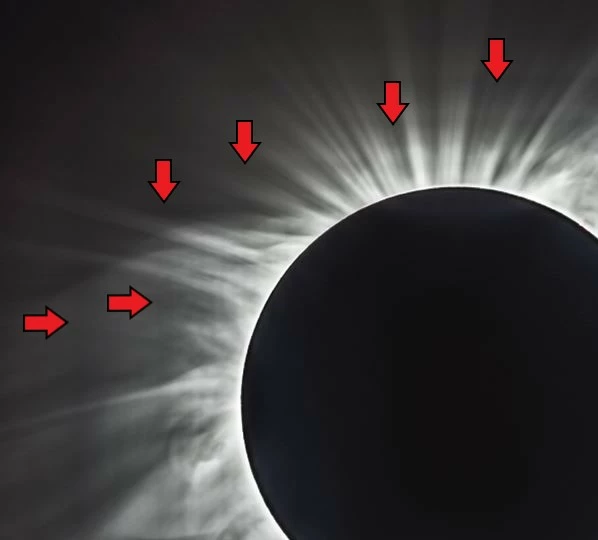
I'm seeing an anomaly when using Camera Raw within Ps CS6. The image below shows that its like a box within a box.  This is not in the original images, nor is it a result of stacking the images.  The boxes become more pronounced when applying more 'Clarity' in Camera Raw, but never goes away totally.  The image below has the Clarity turned way up so you can see what I'm seeing, but even turned way down, it is still visable but faint.

Has anyone else seen this, or know a solution?  I need the clarity to bring out some of the finer detail of the corona.

Thanks
This topic has been closed for replies.

2 replies

ccastleb
Adobe Employee
Adobe Employee
August 30, 2017

Hi,

Any chance you could provide a link to a sample raw image that exhibits this behavior?

You can post the link here or send the link directly to me at ccastleb@adobe.com.

Regards,

- Chris

Inspiring
August 30, 2017

I had some NEF's loaded on a Google Drive.  Let me copy some of the RAW's and I'll provide the link to your directly to your adobe email account.

JP Hess
Inspiring
August 30, 2017

The last version of Camera Raw compatible with Photoshop CS6 is version 9.1.1. It would be interesting to compare a conversion with the latest version which is Camera Raw 9.12. There will be no more enhancements, improvements or updates for Camera Raw for Photoshop CS6.

Inspiring
August 30, 2017

The version I was given with Adobe Cloud Photo was version 9.12.

This really doesn't answer the question to my issue, but thanks none the less.

JP Hess
Inspiring
August 30, 2017

Well now I'm really confused. If you are using the Creative Cloud, why are you using Photoshop CS6 instead of Photoshop CC?