


Known Participant
October 24, 2018
Answered

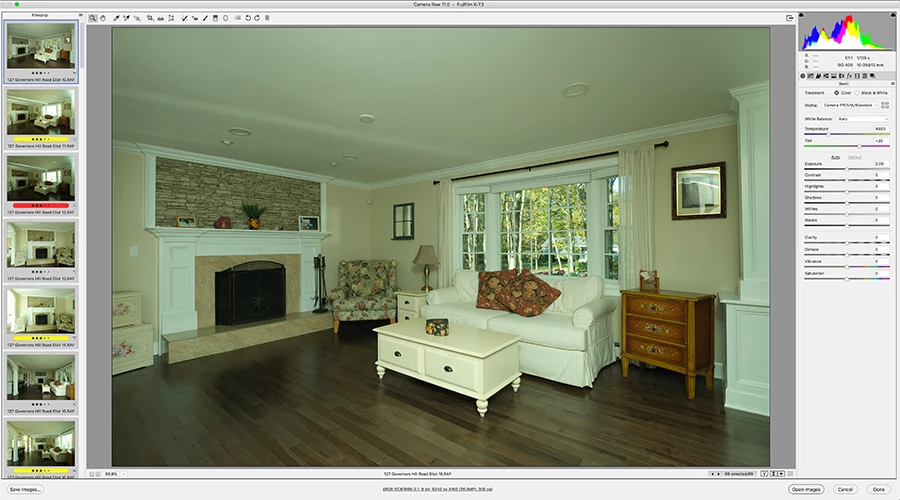
Camera Raw Auto WB a mess with latest version! Green tint!

  • October 24, 2018
  • 4 replies
  • 1407 views

The latest version of ACR (CC 2019)  is adding a terrible green tint when I use Auto WB. I use this for every photo I take to get a good baseline and tweak as necessary. The latest version is making all my images green! The files are much closer to correct when imported. I shoot RAW so no camera processing. It doesn't matter which Profile I choose, Adobe's or my camera's.

I'm on a Mac, OS 10.13.6 (High Sierra). I've used PS for years and have never had issues with Auto WB.
This topic has been closed for replies.
Correct answer ccastleb

Hello. This is a known issue and a fix will be available in a future release.

Regards,

- Chris

4 replies

ccastleb
Adobe Employee
ccastlebCorrect answer
Adobe Employee
October 25, 2018

Hello. This is a known issue and a fix will be available in a future release.

Regards,

- Chris

ssprengel
Inspiring
October 26, 2018

Great.  No bug needed.

ssprengel
Inspiring
October 25, 2018

Can you upload a sample raw file to somewhere like dropbox or onedrive or googledrive and post a public share link to it, here?

CarolynAHAuthor
Known Participant
October 25, 2018

Dropbox - DSCF0502.RAF

Same file as above.

ssprengel
Inspiring
October 25, 2018

I'll submit a bug with Adobe for this.

Chuck Uebele
Community Expert
Community Expert
October 25, 2018

Your screen shot is too low of a resolution for me to read. What camera profile are you using?

CarolynAHAuthor
Known Participant
October 25, 2018

The instructions for uploading an image are up to 900px so that's what size they are.

gary_sc
Community Expert
Community Expert
October 25, 2018

Hi Carolyn,

First off I do not have any initial ideas of what's causing this. But as a test, could you please use the eyedropper (WB Tool) on something that is white? (It appears that there are a number of possible items there).

Also, for the record, what color space are you working in and what kind of camera are you working with.

FWIW, I use a Canon (7Dm2) and I've not seen anything like this at all. Also, I've not seen reports dealing with this so my guess is that there is a setting that is in error. So, let's see if we can work this out.

CarolynAHAuthor
Known Participant
October 25, 2018

Thank you Gary.

I've had to use the eyedropper on each image since Auto turns all my images green. The eyedropper works fine. Working in sRGB color space both in ACR and PS. I also checked in LR and I get the same green tint with Auto WB.

I shoot with Fuji, have ACR set to Provia (Fuji) but this also happens with Adobe's camera profile. Also attaching the color profiles preview, they are all green!

SOOC

Auto WB