


Inspiring
June 7, 2020
Question

Camera Raw Brush tool problem

  • June 7, 2020
  • 2 replies
  • 596 views

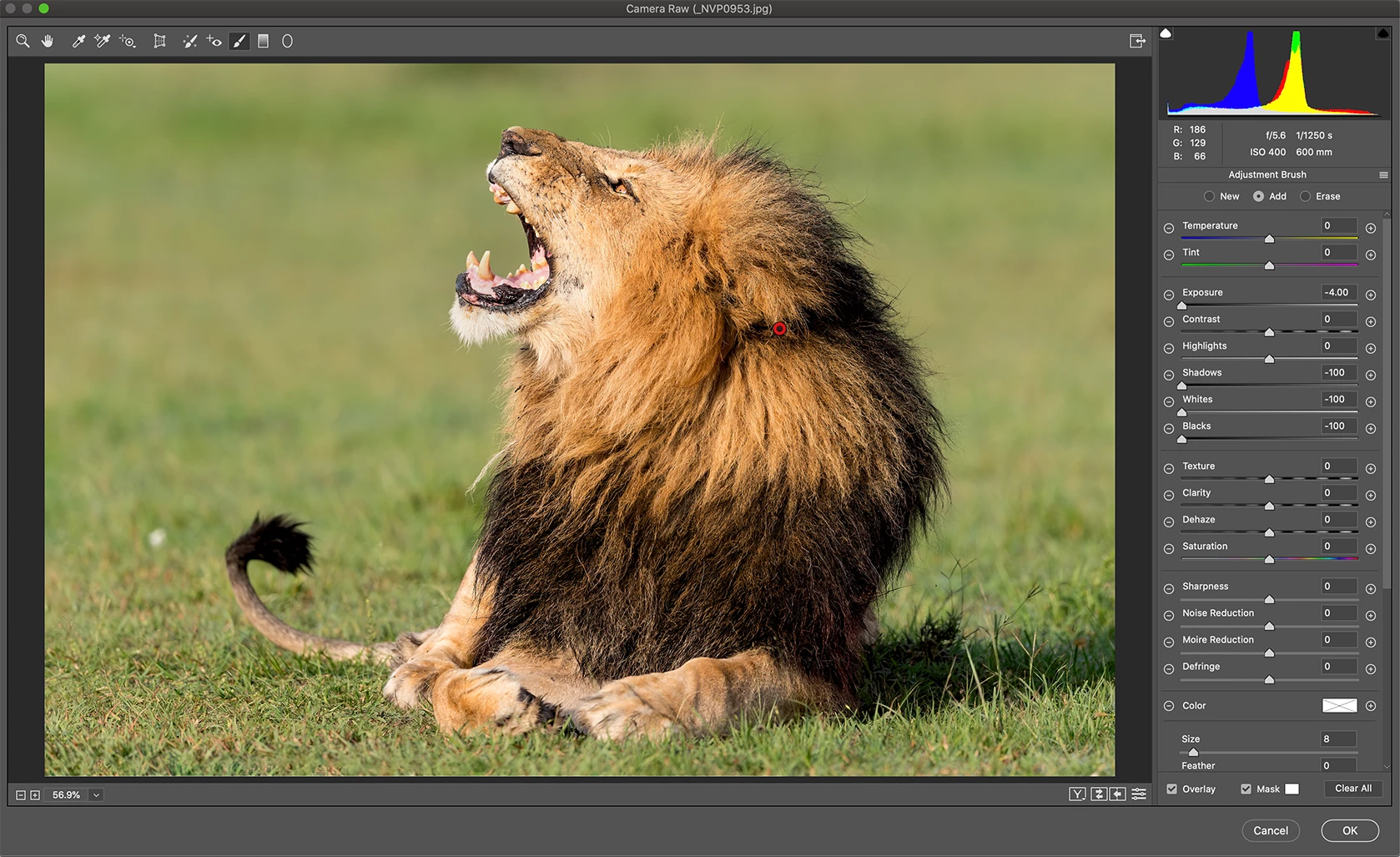
While in Camera Raw when I use the brush tool to apply selected adjustments, nothing happens even if I bump up the exposure all the way to the right or left. Nothing happens for the other functions also. But when I use the radial tool all the functions work perfectly. Anyone else facing this issue especially after the recent upgrade?


Attached is my camera raw window. I had painted the lion with the brush tool and the settings for the exposure, shadow, Whites & Blacks are all the way to the left, and nothing is being applied.
 

This topic has been closed for replies.

2 replies

Just Shoot Me
Legend
June 8, 2020

Set the size to something larger than 8 pixels and test.

Inspiring
June 9, 2020

Still the same, does not effect the image at all.

Inspiring
June 10, 2020

Hey @AdobeCommunity can anyone help me with this?

Just Shoot Me
Legend
June 7, 2020

Please Edit your post to Included your screen shot into the body of the post. You do that by using the Insert Photos icon in the Tool Bar at the top of the Text Entry window.


Thanks.

Inspiring
June 8, 2020

I have added the image.