Participant
October 19, 2017
Answered

Camera Raw & Canon User Defined Picture Profile

  • October 19, 2017
  • 1 reply
  • 1346 views

How can I have a User Defined Picture Profile from a Canon 5DM3 show up in the Camera Raw pull down menu when I am processing the CR2 files in Photo Shop's Camera Raw extension.

    This topic has been closed for replies.
    Correct answer Jeff Arola

    I don't think you can since those are canons proprietary settings which adobe doesn't have access to.

    Maybe someone on the internet has replicated the settings in camera raw so you might goggle for that.

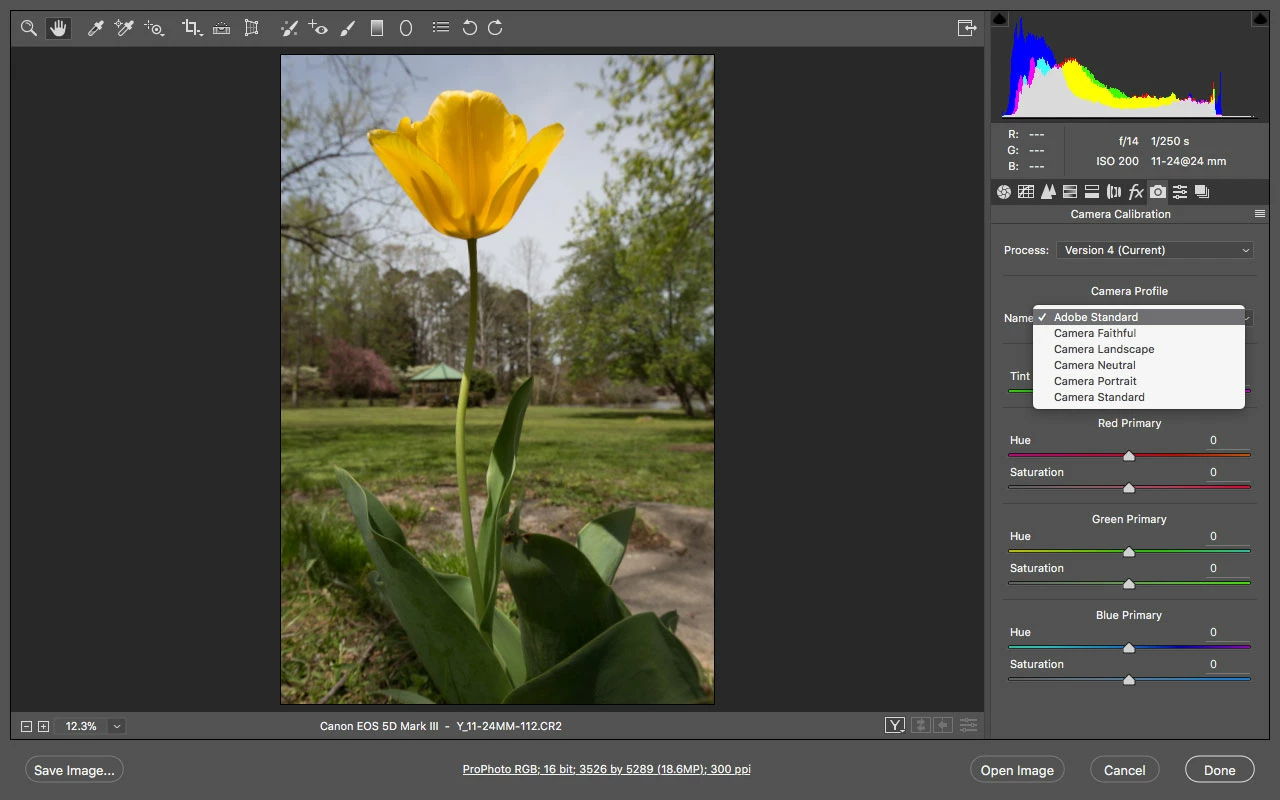
    In camera raw itself under the Calibration tab>Camera Profile there are Adobe’s best approximation of a few of the picture styles.

    test file from here

    Canon 5D Mark III Review - Gallery

    1 reply

    Jeff Arola
    Community Expert
    Jeff ArolaCommunity ExpertCorrect answer
    Community Expert
    October 19, 2017

    I don't think you can since those are canons proprietary settings which adobe doesn't have access to.

    Maybe someone on the internet has replicated the settings in camera raw so you might goggle for that.

    In camera raw itself under the Calibration tab>Camera Profile there are Adobe’s best approximation of a few of the picture styles.

    test file from here

    Canon 5D Mark III Review - Gallery

    Participant
    October 20, 2017

    Thanks Jeff. The solution seems to be to replicate the Cinestyle 'look' using the settings in Camera Raw and then saving those settings to create a recipe for future use - Camera Raw is more than capable of simulating the Cinestyle 'look'. Interestingly, the Cinestyle Picture Profile does show up in Canon's DDP and CR2 files. Another option is in PS, to apply the PS Camera Raw filter to jpeg files using the Cinestyle Picture Profile, but this can be destructive and should be used carefully. Thanks again!