


Inspiring
August 20, 2024
Question

Camera Raw - clicking on the eye icon in the Effects panel resets all effects settings

  • August 20, 2024
  • 1 reply
  • 345 views

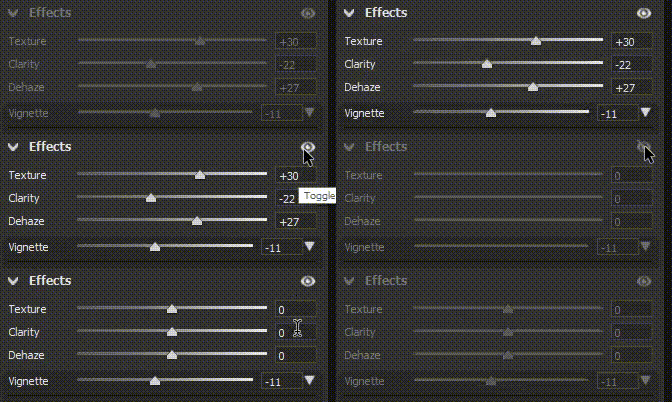
Clicking on the eye icon in the Effects panel resets all effects settings.


Expected - effects should be temporary set to zero and returned to their original values after releasing mouse button.


Camera Raw 16.5.0.1953 Windows x64
This topic has been closed for replies.

1 reply

Sameer K
Community Manager
Community Manager
August 20, 2024

Hey, @DiodorS. Welcome to the Photoshop Community. I'll move this to Camera Raw discussions for now. Please share the system info from Photoshop Help > System info > Copy & paste into a text document > upload & attach here.


I've tried to recreate this with Adobe Camera Raw and the Camera Raw filter without success. I've also used sample JPEG and RAW images. Are you working with multiple displays? 

As a primary step in Photoshop, press & hold the CTRL + ALT key, go to Edit > Preferences > Camera Raw Preferences, and select 'Yes' when prompted to reset Camera Raw preferences.


Let me know if the issue exists. Thanks!
Sameer K

(Use '@mention' to tag me when you reply)

DiodorSAuthor
Inspiring
August 20, 2024

@Sameer K Thanks for trying to reproduce the issue!

With JPG files (and Camera Raw filter) I observe the desired behavior (effects settings do not reset).

I've also tried to reproduce the issue on a different machine, but it behaved correctly with both raws and JPGs.


I did some digging and I think I've tracked down the root cause.


Before clicking the eye icon we need to create and set a Raw default profile.


Step 1 - Set texture, clarity and dehaze to distinct values (let's say 1, 2, 3)

Step 2 - create a preset, name it "test_effects_reset", check only "Effects" (and possibly "Support Amount Slider", not tested with this unchecked)

Step 3 - set this preset as camera raw default

Step 4: now set "texture, clarity and dehaze" to some random values. Press & hold & release the eye icon.

The sliders are reset to the value from the "Raw Default" preset, not to the previously set value.


Step 5: set the "Raw Default" to "Adobe Default". The problem is gone - the sliders are reset back to the previous value after releasing the mouse button.


Could you please try to reproduce this issue with "Raw Defaults" set?