


Inspiring
June 18, 2022
Answered

Camera raw crop query

  • June 18, 2022
  • 2 replies
  • 920 views

Hi. I have been using camera raw/photoshop for quite a while and feel silly asking this question, but here goes:

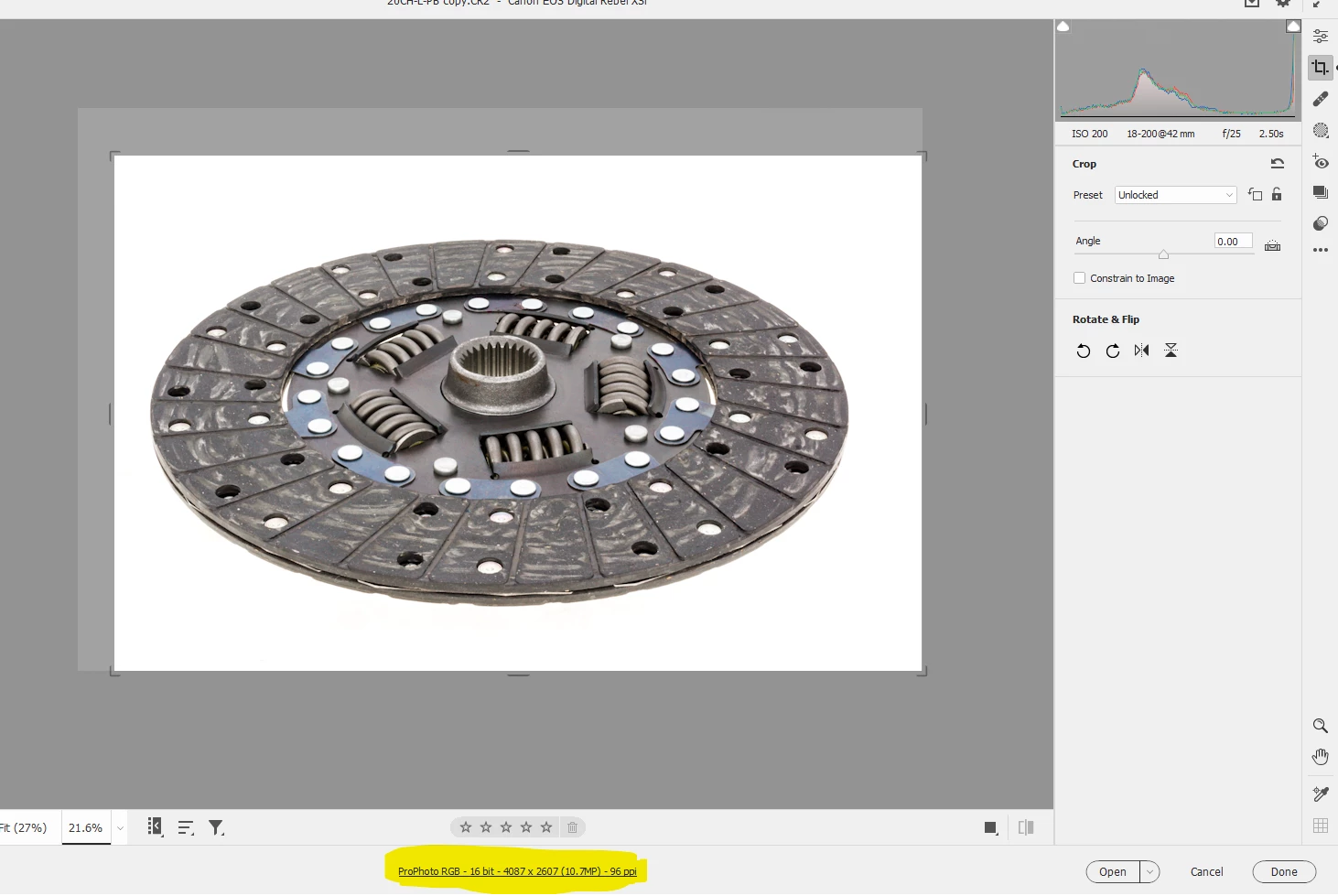
I normally crop in photoshop, not camera raw. However, in camera raw (using latest version 14) there seems no way to crop to a specific height/width in inches/cm/pixels etc. For example, if I choose 1x1 in the drop down menu and then open in Photoshop and select image size, it is indeed in 1x1 but how are the dimensions in pixels or inches that are displayed determined?

My second query is the "constrain to image" checkbox in acr. When I crop it doesn't seem to make a difference whether it's checked or not. How does this work please? Cheers.
This topic has been closed for replies.
Correct answer Lumigraphics

You can certainly crop to a specific size. The highlighted info will update as you move the crop rectangle.

2 replies

LumigraphicsCorrect answer
Legend
June 20, 2022

You can certainly crop to a specific size. The highlighted info will update as you move the crop rectangle.

Rob_Cullen
Community Expert
Community Expert
June 21, 2022

Great answer @Lumigraphics .  (Me - Not a frequent user of ACR- forgot this info.! )

Regards. My System: Windows-11, Lightroom-Classic 15.0, Photoshop 27.0, ACR 18.0, Lightroom 9.0, Lr-iOS 10.4.0, Bridge 16.0 .
Rob_Cullen
Community Expert
Community Expert
June 18, 2022

Simply put- Think of Camera Raw only as a virtual editor. It does not make changes to the original file. It only records the edits you make as 'directions' in a text file (XMP). ACR does not 'understand' what pixels are, so cannot change an original file pixel dimensions by a crop.

Pixel dimensions only come into 'play' when you Export a derivative file (with Custom dimensions) from Lightroom, or [Open] an RGB (pixel) version in a Photoshop document where you can [Resize] and Save..

So Pixel dimensions are determined in the Export, or a Resize in Photoshop.


"Constrain to Image" is useful when you Rotate a Crop in ACR or use Transform functions that create empty (white) space where no image data exists. "Constrain to Image" then 'pulls in' the crop boundaries to only show visible areas of the original image (and not the clear space).


Regards. My System: Windows-11, Lightroom-Classic 15.0, Photoshop 27.0, ACR 18.0, Lightroom 9.0, Lr-iOS 10.4.0, Bridge 16.0 .
Inspiring
June 20, 2022

Hi Rob. Thanks so much for the reply. It makes sense now. I do note that older versions of camera raw (eg version 6)  it was possible to crop to a specific size in pixels, cm, inches, in the custom drop down menu.