



KBStudiosInc
Inspiring
March 14, 2021
Question

Camera Raw Enhanced has locked up

  • March 14, 2021
  • 2 replies
  • 733 views

Took a Sony A7RIII file into Camera Raw to test the enhanced feature.  When I hit the Enhanced process button a few seconds later an |Error message come up.  So I chose another file and tried to Enhance it in Camera Raw.  Now I get a new message. 
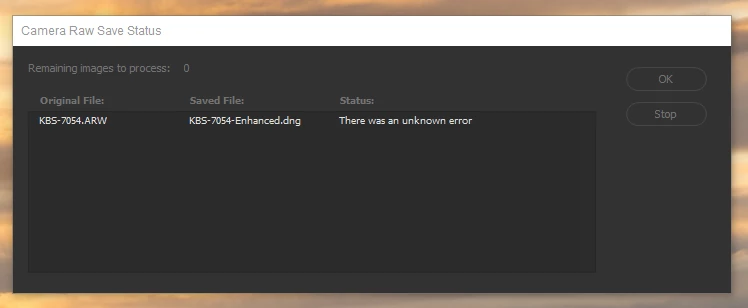
I have restarted Bridge and now the Enhance feature is working.  


So just a heads up to those who use Bridge to enhance Raw files.

This topic has been closed for replies.

2 replies

KBStudiosInc
Inspiring
March 22, 2021

Updated NVIDIA drivers.  Seems to have solved problem.


D Fosse
Community Expert
Community Expert
March 22, 2021

Glad that took care of it, it's always nice when driver bugs actually get fixed 🙂


While I'm here, I need to say this. I know you were just trying to test this with an a7riii file. But this isn't really meant to take already extremely high resolution images and send the pixel count into the stratosphere. I have an a7riii myself, and it has enough pixels for anything. And I mean anything.


The typical use case for "super resolution" is either a very heavily cropped image because you couldn't get close enough (like a bird from 100 m away), or an old, but otherwise technically excellent image from a 6 megapixel camera. In that case it makes sense just to give you a workable file.


It's completely wasted if it is even slightly out of focus, or has any motion blur whatsoever. It needs to be a perfect shot.

KBStudiosInc
Inspiring
March 22, 2021

I don't remember exactly why I was using an A7RIII file in this instance.  But I am really only using the "Enhanced" feature for low res files. 


Just did a job where the files provided by the manufacturer were only a few mbs.  Used the "Enhanced" feature to upres to a size the client could use in their marketing applications.  Composited this with their product taken with an A7RIII.  Used Smart Object to resize the product shot to match size, angle and color of the manufacturers provided image.  All worked great and the client is very happy.  


My other use of the "Enhanced" feature is to upres very old Canon 10D files.  Results so far have been mixed.  I am reallizing that this feature can be image specific.


Thanks D Fosse for your input.

D Fosse
Community Expert
Community Expert
March 15, 2021

It's the same ACR, whether hosted by Bridge or Photoshop. So this is probably a "marginal" GPU driver that gives random errors. Update your driver. Which GPU?

KBStudiosInc
Inspiring
March 15, 2021

I am running a NVIDIA GeForce RTX 2070 Super video card.  Downloaded and installed the lastest driver.  I will see if I can replicate the error.


Thanks.