


Participant
September 6, 2022
Question

Camera raw error

  • September 6, 2022
  • 1 reply
  • 189 views

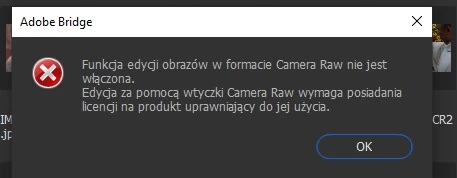
Until yesterday I used Camera raw normally. Today I have an error (until opening files in Adobe Bridge) as attached.

It says: "The function of editing files in camer raw format is not allowed.

Editing with the Adobe Camera Raw is possible only if you have a licence to use it".

Photoshop and Bridge are working just fine.

I have reinstalled Photoshop. All of the Adobe programs are listed as uptodate.

What else can I do to use Camera Raw normally (I want to open files from Adobe Bridge with the right mouse click and option: Open in Camera Raw).

Please give me an advice,

regards

D.


This topic has been closed for replies.

1 reply

TheDigitalDog
Inspiring
September 6, 2022

Can you access and use ACR hosted by Photoshop?

Author “Color Management for Photographers" & "Photoshop CC Color Management/pluralsight"
Participant
September 6, 2022

Yes, I can use ACR within Photoshop. The above listed error appears only within AdobeBridge.

TheDigitalDog
Inspiring
September 6, 2022

You may want to post in the Bridge forum as it isn't ACR that's the issue if it's working in Photoshop.

Author “Color Management for Photographers" & "Photoshop CC Color Management/pluralsight"