peterm72782058
Participant
December 28, 2018
Answered

Camera RAW error

  • December 28, 2018
  • 1 reply
  • 1160 views

Please help me!
What a problem? PS CC 2019 Camera raw newest.

    This topic has been closed for replies.
    Correct answer gary_sc

    Hi Petern,

    I'm on a Mac so I cannot cross-check this myself (and I have the 7Dm2 so also CR2 images but not yours).

    However, keep in mind that if this was happening to everyone who uses ACR and has your camera (a whole lot of people), these forums would be screaming with people. So there must be a setting or something about your instillation that's causing this. Hopefully we can pin it down so you can get back to work.

    I just thought of one other thing to check and that's have you tried to turn your image(s) into DNGs. FWIW, I do on ALL my images, and see no downside.

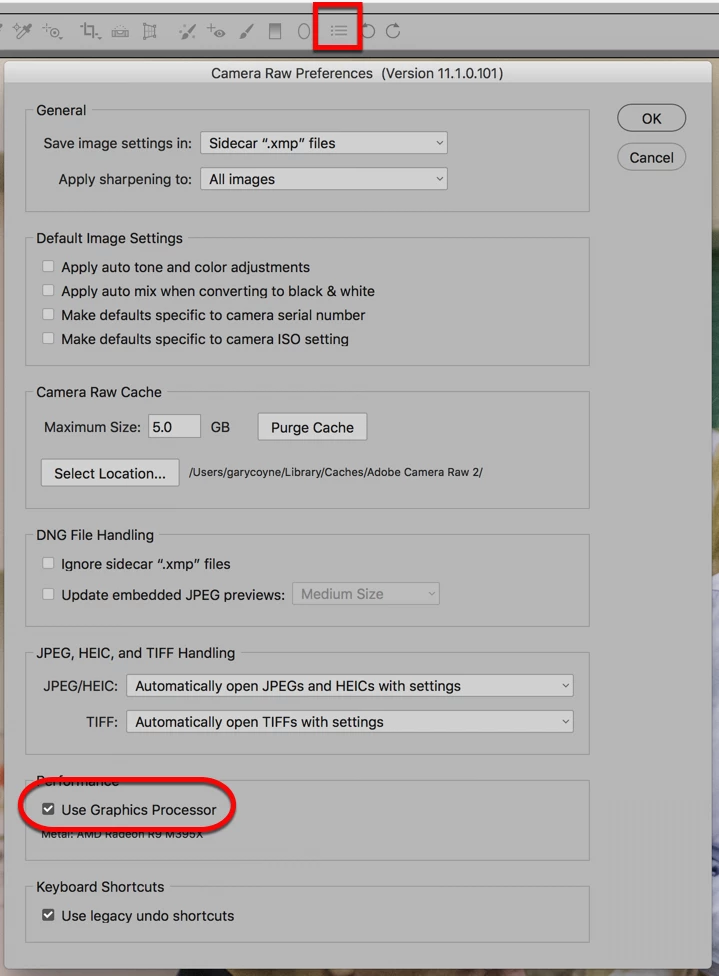
    Otherwise, if you need to see where to turn off your graphic processor see below. If you click on the "bullet list" in the top part of ACR, that opens up the ACR prefs. Than lower (where the round-corner Rectangle is) is the checkbox to turn off the Graphics Processor is

    Let us know if either of these work
    1 reply

    gary_sc
    Community Expert
    Community Expert
    December 28, 2018

    Hi Peterm,

    Couple of quick questions:

    What release of Windows is this?

    Does this happen to all images or just this one?

    You are showing a Canon raw image, if it happens on all Canon raw images does it also happen on JPG and TIF images?

    Have you tried to turn off the Graphic Processor in ACR (in ACR's Preferences)?

    Let us know

    peterm72782058
    Participant
    December 28, 2018

    Hi gary_sc!
    My win is W10 Pro with I7 and 16Gb memory.
    Video card is Nvidia GT1060.
    Its happen all Canon RAW images too.

    A few days ago I noticed this, in principle, there was no update.

    I'm trying to turn it off, thank you.

    gary_sc
    Community Expert
    gary_scCommunity ExpertCorrect answer
    Community Expert
    December 28, 2018

    Hi Petern,

    I'm on a Mac so I cannot cross-check this myself (and I have the 7Dm2 so also CR2 images but not yours).

    However, keep in mind that if this was happening to everyone who uses ACR and has your camera (a whole lot of people), these forums would be screaming with people. So there must be a setting or something about your instillation that's causing this. Hopefully we can pin it down so you can get back to work.

    I just thought of one other thing to check and that's have you tried to turn your image(s) into DNGs. FWIW, I do on ALL my images, and see no downside.

    Otherwise, if you need to see where to turn off your graphic processor see below. If you click on the "bullet list" in the top part of ACR, that opens up the ACR prefs. Than lower (where the round-corner Rectangle is) is the checkbox to turn off the Graphics Processor is

    Let us know if either of these work



