


Participant
February 20, 2019
Answered

Camera Raw file open problem

  • February 20, 2019
  • 4 replies
  • 749 views

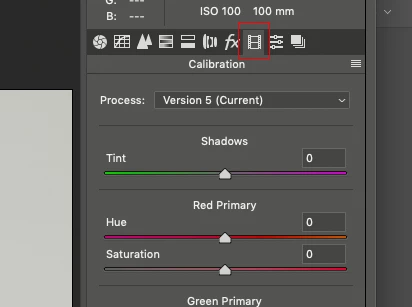
Hi, I have a problem, when a Camera Raw file is opened in Photoshop, instead of  "camera calibration" icon I can only see a "filmstip" icon with Process: "Version 1, Version 2, ... etc., on the right side (you can see on the attached printscreen). So I can't choose the Color Checker profile. I have already tried it in Photoshop CC 19.1.7 and 18.1.6, too. Does anybody have a solution? Thanks!

    This topic has been closed for replies.
    Correct answer gary_sc

    Hi Attila,

    I'm not sure I understand, have you tried to just click on the first icon?

    Sorry if I'm missing something, but I am not sure what you are looking for/needing?

    4 replies

    Inspiring
    February 20, 2019

    Hi,

    Profiles have been moved to the first panel. If you have added custom profiles you'll have to dig down a bit. Is that your question or are you trying to make a profile?

    Participant
    February 21, 2019

    Hi,

    thanks for the help, so I have found my camera (Canon 5DMarkt) profile yet.

    gary_sc
    Community Expert
    gary_scCommunity ExpertCorrect answer
    Community Expert
    February 20, 2019

    Hi Attila,

    I'm not sure I understand, have you tried to just click on the first icon?

    Sorry if I'm missing something, but I am not sure what you are looking for/needing?

    February 20, 2019

    Hi

    Don't mark my post as correct as I just moved it to the appropriate forum, if it's mark as correct you may not get a reply

    February 20, 2019

    Moving to Adobe Camera Raw from Photoshop
