fabriceh60860497
Participant
October 6, 2019
Answered

Camera raw filter not applied when the picture is transferred to photoshop CC

Hello,

I have an issue when I work with Camera Raw, and when I increase the gain to get something sharpen.

I can see the result properly in Camera Raw, however, when I send the picture to Photoshop CC to continue the treatment, this gain disappear !

Have you already been faced to this issue ?

Thx.

Fabrice.

This topic is closed to new replies. Start a new post to keep the conversation going.
ssprengel
ssprengelCorrect answer
Inspiring
October 6, 2019

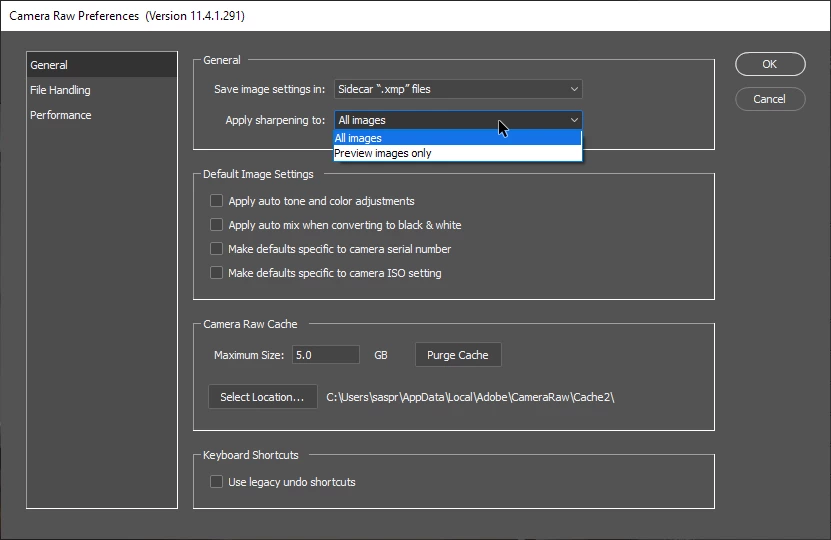
Check to make sure that in your camera raw settings, Appy Sharpening is set to All Images instead of Preview Only:

5 replies

ssprengel
ssprengelCorrect answer
Inspiring
October 6, 2019

Check to make sure that in your camera raw settings, Appy Sharpening is set to All Images instead of Preview Only:

Translate
fabriceh60860497
Participant
October 6, 2019
thank you very much, it works now !
Translate
TheDigitalDog
Inspiring
October 6, 2019

Are you viewing BOTH at 100% zoom (1:1)? 

Translate
Author “Color Management for Photographers" & "Photoshop CC Color Management/pluralsight"
fabriceh60860497
Participant
October 6, 2019
yes, definitely
Translate
TheDigitalDog
Inspiring
October 6, 2019
Try again after turning OFF GPU in preferences.
Translate
Author “Color Management for Photographers" & "Photoshop CC Color Management/pluralsight"