


sturnus21
Inspiring
May 5, 2018
Answered

Camera Raw filter producing horizontal bands instead of image

  • May 5, 2018
  • 1 reply
  • 2668 views

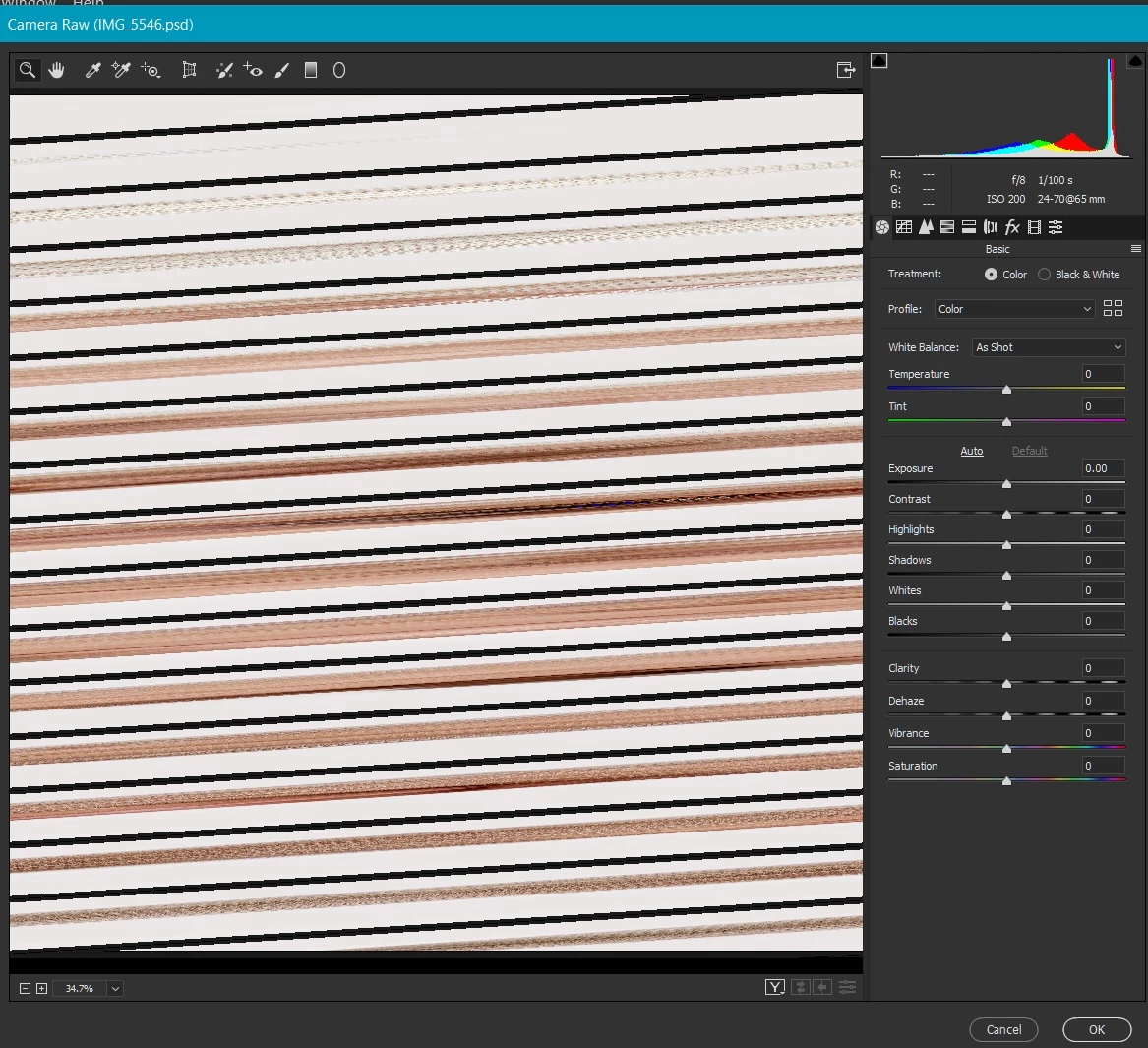
When using the Camera Raw Filter from Adobe Photoshop Version: 19.1.3, running under Windows 10 I am getting coloured horizontal bands instead of my image. I have reproduced this with several other photos and there are always bands instead of pictures (see example below which should show an image of a face). I have no problems when using ACR from Bridge, the problem only occurs with the Camera Raw Filter.

This problem has only occurred in the last few days and, during that time I have installed the new Windows 10 April 2018 update. I have however been unable to find anybody reporting a problem with the filter after installing the Windows update so this could be a red herring, I have tried enabling and disabling the graphics processor  but it made no difference. Has anybody any suggestions?
This topic has been closed for replies.
Correct answer sturnus21

More thoughts - if something is not simply broken (bad memory chip, etc.) than the problem could be your system running out of some resource, such as system memory, video memory, or whatever.  Can you cause the problem by loading up multiple images in Photoshop?  What other programs are running at the same time as Photoshop?  Don't want to be insulting, but have you rebooted?

Are you familiar with Task Manager?  If so, fire it up and see if anything strange is occurring, e.g. a process hogging cpu time or memory, etc.

Richard Southworth


OK, I've gone back to basics with this and had another delve. What I didn't spot is that I have 2 Display adaptors and while one is up to date, the other wasn't. I updated that, went through the performance checks again and now the Camera Raw filter is working as intended.

Thank you for your help.

1 reply

Inspiring
May 5, 2018

I was not able to reproduce.  IMO it's likely to be video driver, latest version installed?  Other settings in the driver?

Richard Southworth

Added by edit - Not sure which preferences you used to disable graphics processor.  The filter running in PS is probably affected by the performance settings in the Photoshop preferences.  Note that there are some advanced options that may affect your issue.

sturnus21
sturnus21Author
Inspiring
May 6, 2018

Thank you for responding. Yes, I have the latest video driver installed and the settings looked good. I have no problems using ACR from Bridge, only the Camera Raw filter within Photoshop is giving me problems.

I used the Camera Raw preferences in Photoshop to disable the graphics processor.

Inspiring
May 6, 2018

No, use the Photoshop preferences to disable/modify the graphics processor in Photoshop.  I believe the Camera Raw Filter inside of Photoshop (not using smart objects) is completely separate from the Camera Raw plug-in function, it just has a similar looking interface.

Richard Southworth

Added by edit - I assumed since your image was a .psd file you are using the Camera Raw Filter function inside of Photoshop, from the Filter menu.  This is completely different than opening the file with ACR.