
Participant
August 24, 2018
Answered

Camera Raw Glitch
  • August 24, 2018
  • 1 reply
  • 3281 views

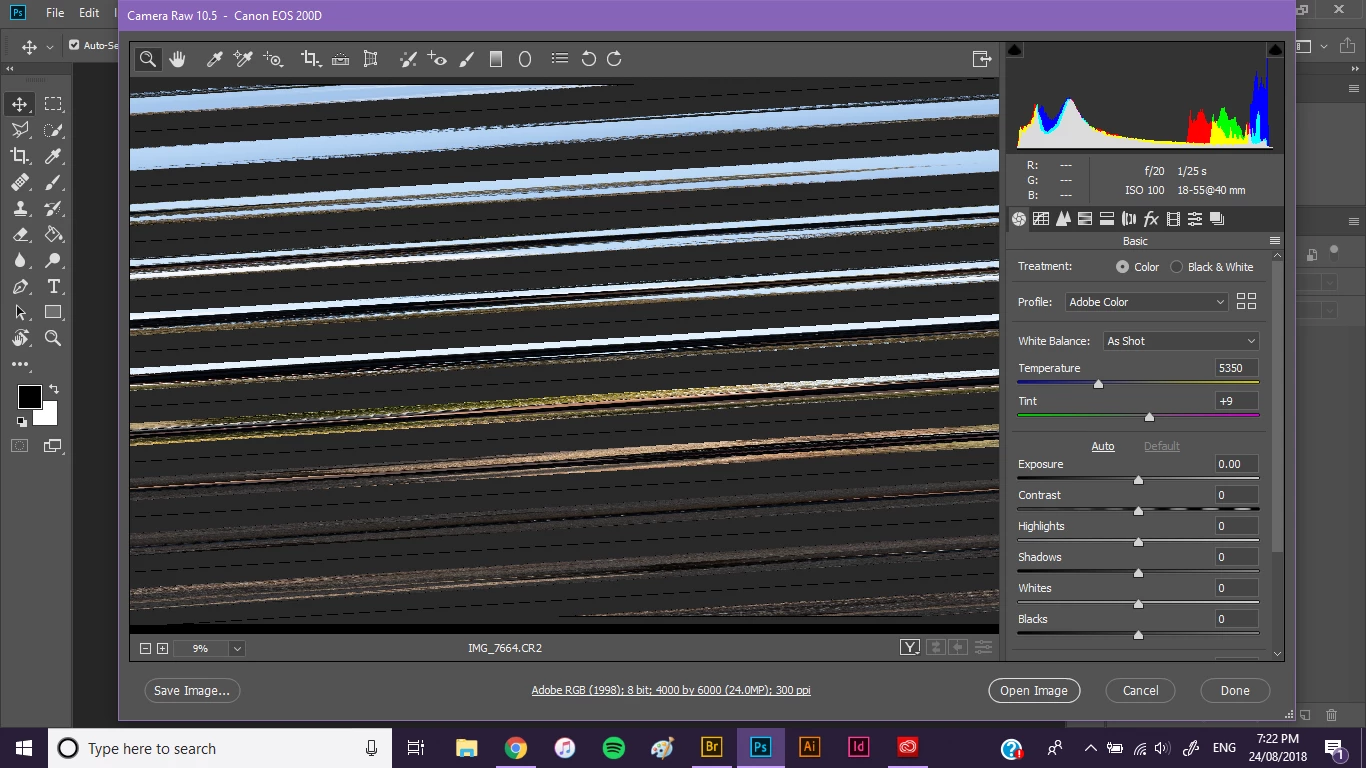
For some reason, suddenly I all of my raw files can only be viewed like this through Camera Raw. I've used Camera Raw recently and it has never shown me whatever this is. I've made no changes to Camera Raw or altered any preferences anywhere. It just suddenly can't read any of my raw files normally. I know the files aren't glitchy; I've checked previous raw files I've opened successfully before and the same thing happens when I now open them in Camera Raw again. The raw files can still be viewed and opened in Bridge and Photoshop. It just seems to be Camera Raw that's the problem. I'm absolutely bamboozled by this. I don't know what happened or how this developed.

This topic has been closed for replies.
Correct answer Akash Sharma

Hi rebekah_l,

Sorry that the raw images you're working with suddenly showing up corrupted in Camera raw filter.

This corruption of images can occur because of two major factors:

1) Graphics card drivers are outdated on your computer and since Camera leverages the GPU, it is showing the image as corrupt.

To verify that the issue is related to GPU, please disable the GPU usage in Camera raw, Refer Adobe Camera Raw graphics processor (GPU) FAQ and troubleshooting

Adobe Camera Raw Error message below the Use Graphics Processor option

2) The source where your images are stored is corrupt, specifically it is a hardware failure. If your images are stored on an external drive or SD card. they might be causing this image corruption.

Thanks,

Akash

1 reply

Akash Sharma
Akash SharmaCorrect answer
Legend
August 24, 2018

Hi rebekah_l,

Sorry that the raw images you're working with suddenly showing up corrupted in Camera raw filter.

This corruption of images can occur because of two major factors:

1) Graphics card drivers are outdated on your computer and since Camera leverages the GPU, it is showing the image as corrupt.

To verify that the issue is related to GPU, please disable the GPU usage in Camera raw, Refer Adobe Camera Raw graphics processor (GPU) FAQ and troubleshooting

Adobe Camera Raw Error message below the Use Graphics Processor option

2) The source where your images are stored is corrupt, specifically it is a hardware failure. If your images are stored on an external drive or SD card. they might be causing this image corruption.

Thanks,

Akash

Rebekah_LAuthor
Participant
August 25, 2018

Thank you for your help! That seems to have solved the problem!

Akash Sharma
Legend
August 28, 2018

Thanks for the update.

Glad to know it's now working fine.

~Akash