

Urban Nerd Studios
Participant
May 19, 2017
Answered

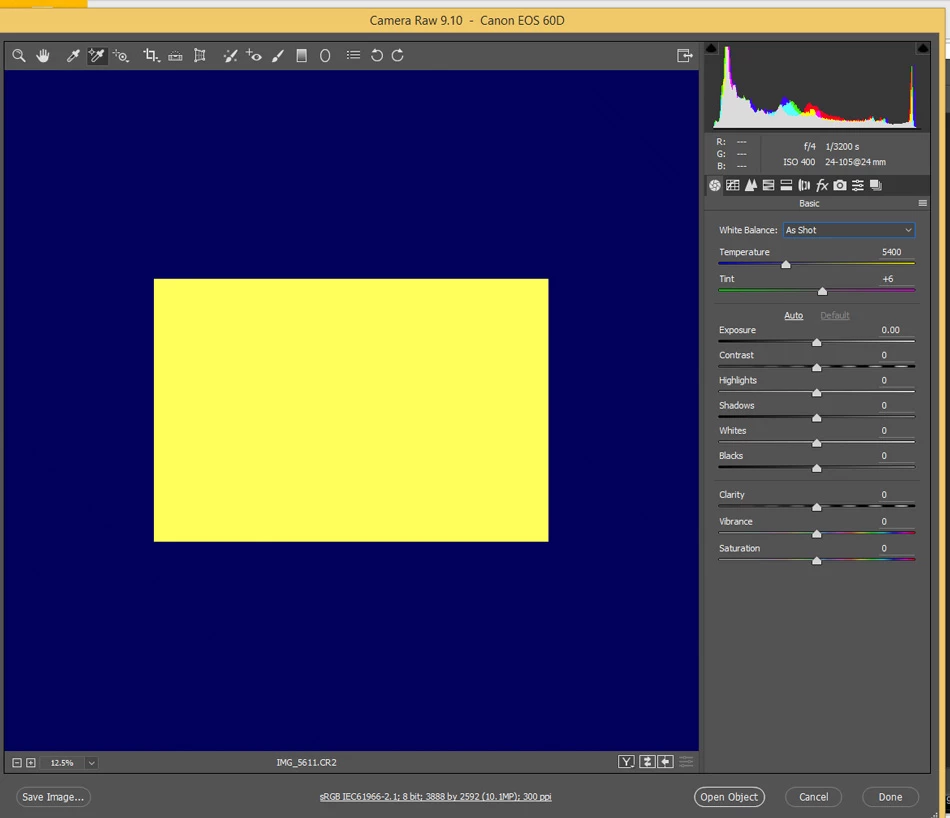
Camera Raw image preview is Solid Yellow??

  • May 19, 2017
  • 1 reply
  • 501 views

When I try to use camera Raw, this is how the preview window shows up, and I cant see what my adjustments look like.

    This topic has been closed for replies.
    Correct answer JP Hess

    Assuming that you are also using Bridge, open the Camera Raw preferences and find the Performance section at the bottom of that dialog. Make sure that there ISN'T a checkmark in the graphics processor option.

    1 reply

    Steve Werner
    Community Expert
    Community Expert
    May 19, 2017

    Moving to Camera Raw forum

    Urban Nerd Studios
    Participant
    May 19, 2017

    Thanks, will i be linked to the replies?

    JP Hess
    JP HessCorrect answer
    Inspiring
    May 19, 2017

    Assuming that you are also using Bridge, open the Camera Raw preferences and find the Performance section at the bottom of that dialog. Make sure that there ISN'T a checkmark in the graphics processor option.

