Participant
December 13, 2024
Answered

Camera RAW open image in lower resolution

  • December 13, 2024
  • 3 replies
  • 527 views

Hi, 

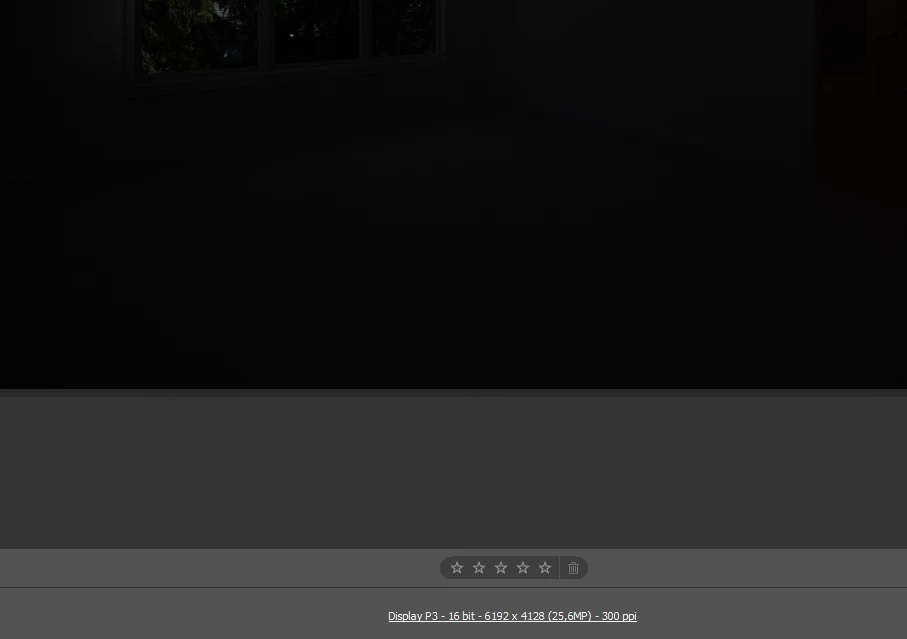
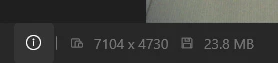
I am trying to process a .NEF file. The image displayed in Camera RAW has lower resolution when opened with Windows Photos. Did Camera RAW scale down my image? Can i get the same resolution as Windows Photos. Any help appreciated. I can provide the image if neccessary

Correct answer David Franzen at Work

I don't know what camera you are using, but according to Nikon's USA's website, in the technical details for the Z 8, the resolution you see in Camera Raw is one of the normal resoltuions for the camera. Scroll down to the Image Area (pixels) section and you'll see listed  "(M)6,192 x 4,128"

https://www.nikonusa.com/p/z-8/1695/overview#tech-specs

I suspect that the other software you are using may not be correctly reading the dimensions of the photo, based on information in the raw file about what the sensor's active area dimensions are in the raw data.


Check on the LCD screen of your camera to see what dimensions it displays for the image size option you selected in the camera's menu system. Does it match the dimensions you see in Camera Raw?


-David

3 replies

David Franzen at Work
Adobe Employee
David Franzen at WorkCorrect answer
Adobe Employee
December 14, 2024

I don't know what camera you are using, but according to Nikon's USA's website, in the technical details for the Z 8, the resolution you see in Camera Raw is one of the normal resoltuions for the camera. Scroll down to the Image Area (pixels) section and you'll see listed  "(M)6,192 x 4,128"

https://www.nikonusa.com/p/z-8/1695/overview#tech-specs

I suspect that the other software you are using may not be correctly reading the dimensions of the photo, based on information in the raw file about what the sensor's active area dimensions are in the raw data.


Check on the LCD screen of your camera to see what dimensions it displays for the image size option you selected in the camera's menu system. Does it match the dimensions you see in Camera Raw?


-David

Participant
December 15, 2024

Hi David,

The image was taken by my customer, so i do not know the exact camera setting. You can download from this link: https://drive.google.com/file/d/1LjsbJaW6Y3WIcACxL3IZ7PhAQCU6cI0k/view?usp=sharing

password is NEF123. The other software I am using is default image viewer of windows 11.  I use right-click properties to get the information of the image, The resolution matches with Windows Photos, and is bigger when opened by Camera RAW. Can you check this for me.


David Franzen at Work
Adobe Employee
Adobe Employee
December 16, 2024

Thank you for sharing the file. The dimensions in CameraRaw, 6,192 x 4,128, are the correct image size for this photo when propertly processing the NEF. You will also see the same image size opening the NEF in Nikon's NS Studio app.
-David

Per Berntsen
Community Expert
Community Expert
December 13, 2024

Is Image Sizing checked in the Workflow settings? That could be the explanation.


Participant
December 15, 2024

Hi Per Berntsen,

I try as you suggest, but there are no other option to select from image sizing.


David Franzen at Work
Adobe Employee
Adobe Employee
December 13, 2024

Please provide a file.