


Participating Frequently
February 4, 2019
Question

Camera Raw over-sharpens green channel?

  • February 4, 2019
  • 1 reply
  • 1975 views

I'm processing some astronomical images. These are Canon CR2 raw files.

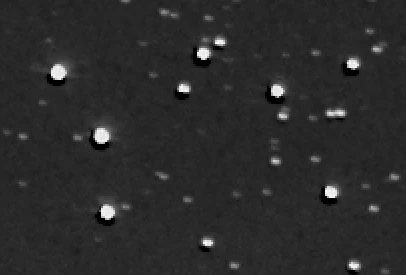
When I open them in Camera Raw I find that the bright stars have a dark offset halo around them in the green channel. Red and blue channels look normal.

The halos have pixel values of zero (general sky background around them is ~3000) and then jump to values of ~20000 on the star itself. It looks as if a severe sharpening process has been carried out but only on the green channel.

If I open the image with a different raw converter it all looks normal. Here is a 200% screen grab.
Is anyone aware of a problem with Camera Raw??

Thanks,

Graham.

    This topic has been closed for replies.

    1 reply

    Daniel E Lane
    Inspiring
    February 6, 2019

    what camera are you shooting with and what does the other RAW converter image look like?

    AstrohamAuthor
    Participating Frequently
    February 6, 2019

    I'm using a Canon EOS 5D Mk3. This is a 90 second exposures at ISO1600.

    The image below shows the R,G and B image planes from DCRAW (top line), and the similar ones from ACR (bottom line).

    There is some nebulosity in the image - so the noisy background is real. My big concern is how the dark rings can have occurred in the green channel.

    Thanks for any help or suggestions you can make!

    AstrohamAuthor
    Participating Frequently
    February 6, 2019

    Sorry, I should have added that I'm working with the latest versions of Photoshop CC and ACR!