


Camera Raw panel preview Option
In latest versions of Camera Raw, when we open an adjusted raw or dng file and make changes in several panels, there is an option (press P key) to preview the Before and After of all those changes.
But there is not a straight way (*) to preview, compare, the Before and After of changes in the current panel.
Because the icon (Highlighted in Fig. 2) that, in my little understanding, should do it, shows instead the default (zero) values,
thus it is not showing the Before and After, but how new values compare to default ones, -values that I am not using at all-, as I have started with non-zero ones.
I think this behaviour should be changed/reversed.
On first capture the initial raw file open. Temperature compensation is changed from 0.
Adjustments are not zero to begin with.
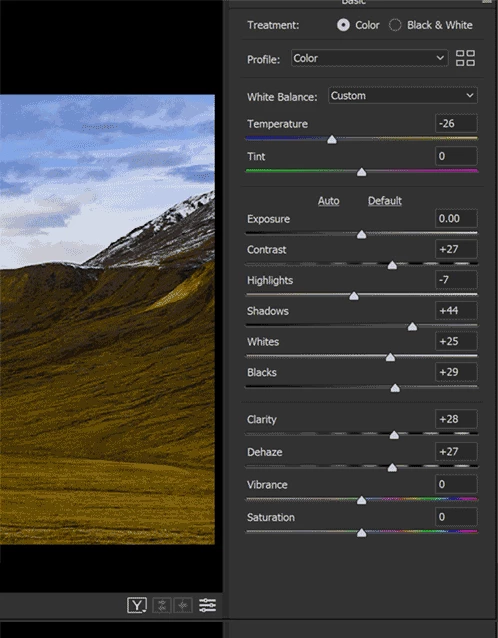
On second capture, when pressing the highlighted icon, that previews with default values,
there is no comparison with what it's being done. It makes no sense.
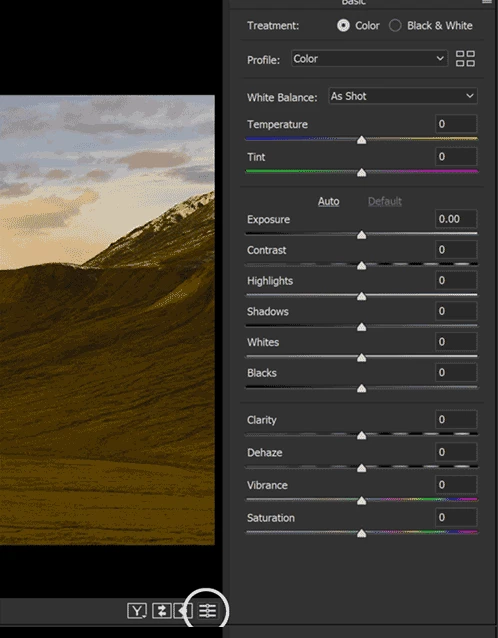
(*)Yes I know I can use Ctrl/Cmd+Z or save snapshots. This icon is actually duplicating the menu: Use Camera Raw defaults.
 AdChoices