


petr66machacek
Participating Frequently
July 10, 2018
Answered

Camera raw plugin only with Bridge or Lightroom (without Photoshop CS)

  • July 10, 2018
  • 1 reply
  • 10194 views

I have a question. I used to use Adobe Bridge and Camera Raw plugin till now. These were the only 2 products I need to work with my photos. After reinstalation of my PC I lost the old licenses and I need to buy some new ones. I would like to ask you is there any possibility of Adobe Bridge modul and Camera Raw plugin combination only without Lightroom or Photoshop CS? Or, alternatively, is it possible to buy only Lighthroom and use the Bridge and Camera Raw plugin this way? I mean will the Camera Raw plugin work with the Lightroom only without Photoshop CS? My idea is to open the photos in Bridge, pick up the snap and by double click open it in Camera Raw plugin. That´s the way I´ve used it till now. Thanks for your reply.

This topic has been closed for replies.
Correct answer ssprengel

In a word, No, to both your scenarios.

But before continuing, have you checked for your serial numbers on www.adobe.com / login / Manage account / password / Plans and Products (up top) / View your products?

Assuming they're not listed, back to your question:

Bridge and the ACR plug-in are parts of Photoshop (and maybe video processing software, not sure), but not a standalone product, and Lightroom contains the functionality of Bridge and ACR within itself, in that once you've imported photos (told LR where the photos are) LR will show you thumbnails and let you make the same adjustments you can make in ACR.  Of course Importing is a separate precursor step to working on the photos, unlike Bridge that opens on a Window Explorer or Mac Finder folder of images without importing.

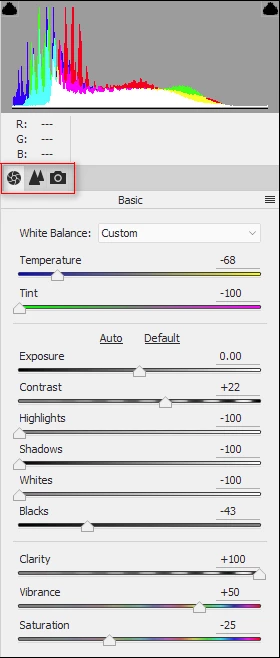
Depending on what you do in Bridge/ACR perhaps Elements would be ok for you, but it's limited to the first three tabs in ACR:  Basic Toning, Detail (Sharpening, Noise-reduction) and Camera Calibration (Process Version and Camera Profile).

The cheapest way to get the current version of LR+PS is a $120/yr subscription billed at $10/month.  If you cancel, early you owe half the remaining balance as penalty:

Compare plans | Adobe Creative Cloud Photography plan

You can subscribe to PS by itself for $20/mo.  Adobe assumes PS-only people are highly paid graphic artists working for some company who can afford to pay for software for it's employees, whereas LR+PS people are barely-getting-by photographers working for themselves, who need a break.

1 reply

ssprengel
ssprengelCorrect answer
Inspiring
July 11, 2018

In a word, No, to both your scenarios.

But before continuing, have you checked for your serial numbers on www.adobe.com / login / Manage account / password / Plans and Products (up top) / View your products?

Assuming they're not listed, back to your question:

Bridge and the ACR plug-in are parts of Photoshop (and maybe video processing software, not sure), but not a standalone product, and Lightroom contains the functionality of Bridge and ACR within itself, in that once you've imported photos (told LR where the photos are) LR will show you thumbnails and let you make the same adjustments you can make in ACR.  Of course Importing is a separate precursor step to working on the photos, unlike Bridge that opens on a Window Explorer or Mac Finder folder of images without importing.

Depending on what you do in Bridge/ACR perhaps Elements would be ok for you, but it's limited to the first three tabs in ACR:  Basic Toning, Detail (Sharpening, Noise-reduction) and Camera Calibration (Process Version and Camera Profile).

The cheapest way to get the current version of LR+PS is a $120/yr subscription billed at $10/month.  If you cancel, early you owe half the remaining balance as penalty:

Compare plans | Adobe Creative Cloud Photography plan

You can subscribe to PS by itself for $20/mo.  Adobe assumes PS-only people are highly paid graphic artists working for some company who can afford to pay for software for it's employees, whereas LR+PS people are barely-getting-by photographers working for themselves, who need a break.

petr66machacek
Participating Frequently
July 11, 2018

Hi ssprengel,

Thanks for your reply. This is for the first time somebody clearly explaines to me what the ACR is a part of .

Now I understand, the LR is the right way for me.

Only 2 notices:

1) Is it possible to use the Bridge module together with LR? Is it free? Yes of course, I understand the LR has the same funcionality as Bridge, but my habit...

2) I asked my reseller about limitation for only the first 3 ACR tabs accesible in LR. He told me there is no limitation and there is the full support for all ACR funcionality in LR. We talk about unlimited time license, not 1 year license rental. Is it true?

Many thanks for your reply.

Petr

ssprengel
Inspiring
July 11, 2018

1) You can subscribe to the LR+PS Photography Plan and just use PS/Bridge/ACR and not touch LR if you want.  I think most photographers use LR mostly and then use PS here and there for extra work that LR cannot do.

2) There are three tabs in ELEMENTS' ACR plug-in.  LR has full functionality.  The unlimited time LR is LR 6 which is not being updated anymore, and does not come with PS/Bridge/ACR.  The current version of LR (Classic CC) is 7.4 and the current version of PS is 19.something.  Adobe has 7-day trials of their software although if it's more than one item you're getting, together, like LR+PS then the clock starts for both of them the minute you login when installing the first one, I think.