


Participant
October 7, 2017
Answered

camera raw starts with white desktop

  • October 7, 2017
  • 1 reply
  • 507 views

I am a windows 10 user and Adobe CC and works without problems with bridge, camera raw and photoshop. Since one week the bridge ist no more able to start camera raw. There ist only a white desktop. Also when I start with photoshop oder witz JPEG an CRTL + R in bridge. Renewed the driver of graphic carde and the complete bridge an photoshop. But there is always a white desktop. Who can help?

This topic has been closed for replies.
Correct answer Jeff Arola

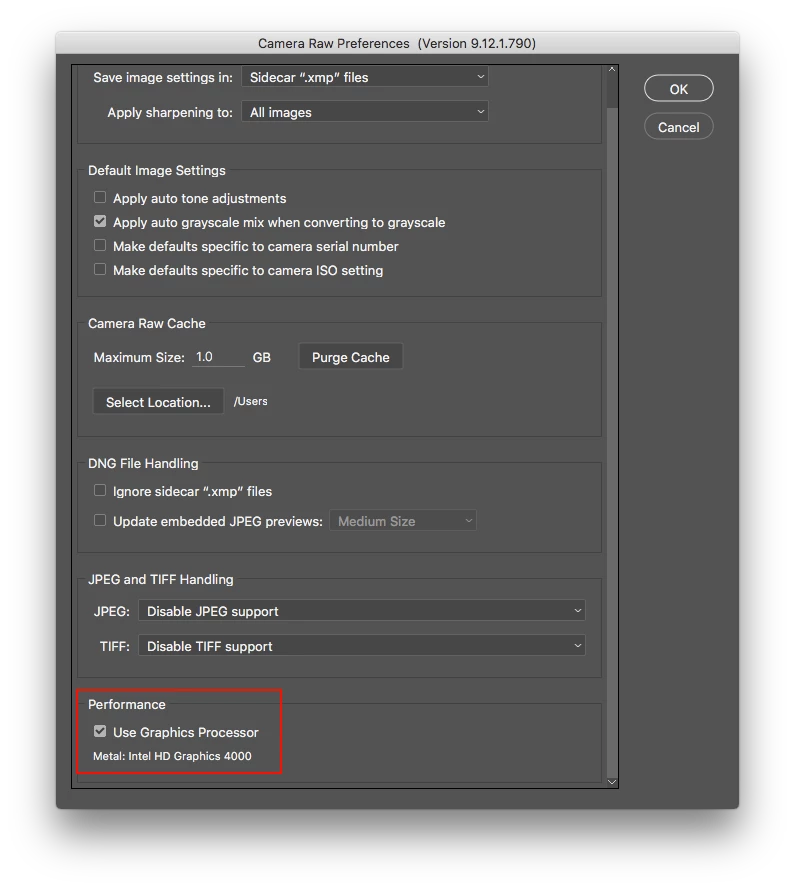
In Bridge go to Edit>Preferences>Camera Raw, uncheck Use Graphics Processor, restart Bridge and try Camera Raw again.

1 reply

Jeff Arola
Community Expert
Jeff ArolaCommunity ExpertCorrect answer
Community Expert
October 7, 2017

In Bridge go to Edit>Preferences>Camera Raw, uncheck Use Graphics Processor, restart Bridge and try Camera Raw again.

Participant
October 9, 2017

Dear Jeff.

That was it!!!! thank you very much.

I haven´t chached the bottom so I was estonnished.

greetings from Gerd