christinem42037195
Inspiring
February 28, 2024
Answered

Camera Raw to photoshop problem

  • February 28, 2024
  • 1 reply
  • 455 views

Hi Everyone,


Recently, when I edit a ( 32.8 MB ) .NEF file in camera raw and then open as smart object in photoshop the file size is very small. 

Working on iMac, Somoma 14.2.1. Everything updated.

original file is 8256 x 5504 and when opened as smart object in PS it's 1080 x 720.

It's only happened in the last week.

I have no idea what I've done to cause this. Can anyone help please?


Many thanks

Christine

    This topic has been closed for replies.
    Correct answer Per Berntsen

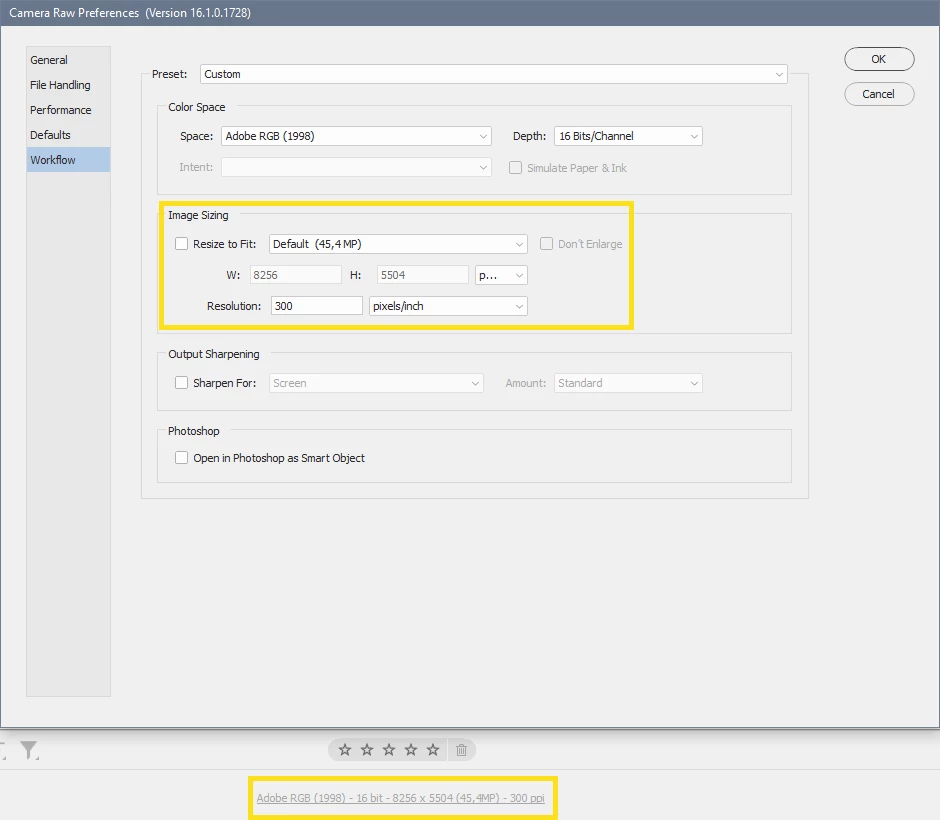
    Have you got Resize to fit checked in the Camera Raw preferences?

    If so, uncheck it, and try again.

    To access the preferences, press Cmd + K while in the Camera Raw window, or click the text at the bottom of the screen.


    1 reply

    jane-e
    Community Expert
    Community Expert
    February 28, 2024

    @christinem42037195 


    I've moved your post from Using the Community (for forum questions) to Photoshop for you


    Jane

    christinem42037195
    Inspiring
    February 28, 2024
    Thank you. I’m not familiar with all of this yet 🤣
    Per Berntsen
    Community Expert
    Per BerntsenCommunity ExpertCorrect answer
    Community Expert
    February 28, 2024

    Have you got Resize to fit checked in the Camera Raw preferences?

    If so, uncheck it, and try again.

    To access the preferences, press Cmd + K while in the Camera Raw window, or click the text at the bottom of the screen.